


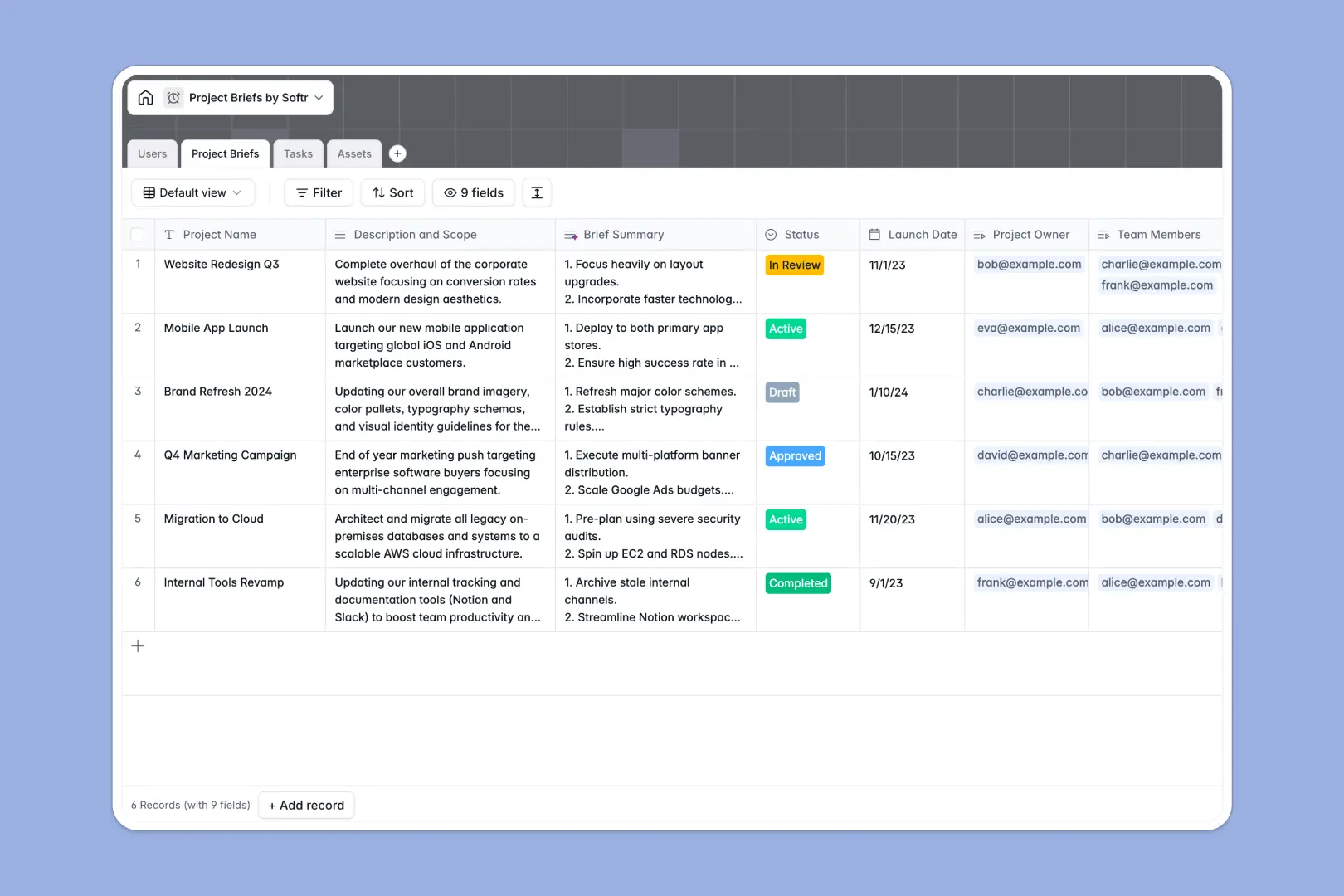
Your Project Briefs Database at a glance
This template replaces messy spreadsheets with a centralized system to track project scopes, team assignments, and deliverables. It keeps everyone perfectly aligned on goals, statuses, and deadlines in one reliable place.
The database organizes your work into connected tables for Users, Project Briefs, Tasks, and Assets. Instead of copy-pasting data, linking a specific task or a design file to a project brief happens natively and automatically.
Built-in AI features automatically generate concise 3-bullet summaries from your long project descriptions. They also act on new tasks, intelligently evaluating titles and descriptions to assign the correct priority level.
Why managing project briefs in spreadsheets breaks down
Tracking detailed project scope across endless spreadsheet rows quickly turns into chaos. Deadlines get missed, files get buried in cell comments, and task ownership becomes unclear as columns multiply.
What a structured database changes
A structured system removes the clutter by enforcing data types. Dates stay formatted exactly as dates, attachments live properly inside dedicated file fields, and dropdowns keep project statuses completely consistent.
You can effortlessly connect an asset or task directly to its parent project without relying on fragile, breaking formulas. This is exactly what Softr Databases are designed for, keeping your daily operations scalable and clean.
What you can do with this template
Centralize all your project documentation, monitor task progress from "To Do" to "Done," and manage your team's workload in a single reliable view.
Thanks to native Database AI agents, your database automatically distills lengthy project scopes into quick summaries and categorizes task priorities. This prevents daily manual triage and saves project managers hours of administrative work.
-
Users
Manage system access and profiles for project owners and team members
-
Project Briefs
Define project scope and utilize AI to generate concise brief summaries
-
Tasks
Track deliverables with AI-powered priority assessment and status updates
-
Assets
Store reference materials and project files with type classification
Who is this Project Briefs database for
This template provides structure and clarity for teams juggling multiple complex workflows.
- Project Managers: Oversee project scopes, track task assignments, and monitor deadlines securely in one view.
- Marketing Teams: Keep campaign briefs, creative assets, and precise launch dates perfectly organized.
- Agencies: Centralize client requests and required deliverables without digging through scattered email threads.
How to take it further
Start by customizing the database structure to perfectly fit your team's terminology. You can quickly modify the task status dropdowns or add new asset categories to match your exact workflow.
Bring your current active projects over seamlessly. Simply upload your existing project list via a CSV import to instantly populate the tables and get your team moving without delay.
When you are ready to scale, you can easily turn this core database into a fully functional team workspace. By using Softr's interface builder, you can create a customized web portal where team members log in to view only their assigned tasks.
Setting up proper users and permissions ensures external contractors only access specific project briefs, while admins maintain full editing control over the entire roadmap.
-
1
-
2
-
3
-
4
Frequently asked questions
-
What is a project briefs database?
-
Why use a no-code database to build a project tracker?
-
How can AI help managing data for project briefs?
-
Can I build an app with this project briefs database?
-
Is this project briefs template free?
-
Why do spreadsheets fail for tracking project briefs?
Start building today. It's free!
Build and launch your first app in under 30 minutes.