


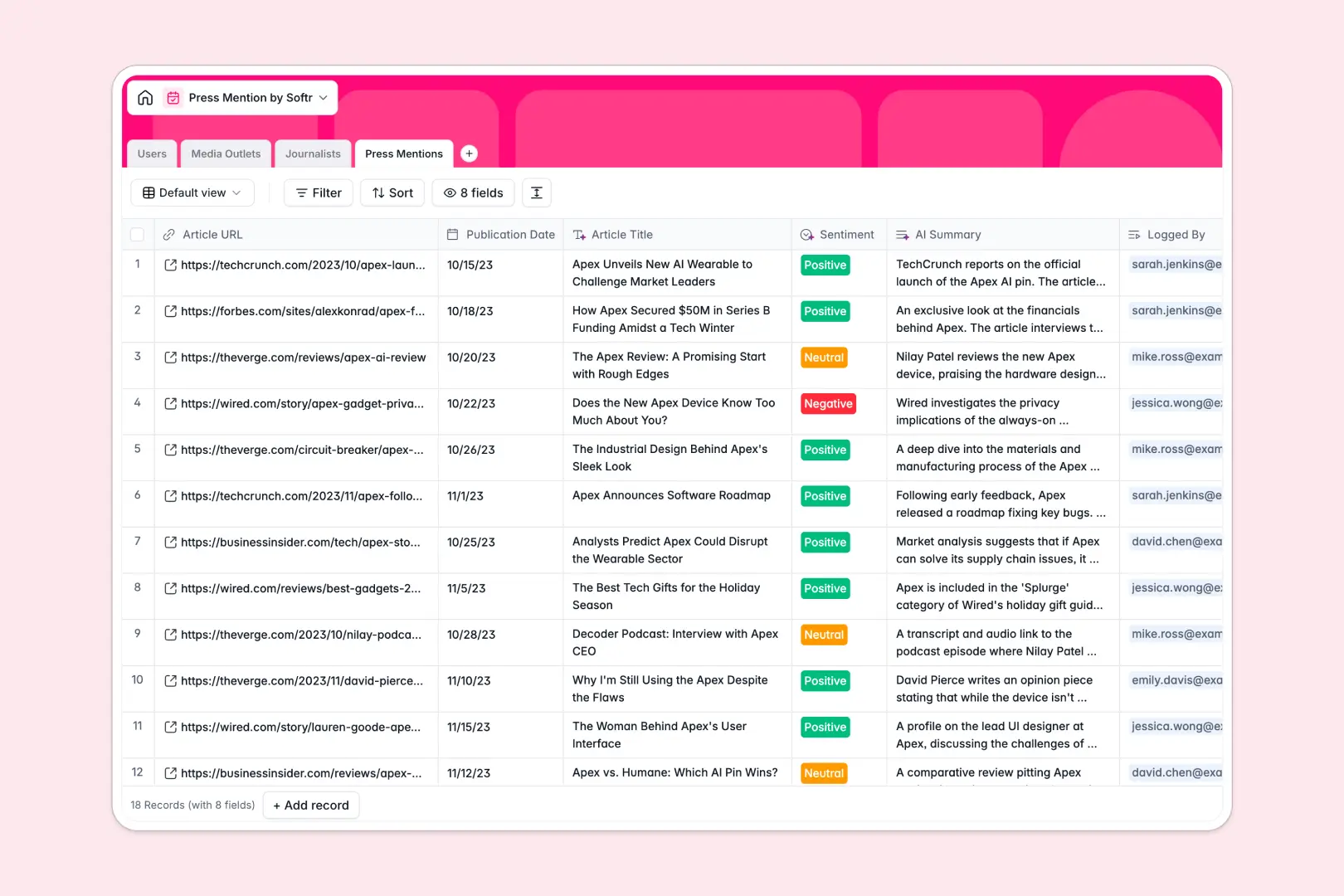
Your Press Mention database at a glance
This template helps PR teams automatically track media coverage, extract insights from articles, and manage relationships with key journalists.
It connects your published press mentions directly to the media outlets and specific journalists who wrote them. This clean, relational structure keeps all your outreach data organized and easy to navigate.
Built-in AI features instantly scan new article URLs to extract headlines, summarize the core content, and analyze the overall brand sentiment.
Why tracking press mentions gets messy in spreadsheets
Managing PR coverage in spreadsheets quickly becomes chaotic as you try to link individual articles to journalists, outlets, and internal team members without breaking rows.
What a structured database changes
In a relational system, every object has its own dedicated space. You can log a new press mention and connect it to an existing journalist without copying and pasting their contact details across multiple columns.
As your media list grows, your data stays perfectly clean and protected from accidental deletions or mixed data types. This is exactly what Softr Databases are designed to provide—a scalable foundation for your business workflows.
What you can do with this template
Log a single URL and let built-in AI automatically fetch the article title, read the content, and categorize the publication's industry.
Keep a clear, actionable view of relationship statuses—from 'New' to 'Friendly'—so your outreach team always knows who to pitch next.
-
Users
Manage internal team members, PR roles, and their assigned journalists
-
Media Outlets
Catalog publications with AI-generated descriptions and industry tagging
-
Journalists
Maintain writer profiles with contact info and AI-sourced professional bios
-
Press Mentions
Monitor brand coverage with AI-powered summaries, titles, and sentiment
Who is this Press Mention database for
Keep track of your brand's public narrative with perfectly structured data.
- PR Managers: Track the exact sentiment and AI summaries of every brand mention to measure campaign success instantly.
- Outreach Specialists: Maintain a clean directory of targeted media outlets and clearly track journalist relationship statuses.
- Founders: Quickly view high-level summaries and estimated monthly reach to understand overall brand visibility.
How to take it further
Customizing this database is incredibly simple and takes no technical skills. You can easily add new options to the relationship status field or add a column to track campaign budgets.
If you already have media lists, use the CSV import tool to upload them in bulk. This instantly populates your tables so your team can get to work right away.
When you are ready, you can build a complete, interactive portal on top of this structure. Adding strict users and permissions ensures that individual outreach specialists only access and edit the specific journalists they personally manage. Starting with a structured backend makes launching these custom internal tools effortless.
-
1
-
2
-
3
-
4
Frequently asked questions
-
What is a press mention database?
-
Why use a no-code database to build a PR tracking system?
-
How can AI help managing data for media coverage?
-
Can I build an app with this press mention database?
-
Is this Press Mention database free?
-
How is a media tracking database different from spreadsheets?
Start building today. It's free!
Build and launch your first app in under 30 minutes.