


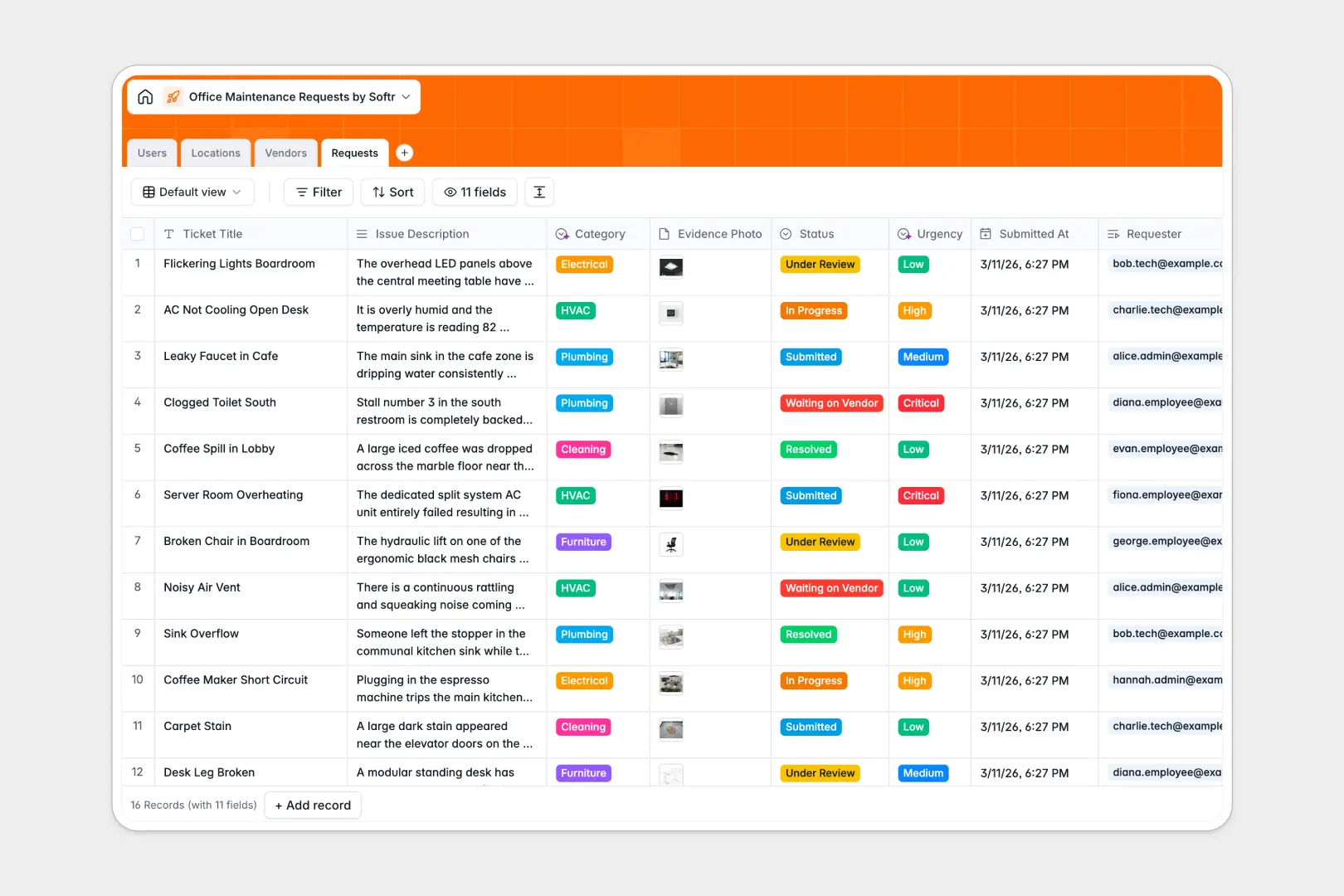
Your Office Maintenance Requests Database at a glance
This database tracks every reported office issue, from broken HVACs to faulty Wi-Fi, keeping your workplace fully operational.
It connects four simple tables—Users, Locations, Vendors, and Requests—so you can instantly see which technician or external contractor is assigned to fix a specific room.
Built-in AI instantly assigns urgency levels and categories based on the request description, while independently researching external vendor backgrounds for you.
Why tracking office maintenance requests in spreadsheets breaks down
Managing facility repairs in a spreadsheet quickly turns into chaos when multiple employees report the same broken printer or leaky faucet.
What a structured database changes
Spreadsheets rely on messy text inputs and fragile formulas that break easily when rows get deleted. You can't securely attach evidence photos or link one plumbing issue to an external vendor without manual copy-pasting.
This is exactly what Softr Databases are designed to solve. Every column enforces a clear data type, meaning status updates stay strictly as dropdowns and related records seamlessly connect tickets to specific office locations.
What you can do with this template
Log new tickets with attached photo evidence and immediately assign them to the right internal technician or external vendor. You can track total issue counts by floor or room to spot recurring problems before they escalate.
Thanks to Database AI agents, the system instantly categorizes incoming requests and determines if an issue is low or critical urgency based purely on the description.
-
Users
Manage office staff and technicians including contact details and roles
-
Locations
Organize office building zones and floors to track reported issues
-
Vendors
Manage external contractors using AI to summarize service reputations
-
Requests
Track maintenance tickets with AI-powered categorization and urgency
Who is this Office Maintenance Requests database for
This template is built for facility and operations teams who need to keep the workplace running smoothly.
- Facility Managers: Track all ongoing repairs, assign technicians, and monitor vendor performance in one connected view.
- Office Administrators: Easily log requests on behalf of employees and map recurring issues to specific floors or zones.
- IT Support Teams: Separate hardware and network tickets from general building repairs automatically.
How to take it further
You can easily customize this native database to fit your exact building layout. Add new structural zones to the Locations table or adjust the specialty dropdowns to match your approved vendors.
Bring your current historical tickets over instantly without losing context. Just upload a CSV to map your old spreadsheet rows directly into these clean, structured tables.
When your process grows, you can transform this foundation into a complete internal app using the interface builder. Create an employee portal where staff can submit tickets, check statuses, and upload photos directly.
By setting up users and permissions, you can ensure external vendors only see the specific work orders assigned to them, while your admins maintain full visibility of the entire building.
-
1
-
2
-
3
-
4
Frequently asked questions
-
What is an office maintenance requests database?
-
Why use a no-code database to build an office maintenance tool?
-
How can AI help managing data for office maintenance requests?
-
Can I build an app with this office maintenance requests database?
-
Is this Office Maintenance Requests database free?
-
How is a maintenance requests database different from a spreadsheet?
Start building today. It's free!
Build and launch your first app in under 30 minutes.