


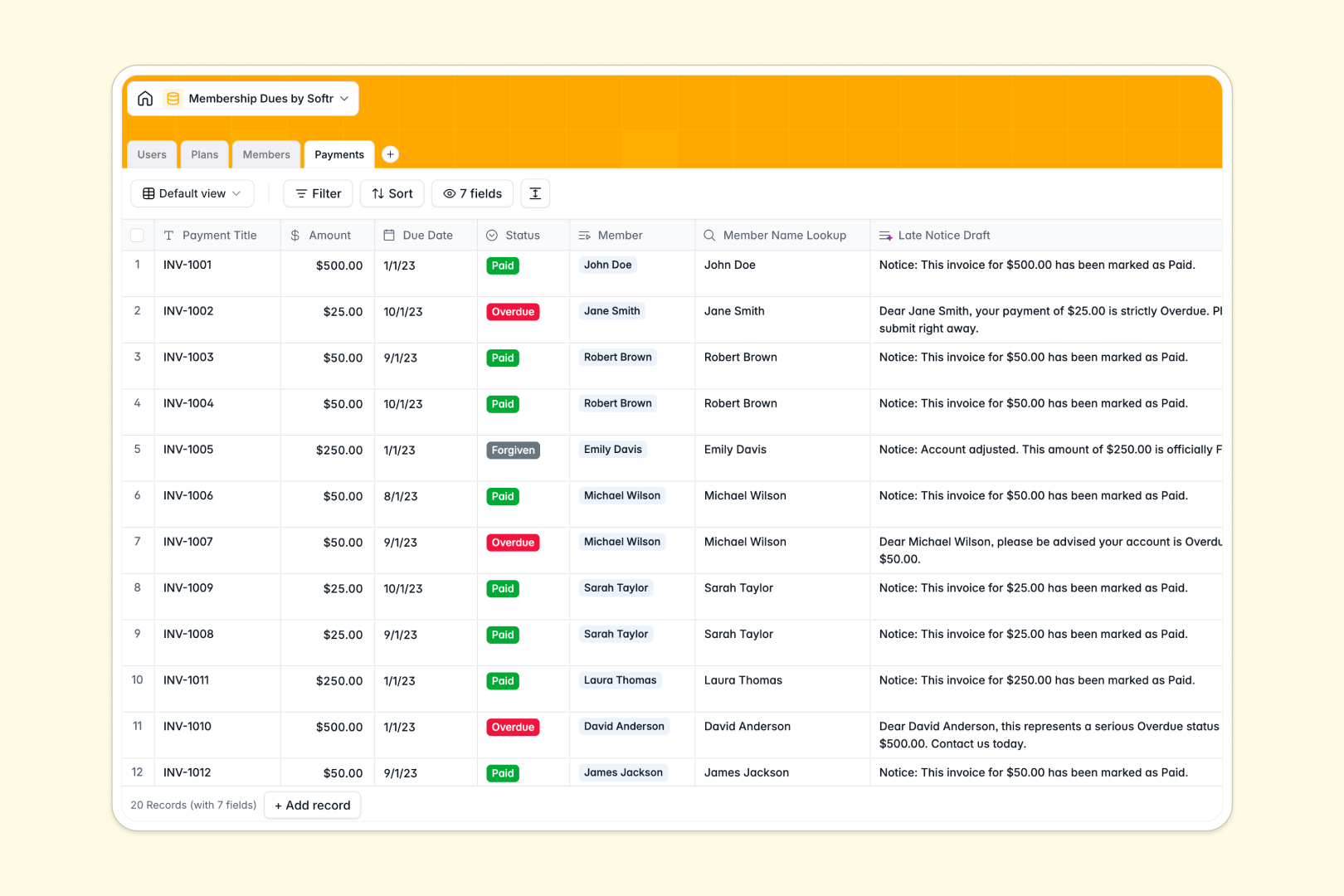
Your Membership Dues Database at a glance
Say goodbye to tracking payments in messy spreadsheets. This template gives you a central hub to manage member details, active plan tiers, and overdue invoices in real time.
It structures your data seamlessly across connected tables for Users, Plans, Members, and Payments. You can click on any member to instantly view their assigned account manager and full payment history without running a single formula.
Included AI fields act as an automated assistant to speed up your daily operations. The database automatically drafts late payment notices and summarizes member profiles as soon as new data is entered.
Why a membership dues spreadsheet breaks down
Managing members, complex plans, and rolling payments across spreadsheet tabs quickly turns into a logistical nightmare. Formulas break, critical data gets accidentally overwritten, and it becomes impossible to see a clear historical timeline of your cash flow.
What a structured database changes
A structured database forces your data to stay neatly organized and reliable. Instead of typing out statuses fifty different times, every column strictly enforces formatting like currencies, dates, or selection dropdowns.
Tables relate directly to one another without the need for fragile VLOOKUP formulas. This is exactly what Softr Databases are built to handle, making it effortless to link a specific payment to a member safely.
What you can do with this template
You can instantly flag overdue accounts and group your members by active, suspended, or past due status. Tracking historical payment logs and forecasting plan renewals happens completely automatically.
You can also leverage Database AI agents to eliminate manual email follow-ups. The system will automatically draft professional late payment notices the second an invoice gets marked as overdue.
-
Users
Manage internal staff profiles, access roles, and member assignments
-
Plans
Define membership tiers and fees with AI-generated sales pitches
-
Members
Track client status and plans using AI for automated profile summaries
-
Payments
Log dues and use AI to draft late notices for overdue accounts
Who is this Membership Dues database for
This ready-to-use template is designed for organizations that rely on accurate tracking of recurring payments and active client tiers.
- Associations & Clubs: Track active members, monitor overdue accounts, and manage different tier levels easily.
- Gyms & Studios: Keep a clean log of client payments and manage renewals seamlessly.
- Non-profits: Track recurring donor plans and assign internal staff to important sponsor relationships.
How to take it further
Customizing this database only takes a few seconds. You can easily adjust the predefined payment statuses, add new billing cycle options, or refine the AI prompts to match your brand's voice.
To get started fast, simply bulk upload your existing tracking sheets via CSV directly into the tables. In just a few clicks, your messy historical data transforms into a clean, searchable system.
When your team is ready, you can build a secure portal around your tracking data using an interface builder. By configuring automated users and permissions, you guarantee that members only ever see their personal assigned invoices. A properly structured database makes launching a fully functional client portal effortless.
-
1
-
2
-
3
-
4
Frequently asked questions
-
What is a membership dues database?
-
Why use a no-code database to build a dues tracking tool?
-
How can AI help managing data for membership tracking?
-
Can I build an app with this membership dues database?
-
Is this Membership Dues database free?
-
How does this template compare to a membership dues spreadsheet?
Start building today. It's free!
Build and launch your first app in under 30 minutes.