


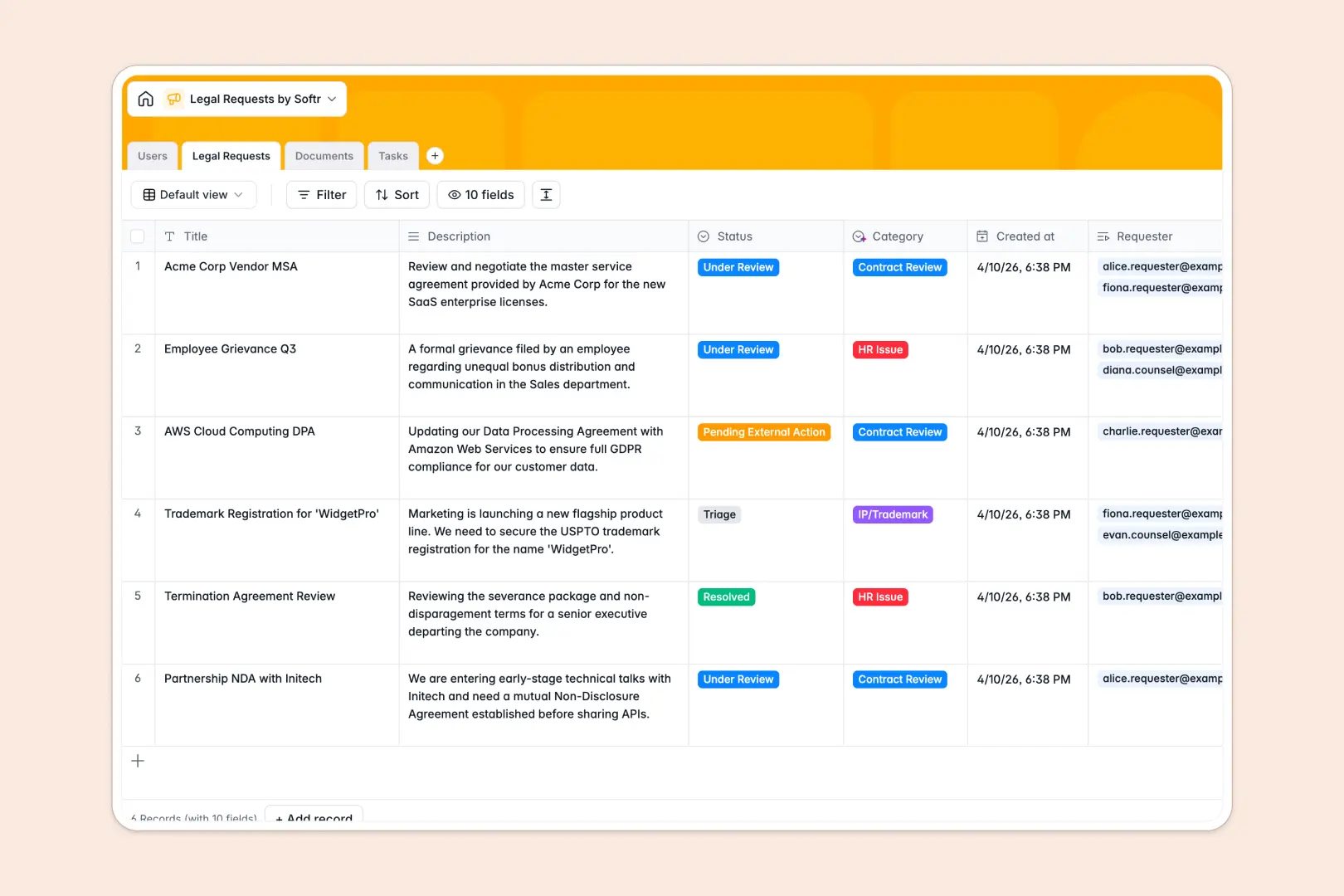
Your Legal Requests database at a glance
This template acts as a secure intake system for all legal inquiries, contracts, and internal policies. It keeps your team aligned and ensures no critical NDA or complex legal task falls through the cracks.
The system links four straightforward tables: Users, Legal Requests, Documents, and Tasks. A single legal request automatically connects to the employee requesting it, the assigned counsel, the attached documents, and related sub-tasks without any manual data entry.
Built-in AI features go to work immediately to automate triage. They automatically classify incoming requests, summarize the main issue into bullet points, and even translate complex contract clauses into plain English.
Why tracking legal requests in a spreadsheet breaks down
Handling legal requests in a spreadsheet usually leads to a scattered mess of broken file links, mixed access rights, and forgotten follow-ups.
What a structured database changes
In a flat spreadsheet format, properly managing attached contracts and maintaining confidentiality is nearly impossible. Columns quickly get overloaded with mixed file URLs, lengthy descriptions, and inconsistent status updates that derail your workflow.
A structured system naturally eliminates this chaos and enforces data integrity. You can easily link an MSA directly to an intake request and assign specific tasks to a legal counsel without copying and pasting across rows or relying on fragile VLOOKUPs.
This is exactly what Softr Databases are designed to do. Everything is accurately categorized, files stay permanently attached exactly where they belong, and your legal team works natively with clean, reliable data.
What you can do with this template
Centralize your entire intake process immediately with pre-built status tracking and connected task assignments. You can see exactly what is in triage, under review, or blocked by external action at a glance.
Leverage Database AI agents to automate administrative legwork and streamline reviews. The database will automatically read uploaded contracts, categorize the inquiry type, and simplify confusing legal jargon into simple text the moment a record is created.
-
Users
Manage system access for requesters and legal counsel with roles and departments
-
Legal Requests
Log legal intakes using AI for automated classification and issue summarization
-
Documents
Store legal files with AI-powered translation of complex clauses into plain terms
-
Tasks
Coordinate action items and owner assignments to ensure timely request resolution
Who is this Legal Requests database for
This template is built for teams that need a secure, organized way to maintain legal operations and contract tracking without writing code.
- Legal Departments: Centralize contract reviews, track MSAs automatically, and keep your intake queue highly organized.
- HR Teams: Securely handle internal policy inquiries and sensitive employee matters in a structured environment.
- Operations Managers: Ensure every vendor agreement and NDA is properly vetted before final signatures.
- Sales Leaders: Speed up deal closures by gaining clear visibility into contract review pipeline statuses.
How to take it further
Customize this database effortlessly by adjusting fields to match your exact legal procedures. You can add new document types, modify status trackers, or tweak the AI prompts to extract specific risk factors from an uploaded NDA.
Bring your historical data into the system by importing your existing legal logs via CSV. This bulk upload capability allows your team to access past contract reviews and open requests immediately.
When your organization scales, you can transform this database into a fully custom internal legal portal. By combining it with our interface builder, you can create a front-end module where employees log in to securely submit their inquiries.
Thanks to robust users and permissions, you can ensure that general employees only see their own submitted requests, while legal counsel can view and manage the entire operational queue. Starting with a perfectly structured backend makes deploying secure, production-ready legal apps effortless.
-
1
-
2
-
3
-
4
Frequently asked questions
-
What is a legal requests database?
-
Why use a no-code database to build a legal intake system?
-
How can AI help managing data for legal requests?
-
Can I build an app with this legal requests database?
-
Is this legal requests database template free?
-
Why is tracking legal requests in a spreadsheet risky?
Start building today. It's free!
Build and launch your first app in under 30 minutes.