


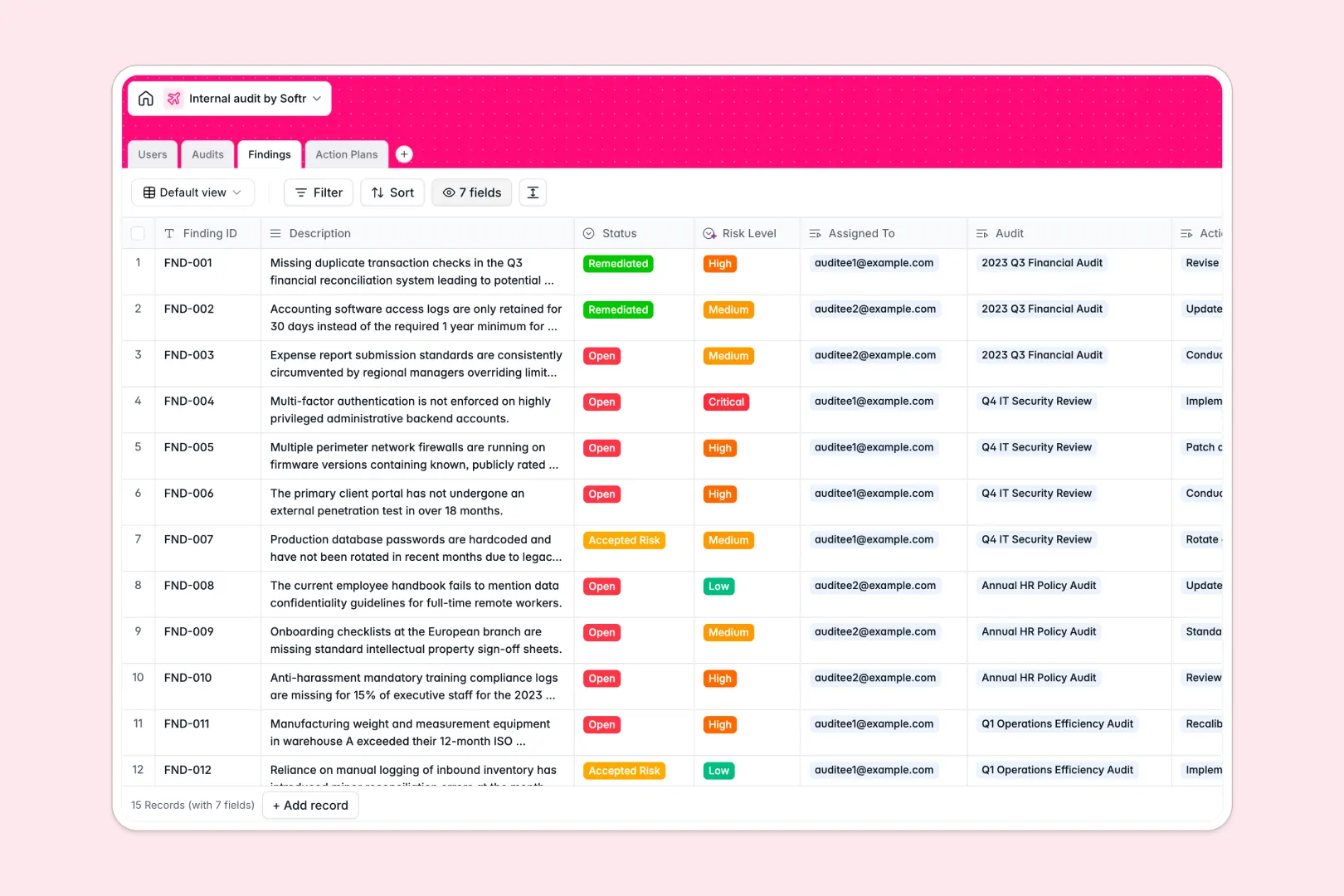
Your Internal Audit Database at a glance
This template lets you systematically track audit engagements, log compliance findings, and drive action plans to completion. It gives your team a clear, single source of truth for all internal audit operations.
It connects four simple tables seamlessly. Audits link directly to specific Findings, which then connect strictly to the Action Plans and assigned Users required to resolve them.
AI Agents handle the heavy lifting for you automatically. They draft executive summaries based on your audit scopes, classify finding risk levels from Low to Critical, and generate clear titles for remediation tasks.
Why tracking internal audits in spreadsheets breaks down
Managing complex audits across scattered spreadsheet tabs usually leads to dropped findings, delayed remediation, and messy version control.
What a structured database changes
In a database, data integrity is built-in permanently. Audit scopes, evidence attachments, and remediation deadlines stay in their proper formats, while critical risk scores can't accidentally be overwritten by a user.
Instead of relying on fragile formulas, you effortlessly link a specific finding directly to an audit engagement and its assigned action plan. This is exactly what Softr Databases are designed for.
When teams open this system, they see a clean hierarchy of information right away. It completely replaces the overwhelming grid of endless rows and mixed data found in traditional spreadsheets.
What you can do with this template
You can immediately log engagements, assign lead auditors, and track findings from open to remediated. Every action plan is tied directly to accountable users so nothing falls through the cracks.
It also comes equipped with Database AI agents that automatically assess finding descriptions and assign accurate risk severity classifications instantly.
This setup ensures your compliance teams spend less time compiling manual reports and more time resolving critical business risks.
-
Users
Manage internal staff profiles with roles and audit project assignments
-
Audits
Track audit missions with AI-generated summaries based on scope details
-
Findings
Identify audit risks and gaps with AI-powered severity classification
-
Action Plans
Execute remediation tasks using AI to generate concise titles and goals
Who is this Internal Audit Database for
This template provides immediate structure for teams managing compliance, risk, and internal controls.
- Compliance Officers: Track regulatory gaps, maintain secure evidence logs, and ensure strict accountability for risk remediation.
- Internal Audit Leads: Plan audit scopes clearly and monitor team progress from the initial draft phase through final reporting.
- Department Heads: Monitor assigned action plans easily and stay updated on the status of required operational improvements.
- Risk Managers: Rely on auto-classified risk levels to prioritize high-severity findings over low-impact issues instantly.
How to take it further
Customizing this template takes just a few clicks. You can easily adjust the department list, add new status stages for your audits, or append custom fields to track specific regulatory frameworks.
Getting your historical audit data into the system is incredibly simple. Use a CSV upload to securely import past findings, or securely connect via API to sync with your existing tools.
When you are ready to scale, you can easily build an app to turn this database into a complete compliance portal. Auditees can log in securely to submit evidence, view their assigned action plans, and manually update task statuses.
By layering secure users and permissions into your portal, you guarantee that department heads only see findings relevant to their specific team while lead auditors retain global oversight.
-
1
-
2
-
3
-
4
Frequently asked questions
-
What is an internal audit database?
-
Why use a no-code database to build an internal audit system?
-
How can AI help managing data for internal audits?
-
Can I build an app with this internal audit database?
-
Is this Internal Audit Database free?
-
Why tracking internal audits gets messy in spreadsheets?
Start building today. It's free!
Build and launch your first app in under 30 minutes.