


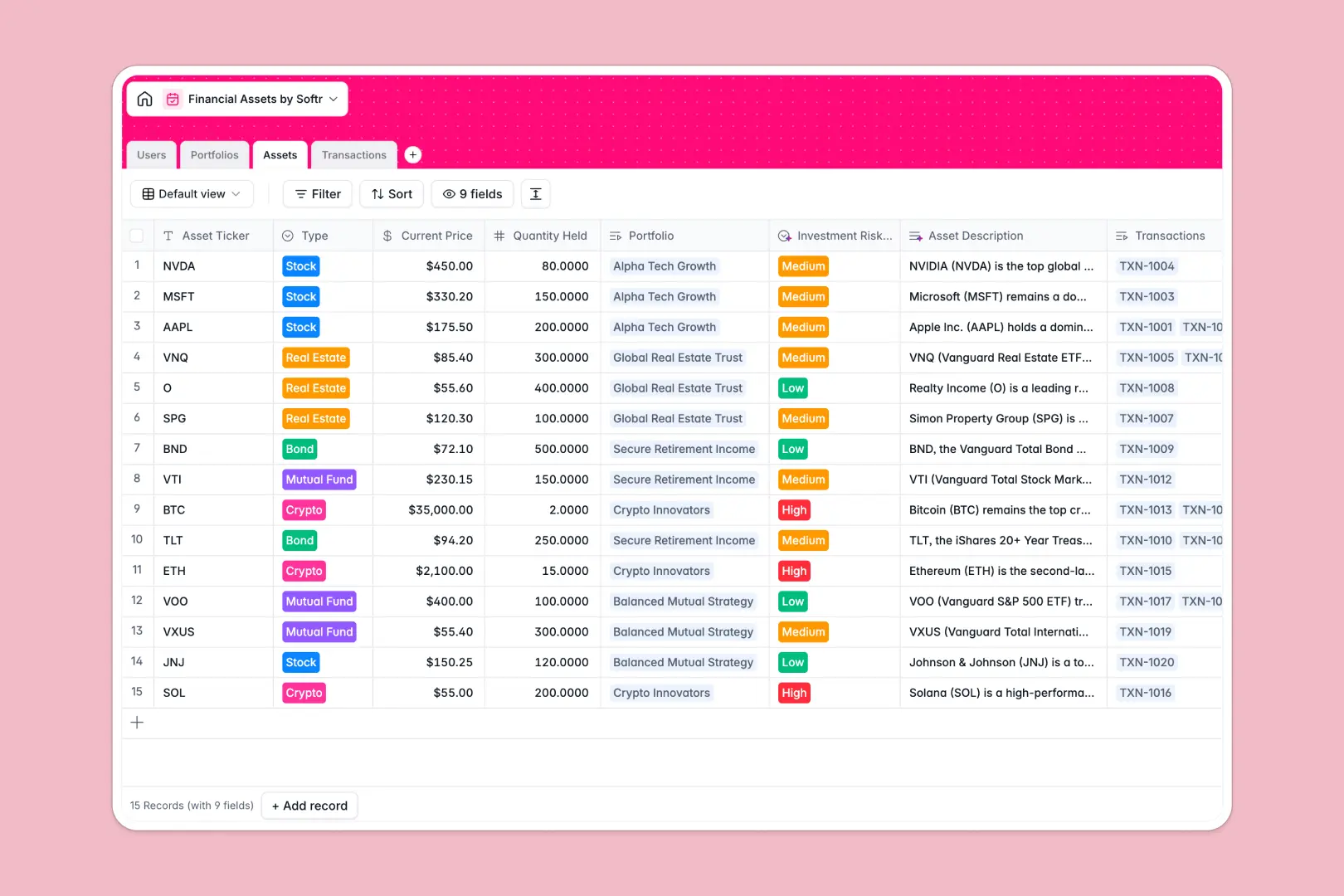
Your Financial Assets Database at a glance
This template gives you a highly structured, centralized system to track portfolios, log transactions, and monitor asset performance. It completely replaces the manual data entry and broken formulas that plague financial spreadsheets.
The database seamlessly connects individual assets to their respective portfolios and transaction logs. Whenever you buy or sell a stock, bond, or crypto asset, the database records the receipt and dynamically updates the total portfolio value automatically.
Because this template includes native AI capabilities, it does the heavy lifting for you. The system can automatically run web searches to generate ticker overviews, classify investment risk levels, and summarize entire portfolio strategies based on live asset data.
Why financial assets get messy in spreadsheets
Managing dynamic financial holdings in a spreadsheet quickly turns into a nightmare. As transaction volumes grow, manual updates, fragmented tabs, and broken VLOOKUPs make it impossible to trust your portfolio data.
What a structured database changes
A true relational structure means every transaction connects reliably to its exact asset and portfolio. Rollups calculate total values accurately without brittle formulas snapping when new rows are added.
This is exactly what Softr Databases are designed for. Mixed data types disappear, currencies stay perfectly formatted, and client records never get accidentally duplicated.
What you can do with this template
Log complex buy, sell, and dividend transactions and watch your portfolio values calculate seamlessly. Assign wealth managers and clients directly to their respective holdings for crystal-clear reporting.
You can also fully automate your asset research. The built-in AI fields will automatically pull market outlooks for requested tickers and cleanly classify the risk profile of every investment you add.
-
Users
Manage staff and client profiles with contact details and linked portfolios
-
Portfolios
Organize grouped investments with AI-generated summary reports on strategies
-
Assets
Track financial instruments using AI for market overviews and risk assessment
-
Transactions
Log buy and sell activities with transaction receipts and execution dates
Who is this Financial Assets database for
This comprehensive system is built for operations teams, financial groups, and wealth managers who need total clarity over their investments.
- Portfolio Managers: Replace scattered lists with an automated tracker that calculates asset values securely and accurately.
- Wealth Management Firms: Maintain a unified source of truth for all client holdings without worrying about spreadsheet corruption.
- Operations Admins: Log daily transactions, securely attach trade receipts, and ensure portfolio data stays perfectly structured.
How to take it further
Customize the database
You can instantly rename asset types—like adding specific crypto tokens or real estate categories—to fit your exact portfolio spread. Because it is fully native, adjusting structural fields or tweaking AI prompts takes seconds without breaking the system.
Import your existing data
Easily upload your historical transaction logs and client directories via CSV import. You can also connect to the API to automatically push new trade data directly into the database.
Build a full app around it
When your team wants to share these insights securely, you can easily turn this database into a robust client portal. Clients can log in and view a dashboard tailored exactly to their assigned portfolio, keeping all internal notes entirely hidden.
By leveraging robust users and permissions, you guarantee that external viewers only see the assets they own, while admins see the entire board. A well-structured functional database makes building a professional client app completely effortless.
-
1
-
2
-
3
-
4
Frequently asked questions
-
What is a financial assets database?
-
Why use a no-code database to build a financial asset system?
-
How can AI help managing data for financial assets?
-
Can I build an app with this financial assets database?
-
Is this Financial Assets Database free?
-
How is a financial assets database different from an Excel spreadsheet?
Start building today. It's free!
Build and launch your first app in under 30 minutes.