


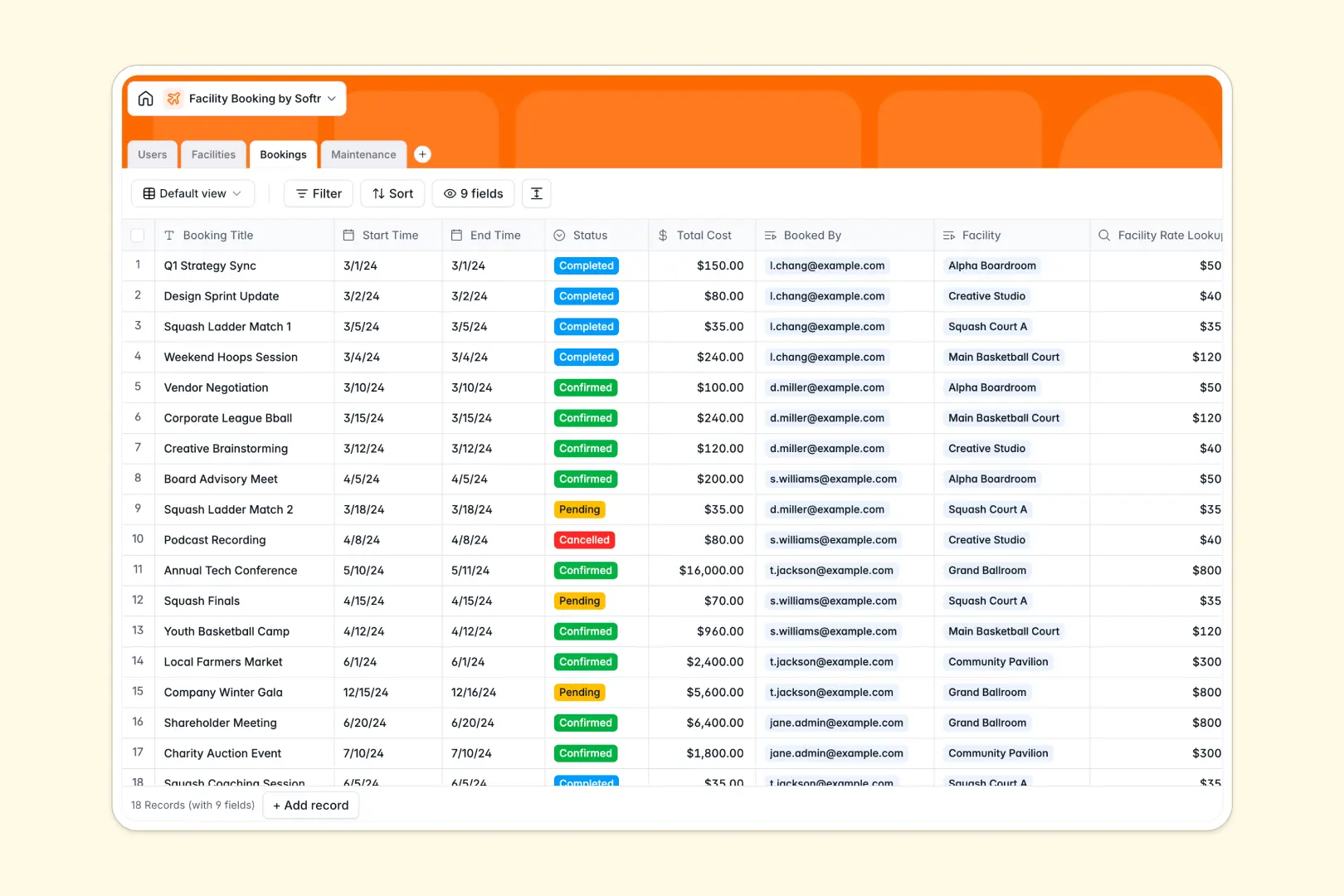
Your Facility Booking Database at a glance
This template gives you a complete, structured system to manage users, bookable spaces, and maintenance tasks in one place. It eliminates double bookings and keeps your facility operations running smoothly.
The database connects four main tables: Users, Facilities, Bookings, and Maintenance. When a member reserves a space, the booking automatically links to both their user profile and the specific facility.
Built-in AI features make managing this database effortless. The system automatically writes engaging facility descriptions with web research, summarizes booking statuses, and classifies the urgency of new maintenance issues based on your notes.
Why facility bookings get messy in spreadsheets
Tracking meeting rooms and sports courts across spreadsheet tabs almost always leads to double bookings and lost maintenance requests. When you mix schedules, costs, and user details in flat rows, the system quickly breaks down.
What a structured database changes
A structured system keeps your data clean by giving every piece of information its own dedicated space and type. Dates act like real dates, currency formats correctly, and space capacities remain consistent.
Instead of relying on fragile VLOOKUPs, you connect records natively. You can link a maintenance ticket directly to an event hall without copying data back and forth.
This is exactly what Softr Databases are designed for. As your facility usage grows, your data remains organized, searchable, and secure.
What you can do with this template
You can instantly view all pending, confirmed, or completed bookings linked to specific spaces and members. Tracking capacities, hourly rates, and total costs happens naturally in real time.
You can also use built-in AI to automate administrative overhead. The database instantly detects if a reported maintenance issue is high-urgency, ensuring critical repairs aren't ignored.
-
Users
Manage system administrators, members, and staff with roles and contact info
-
Facilities
Catalog bookable spaces using AI to generate engaging facility descriptions
-
Bookings
Track space reservations with cost lookups and AI-generated status summaries
-
Maintenance
Log facility repairs using AI to automatically classify task urgency levels
Who is this Facility Booking database for
This template is built for operators and community managers who need a reliable way to coordinate space usage and upkeep without the manual chaos.
- Office Managers: Track meeting room reservations and ensure spaces are clean before critical client visits.
- Community Centers: Manage sports court capacities and coordinate member access without scheduling overlap.
- Event Hall Operators: Log reservation instances, calculate total costs based on hourly rates, and track user payments.
- Maintenance Staff: Monitor a centralized log of scheduled tasks, reported damage, and resolution notes.
How to take it further
It is incredibly easy to customize this database to fit your exact operational needs. Add new facility categories, adjust booking statuses, or modify the AI columns to extract different details.
You can quickly import your existing facility roster or historical booking data via CSV. Bulk uploading gives your team immediate value and a single source of truth from day one.
When you are ready, you can use Softr's tools to turn this database into a complete portal. Your members can log in to view availability and book spaces themselves via a custom web app.
You can easily configure users and permissions so that staff only see assigned maintenance tasks while users only see their own booking history. A well-structured database makes building customized applications totally seamless.
-
1
-
2
-
3
-
4
Frequently asked questions
-
What is a facility booking database?
-
Why use a no-code database to build a facility booking tool?
-
How can AI help managing data for facility booking?
-
Can I build an app with this facility booking database?
-
Is this Facility Booking template free?
-
How is a facility booking database different from a facility booking spreadsheet?
Start building today. It's free!
Build and launch your first app in under 30 minutes.