


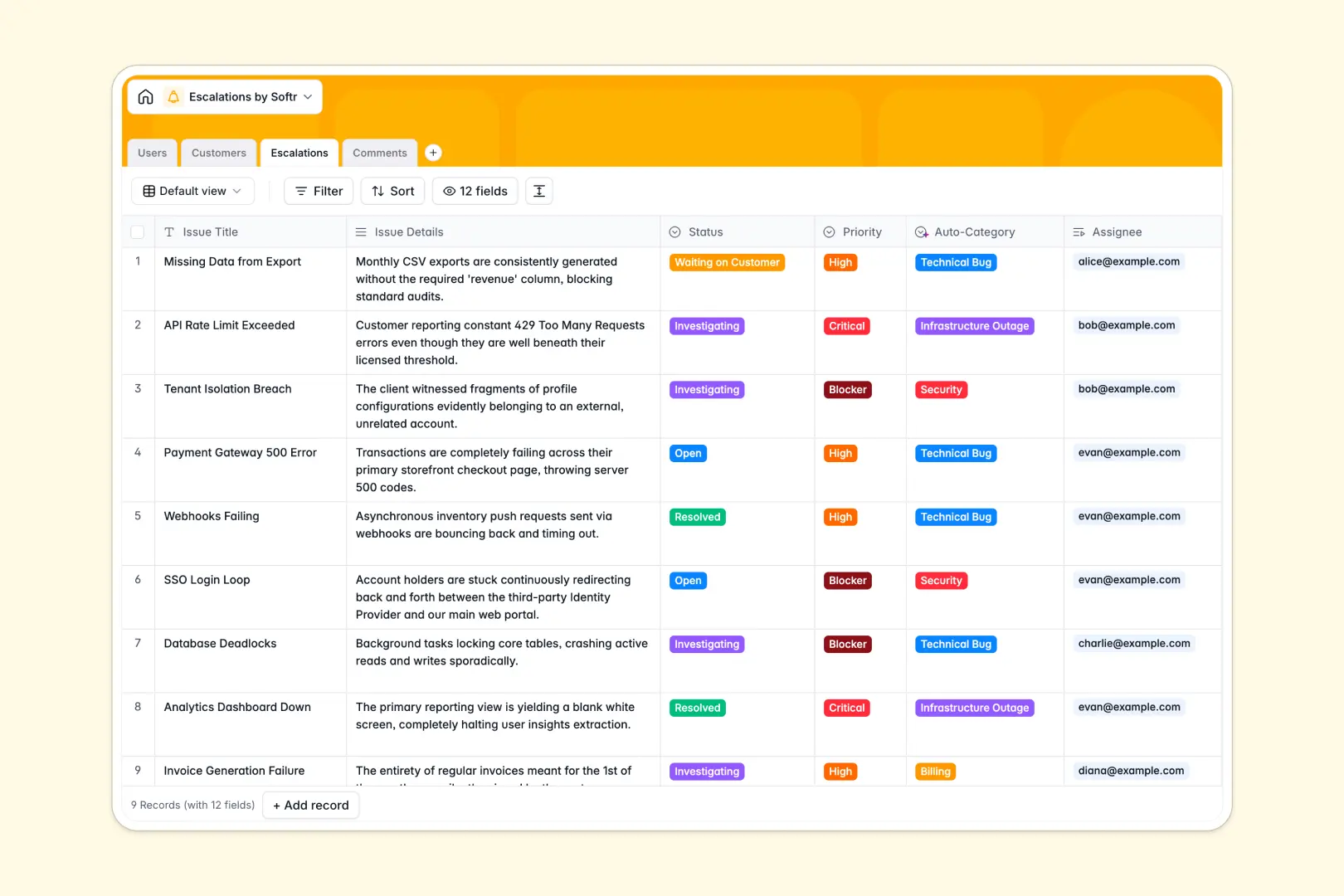
Your Escalations Database at a glance
This template gives support and engineering teams a single source of truth to manage high-priority incidents and blockers. It eliminates data silos, ensuring critical issues are completely visible, assigned correctly, and consistently tracked across the finish line.
Behind the scenes, the database directly links escalations to specific customers and users seamlessly. Every distinct investigative update is safely logged in a connected comments table, permanently removing the need to repeatedly copy-paste missing context.
To accelerate resolution times, native AI automatically researches affected clients to identify business impacts and categorizes bugs dynamically. It will also generate rapid, three-bullet summaries of massive comment threads so executives grasp progress immediately.
Why tracking escalations in spreadsheets breaks down
When critical operational blunders strike, relying on a flat spreadsheet leaves incident responders scrolling endlessly through unreadable cells filled with tangled notes.
What a structured database changes
In a flat file paradigm, attaching ongoing communication logs to a single bug involves notoriously fragile and complicated formulas. As the master list of incidents expands inevitably month-over-month, crucial updates get accidentally wiped out because the structure cannot scale.
A true relational backend perfectly fixes this chaos by keeping every specific data type strictly enforced across specific linked tables. This is exactly the robust automated environment Softr Databases provide for your team, keeping your incident response flawlessly organized as you grow.
What you can do with this template
You can confidently track active enterprise bottlenecks while automatically rolling up historical responses without tedious manual data entry. Everything functions flawlessly directly out of the box so your engineers can jump right back into securely resolving massive bugs.
Autonomous fields will silently categorize incoming technical errors into billing, security, or infrastructure buckets completely on your behalf. Built-in automation also constantly reads convoluted ticket histories and safely generates crisp executive summaries for transparent leadership oversight.
-
Users
Manage internal staff profiles, roles, and assigned escalation activities
-
Customers
Store client data featuring AI-powered business overviews and risk context
-
Escalations
Track critical issues using AI for auto-categorization and resolution summaries
-
Comments
Log detailed investigative updates and internal communication for every ticket
Who is this Escalations Database for
This intelligent tracker is explicitly built for dynamic teams organizing and routing critical operational bottlenecks:
- Level 2 Support Leads: Escalate complex tickets seamlessly to engineering with aggregated context and automated summary statements attached instantly.
- Engineering Managers: Directly assign blocking infrastructure outages rapidly and monitor exact resolution statuses without actively chasing down assignees.
- Customer Success Directors: Understand the real-time status of critical bugs negatively affecting Enterprise-tier customers utilizing auto-generated company reports.
How to take it further
Because this inherently operates as a native customizable environment, you purposefully maintain absolute control over the entire internal schema. You can effortlessly rename the active priority dropdowns or rewrite select values to beautifully match your company's existing technical terminology.
If your department is frustratedly transitioning off broken legacy spreadsheets, quickly populate this system by initiating a securely executed CSV upload. Engineers can similarly sync external support platforms by pushing automated payloads efficiently into this centralized workflow tool.
Once your exact ticket protocol massively matures, naturally transition this operational backend into an interactive portal meant for broader cross-functional consumption. Applying robust users and permissions guarantees that support specialists easily edit actively assigned tickets securely while isolated executives access safe, read-only analytical views.
Structuring your underlying data with flawless precision profoundly transforms exactly how your team subsequently builds powerful customized applications. Launching complex full-scale internal resources immediately becomes shockingly intuitive and profoundly scalable over time.
-
1
-
2
-
3
-
4
Frequently asked questions
-
What is an escalations database?
-
Why use a no-code database to build an escalations system?
-
How can AI help managing data for escalations?
-
Can I build an app with this escalations database?
-
Is this Escalations Database free?
-
How is an escalations database different from a spreadsheet?
Start building today. It's free!
Build and launch your first app in under 30 minutes.