


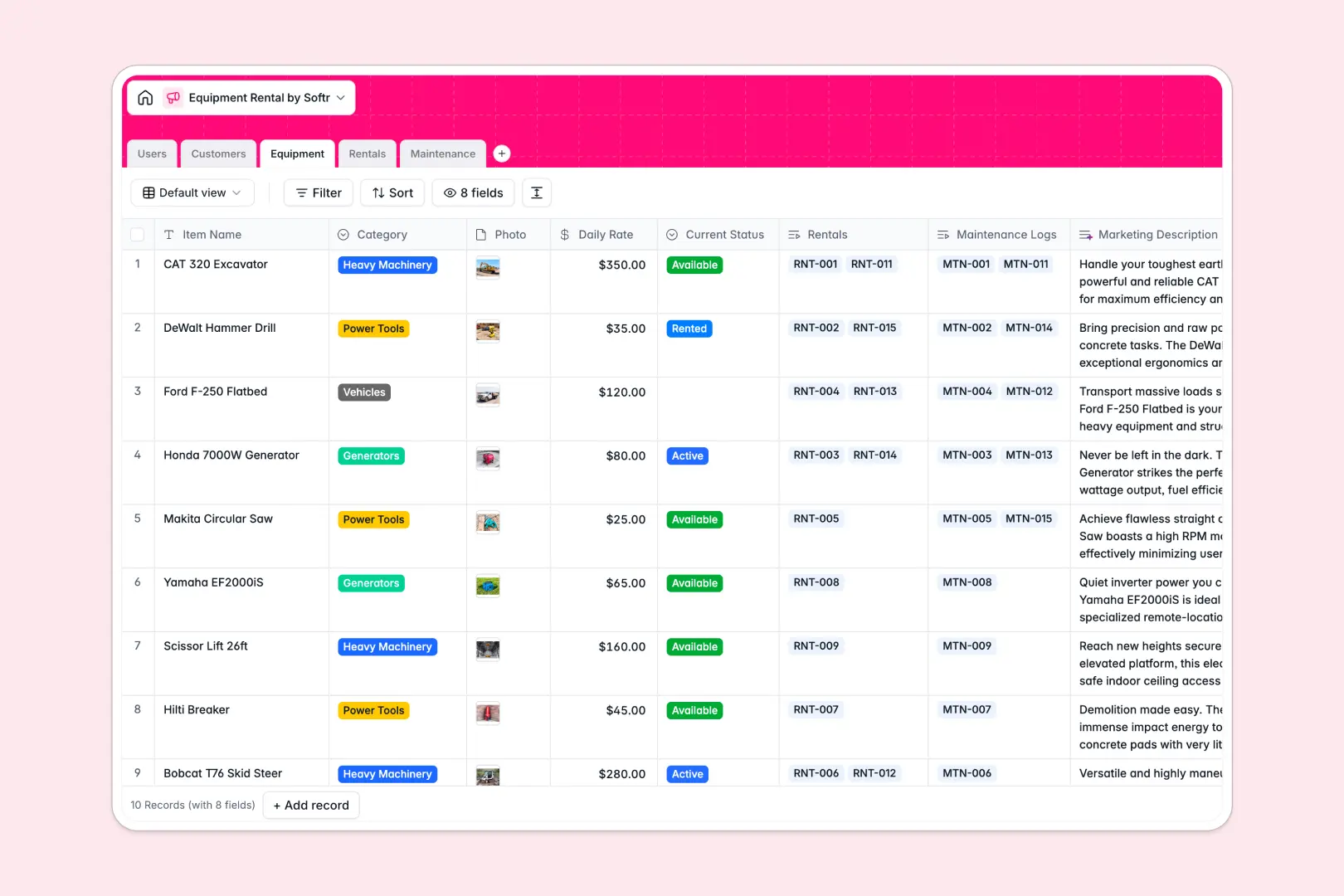
Your Equipment Rental Database at a glance
This template provides a clear, reliable way to manage active rentals, customer information, and equipment maintenance in one place. It eliminates the guesswork from your daily operations by keeping every item's availability clearly visible.
The system works by naturally linking your Customers to specific Equipment through a dedicated Rentals log. Staff can track statuses—from "Available" to "In Maintenance"—instantly, knowing exactly who has what gear.
Built-in AI features automatically draft professional marketing descriptions for your equipment and evaluate maintenance urgency based on problem descriptions. This keeps your listings attractive and ensures technicians prioritize critical repairs automatically.
Why tracking equipment rentals in spreadsheets breaks down
Managing availability, customer contracts, and repair histories across multiple spreadsheet tabs quickly turns into a logistical nightmare. Formulas break unexpectedly, embarrassing double-bookings happen, and crucial service histories get lost in hidden cells.
What a structured database changes
A structured system ensures every piece of data has a strict, unbreakable format. Dates stay formatted as real dates, daily rates remain numbers, and drop-downs enforce proper equipment status updates.
You can relate a customer directly to their active rental and the specific equipment used without writing fragile VLOOKUPs. This is exactly what Softr Databases are designed for.
As your inventory scales, a database prevents staff from accidentally overriding past maintenance logs or active rental quotes. This structure keeps your operation organized, no matter how fast you grow.
What you can do with this template
Instantly log rental contracts and see a clear timeline of which items are overdue, returned, or actively deployed. You can manage complex scheduling without ever touching complex code.
Use built-in Database AI agents to automatically pull a customer's company background simply by entering their business website domain. You can also automatically categorize repair tickets as Low, Medium, or High urgency the moment an issue is logged.
Ditch chaotic rows for a clean, connected system that teams can trust from day one.
-
Users
Manage internal staff roles, contact details, and assigned maintenance tasks
-
Customers
Store client profiles with contact info and AI-generated industry overviews
-
Equipment
Catalog rental inventory with rates and AI-generated marketing descriptions
-
Rentals
Track active rental contracts, timelines, and total costs across the fleet
-
Maintenance
Log equipment repairs and use AI to classify urgency based on issue reports
Who is this Equipment Rental database for
This system is built for businesses heavily reliant on accurate scheduling and reliable inventory management.
- Rental Shop Owners: Track daily availability, upcoming reservations, and overdue returns in one clear view.
- Maintenance Technicians: Log repair costs, view issue descriptions, and identify high-priority fixes immediately.
- Sales Agents: Manage client profiles efficiently, pull company backgrounds automatically, and tie contracts securely to specific users.
How to take it further
Customize the database to fit your exact daily workflow effortlessly. You can easily add new equipment categories or modify the rental status options without breaking the structure.
Bring your current inventory over in minutes to get started immediately. Use a simple CSV upload to populate your equipment items and existing customer records instantly.
Once your data is cleanly structured, you can build an app on top of it to dramatically improve the user experience. Create a secure mobile dashboard where field technicians can update maintenance logs directly from their phones.
By setting up proper users and permissions, you securely control exactly who can approve rentals or view financial rates. A thoughtfully structured database makes building these custom internal tools completely effortless.
-
1
-
2
-
3
-
4
Frequently asked questions
-
What is an equipment rental database?
-
Why use a no-code database to build a rental management tool?
-
How can AI help manage data for equipment rentals?
-
Can I build an app with this rental database?
-
Is this Equipment Rental database free?
-
How is a rental database different from an equipment rental spreadsheet?
Start building today. It's free!
Build and launch your first app in under 30 minutes.