


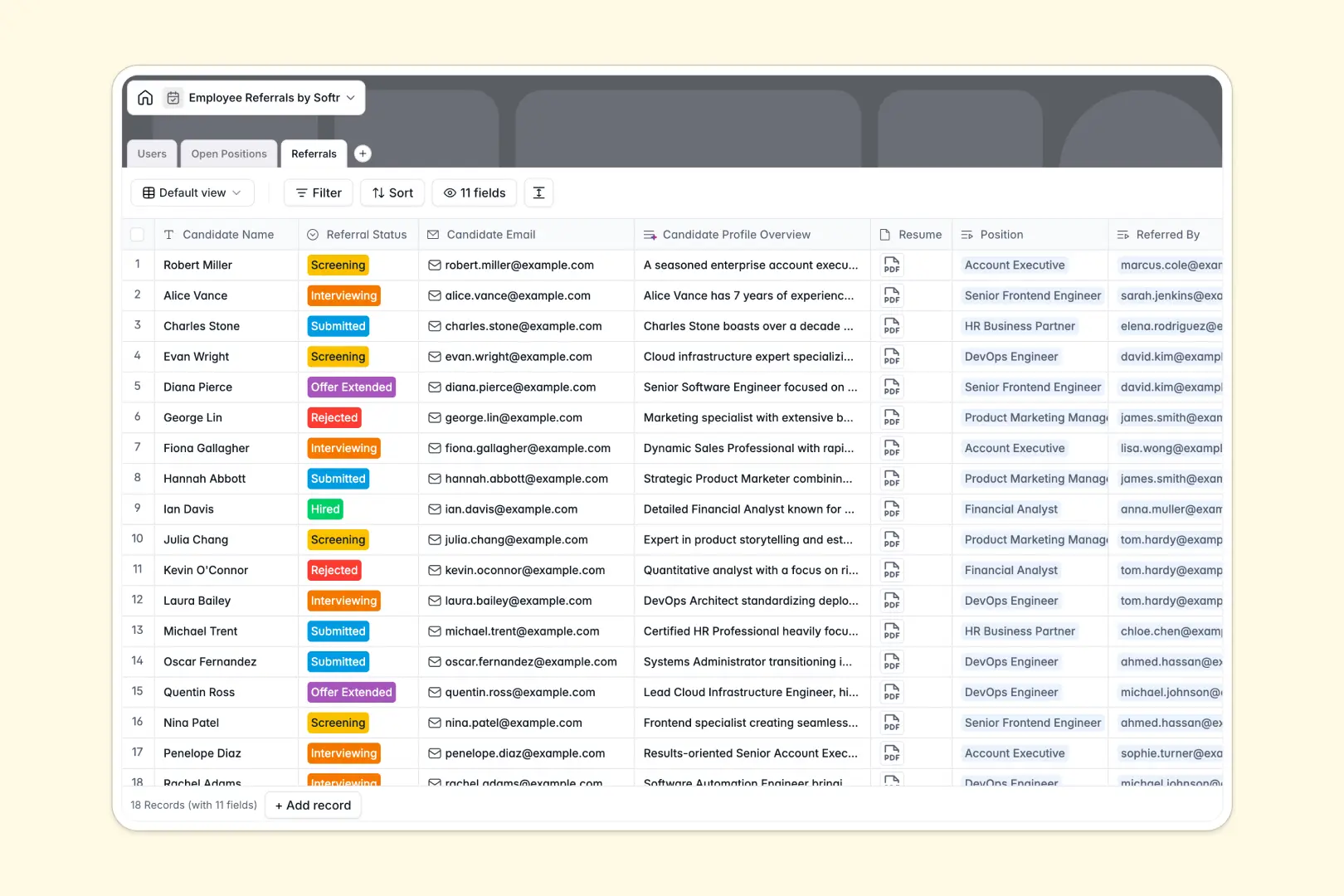
Your Employee Referrals database at a glance
This structured database centralizes your referral process, tracks exactly who recommended whom, and keeps candidate statuses neatly organized. Say goodbye to scattered resumes and confusing email threads by managing your entire pipeline in one reliable place.
The system runs on three connected tables: Users (employees and HR), Open Positions, and Referrals. Native relational links automatically connect a submitted candidate to a specific job opening and the employee who referred them, ensuring bonuses are tracked accurately.
AI also works seamlessly in the background to save your recruiters time. It automatically drafts snappy social sharing summaries for your open roles and instantly researches candidate LinkedIn profiles to pull back a professional overview.
Why tracking employee referrals in spreadsheets breaks down
Spreadsheets get notoriously messy when tracking hiring pipelines. Resumes get buried in comments, candidate statuses quickly become outdated, and linking a single applicant to both a job opening and a referring employee requires fragile formulas.
What a structured database changes
Structure fixes the hiring chaos instantly and prevents data from breaking as you scale. Candidates stay flawlessly linked to specific jobs and hiring managers without needing to copy-paste names across multiple rows.
Files like resumes and portfolios live cleanly as native attachments inside each candidate record. Furthermore, critical details like referral statuses and departments are restricted to clean dropdown menus, eliminating terrifying data entry errors.
This is exactly what Softr Databases are designed for. They provide the highly reliable, interconnected foundation your HR processes actually need to run smoothly.
What you can do with this template
Automatically calculate how many total referrals an employee has submitted using powerful rollup fields. You can also instantly view the total applicant pool grouped by any open position.
Use built-in Database AI agents to automatically parse a candidate's LinkedIn profile without ever leaving the table, drastically speeding up the screening process. Start organizing your referral pipeline right away with this ready-to-use structure that outperforms basic spreadsheets.
-
Users
Manage employee and HR profiles with department roles and referral stats
-
Open Positions
List job openings with AI summaries for social sharing and hiring status
-
Referrals
Track candidate leads with AI profiles generated from LinkedIn and resumes
Who is this Employee Referrals database for
This template provides the perfect foundation for teams looking to streamline their hiring pipeline and reliably reward top referrers.
- HR Managers: Track applicant statuses, review natively attached resumes, and instantly monitor which open positions are getting the most traction.
- Recruiting Teams: Automatically research applicant backgrounds using AI and quickly evaluate candidate pipeline health across all departments.
- Operations Leaders: Ensure employee referral bonuses are accurately documented by flawlessly linking hired candidates back to the referring staff member.
How to take it further
Customize the database
Easily adapt the structure to match your exact hiring workflow right now. You can modify the referral status dropdowns or add new company departments with just a few intuitive clicks.
Import your existing data
Bring your current candidate lists, employee directories, and open roles over instantly. You can easily drag and drop a CSV file to hit the ground running without tedious manual data entry.
Build a full app around it
When your team is ready, use the interface builder to turn this database into a secure internal employee referral portal.
You can easily set users and permissions so employees only ever see the statuses of their own referrals, while HR managers get full access to the entire pipeline. Having this well-organized database makes building that custom, role-based app incredibly simple.
-
1
-
2
-
3
-
4
Frequently asked questions
-
What is an employee referrals database?
-
Why use a no-code database to build a referral tracking system?
-
How can AI help managing data for employee referrals?
-
Can I build an app with this employee referrals database?
-
Is this Employee Referrals database free?
-
Why is a database significantly better for tracking referrals than a spreadsheet?
Start building today. It's free!
Build and launch your first app in under 30 minutes.