


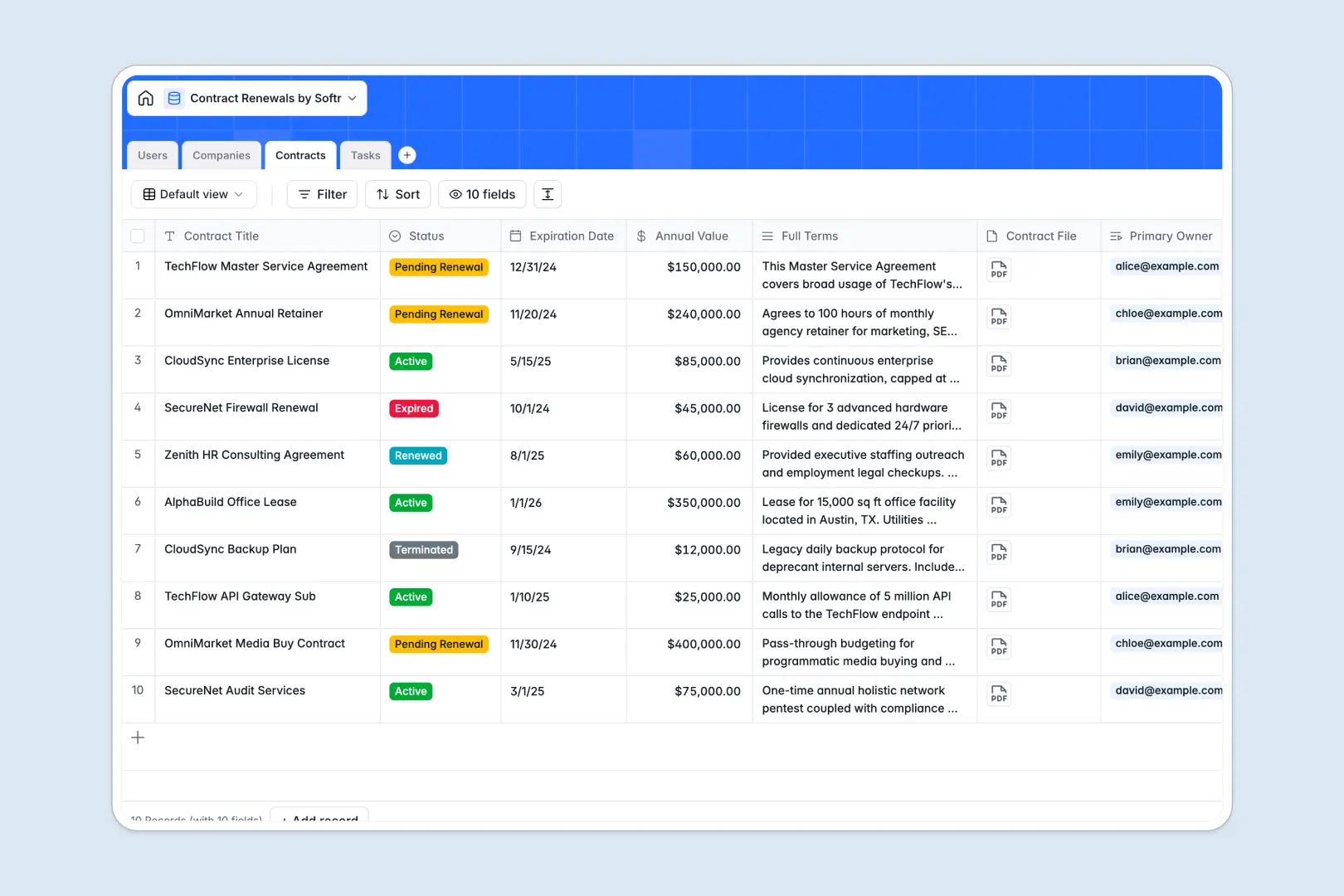
Your Contract Renewals Database at a glance
This template gives you a centralized system to track agreements, monitor upcoming expirations, and assign renewal tasks to your team. It replaces scattered files and messy rows with a clear, actionable view of your entire contract portfolio.
The database securely links four core tables—Users, Companies, Contracts, and Tasks—so everything stays in sync automatically. When you view a company, you instantly see all their active contracts and pending action items without duplicate data entry.
Built-in AI fields automatically summarize long contract terms into quick bullet points and suggest immediate next steps for pending tasks. It even searches the live web to auto-populate company profiles based solely on their website URL.
Why tracking contract renewals in spreadsheets breaks down
Spreadsheets are great for static lists, but they quickly become a liability when managing high-stakes renewals. Keeping track of varying deadlines, attached PDFs, and status updates across messy rows often leads to missed deadlines and lost revenue.
What a structured database changes
A structured system naturally enforces rules: dates stay formatted properly, statuses are strictly controlled, and files are securely attached directly to the specific record.
You can easily link an upcoming renewal task to the exact contract and client, ensuring accountability without fragile VLOOKUPs. This is exactly what Softr Databases are designed for—keeping critical data clean and connected as you scale.
What you can do with this template
Instantly see which contracts are expiring soon and filter them by status or internal owner. Securely attach raw contract files directly to the record so your team never has to hunt through shared drives.
Thanks to native Database AI agents, you can automatically extract actionable summaries from dense legal terms the moment a contract is uploaded. Your team stays focused on closing renewals instead of reading pages of fine print.
-
Users
Manage internal team members, their roles and assigned contract renewals
-
Companies
Store client data with AI-enhanced company profiles based on web research
-
Contracts
Centralize all agreements using AI to summarize full terms and key dates
-
Tasks
Track action items with AI-suggested next steps to streamline renewals
Who is this Contract Renewals database for
This template provides a reliable foundation for any team handling ongoing agreements and recurring revenue.
- Sales and Account Managers: Monitor client contract statuses and start proactive renewal conversations.
- Legal and Compliance Teams: Maintain a secure, centralized view of all active agreements and exact terms.
- Operations and Procurement: Track vendor contracts, manage expiration dates, and avoid unwanted auto-renewals.
- Founders and Leaders: Get an instant overview of total annual contract value and pending renewals.
How to take it further
Customizing this template is simple and immediate. You can easily add new fields, tweak the contract statuses to match your internal process, or adjust the AI prompts to extract specific legal clauses.
Bring in your historical agreements seamlessly via CSV import for bulk uploads. You can also use the API to sync live contract data straight from your essential e-signature tools.
When your team is ready, building a full app around this database is the natural next step. You can use Softr's interface builder to create a custom internal dashboard where account managers only see their assigned renewals.
Alternatively, you could build an external vendor portal where partners can securely upload new agreements. With comprehensive users and permissions, you maintain total control over who views and edits specific contract details.
-
1
-
2
-
3
-
4
Frequently asked questions
-
What is a contract renewals database?
-
Why use a no-code database to build a contract management system?
-
How can AI help managing data for contract renewals?
-
Can I build an app with this contract renewals database?
-
Is this Contract Renewals template free?
-
How does a contract database beat tracking renewals in spreadsheets?
Start building today. It's free!
Build and launch your first app in under 30 minutes.