


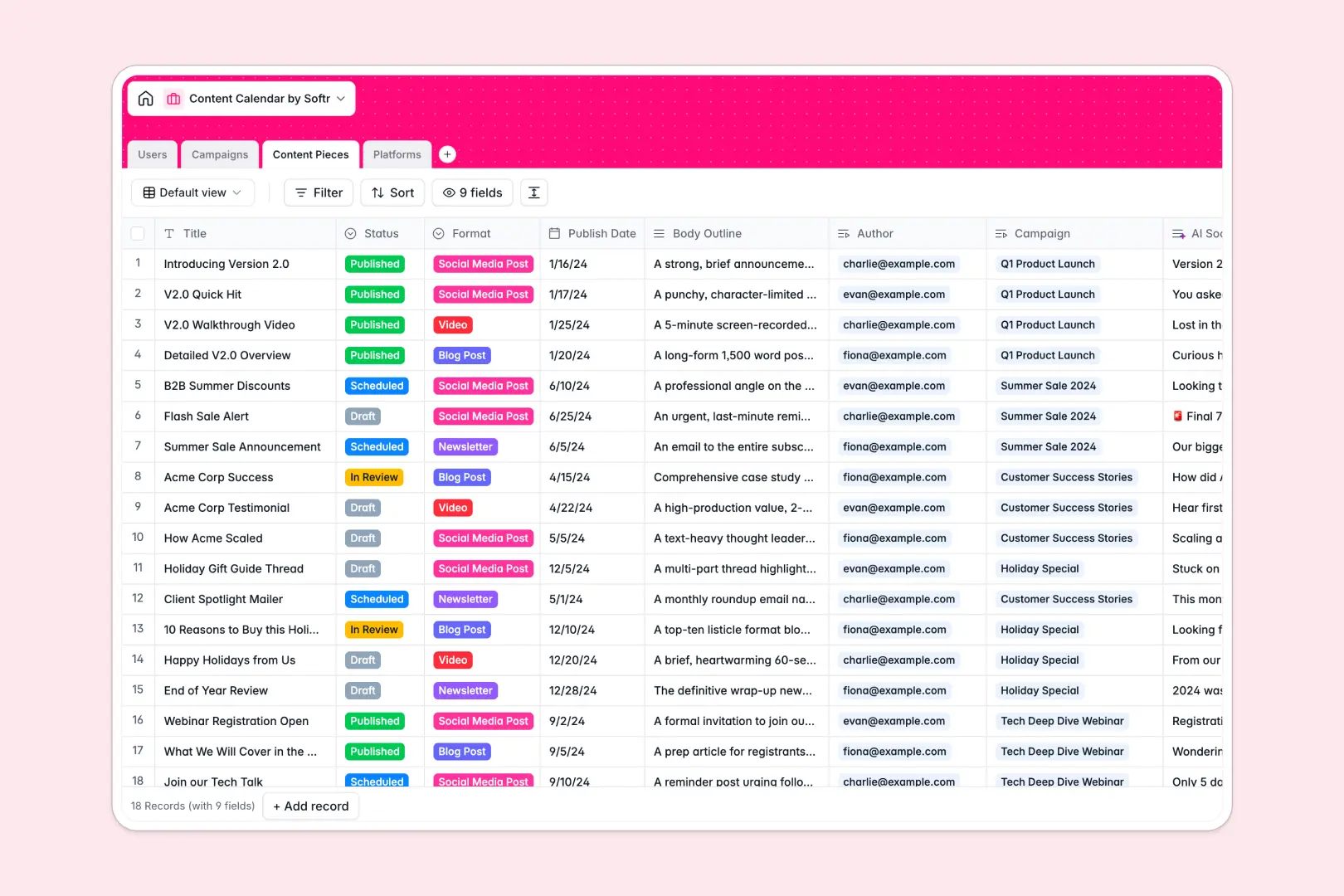
Your Content Calendar Database at a glance
This template gives you a central hub to plan campaigns, track individual content pieces, and monitor multi-channel distribution. It replaces scattered sheets with a single true source of record for your editorial workflow.
Content pieces link directly to overarching campaigns, authors, and distribution platforms without repetitive manual entry. This means you can see exactly who is writing what, for which campaign, without constantly duplicating data strings.
Built-in AI agents automatically generate campaign concept ideas whenever a new brief is added. They sequentially summarize your body outlines into catchy social snippets and research platform audience overviews instantly.
Why a content calendar spreadsheet breaks down
Tracking a busy, multi-author editorial pipeline in a spreadsheet quickly becomes a nightmare. Statuses constantly get overwritten, deadlines slip entirely unnoticed, and connecting a single blog post to a larger campaign requires fragile formulas that inevitably break.
What a structured database changes
In a relational database, every column has a strict, enforceable purpose—publish dates stay dates, and drop-down statuses remain perfectly consistent. Instead of copying and pasting text for author names or campaign goals, tables link natively to each other.
This is exactly what Softr Databases are specifically designed for. When you push back a campaign's end date, every linked content piece automatically retains that new context, keeping your whole team aligned perfectly as you scale.
What you can do with this template
Ditch manual copy-pasting altogether and connect your individual content drafts directly to campaigns and designated target platforms. You can reliably view your entire pipeline at a simple glance, tracking progress logically from initial draft to published.
Best of all, native AI fields work constantly in the background to speed up your asset creation operations. Whenever a new content outline is updated, the database actively drafts your platform-specific social media snippets automatically.
-
Users
Manage team member profiles, roles, and content assignments across campaigns
-
Campaigns
Organize marketing initiatives with AI-generated concept ideas for content
-
Content Pieces
Draft and schedule content using AI to generate targeted social snippets
-
Platforms
Catalog distribution channels with AI-powered summaries of each platform goal
Who is this Content Calendar database for
This fundamentally structured template is built specifically for operations teams that continually plan, create, and distribute content across multiple channels.
- Marketing Managers: Track multi-channel campaigns precisely and ensure every individual asset ships exactly on time.
- Content Teams: Keep ongoing drafts, social snippets, and target distribution platforms beautifully mapped in one central view.
- Agencies: Manage multiple client campaigns concurrently while explicitly assigning roles to authors, editors, and admins.
How to take it further
Start immediately by customizing the complete database structure to fit your exact editorial flow perfectly. You can rapidly rename status labels, add new rich content formats, or tweak the core AI prompt instructions to naturally match your brand's unique voice.
If you already manage a growing editorial backlog, simply import your existing data via a quick CSV upload in just a few minutes. Connect your messy, old spreadsheets effortlessly so you never lose any valuable historical campaign data.
When your content team is ready, you can seamlessly build a full editorial app directly on top of this live data hub. Turn this backend structure into a cleanly designed collaborative portal where writers safely submit structured drafts and managers systematically approve them.
Because it runs entirely on Softr natively, you can proactively apply custom users and permissions directly to the team workflow. This dynamically ensures your freelance contributors only access the specific articles strictly assigned to them, while your core admins get a bird's-eye view of your entire content architecture.
-
1
-
2
-
3
-
4
Frequently asked questions
-
What is a content calendar database?
-
Why use a no-code database over a content calendar spreadsheet?
-
How can AI help manage my editorial content?
-
Can I build an app with this content calendar database?
-
Is this Content Calendar Database free?
Start building today. It's free!
Build and launch your first app in under 30 minutes.