


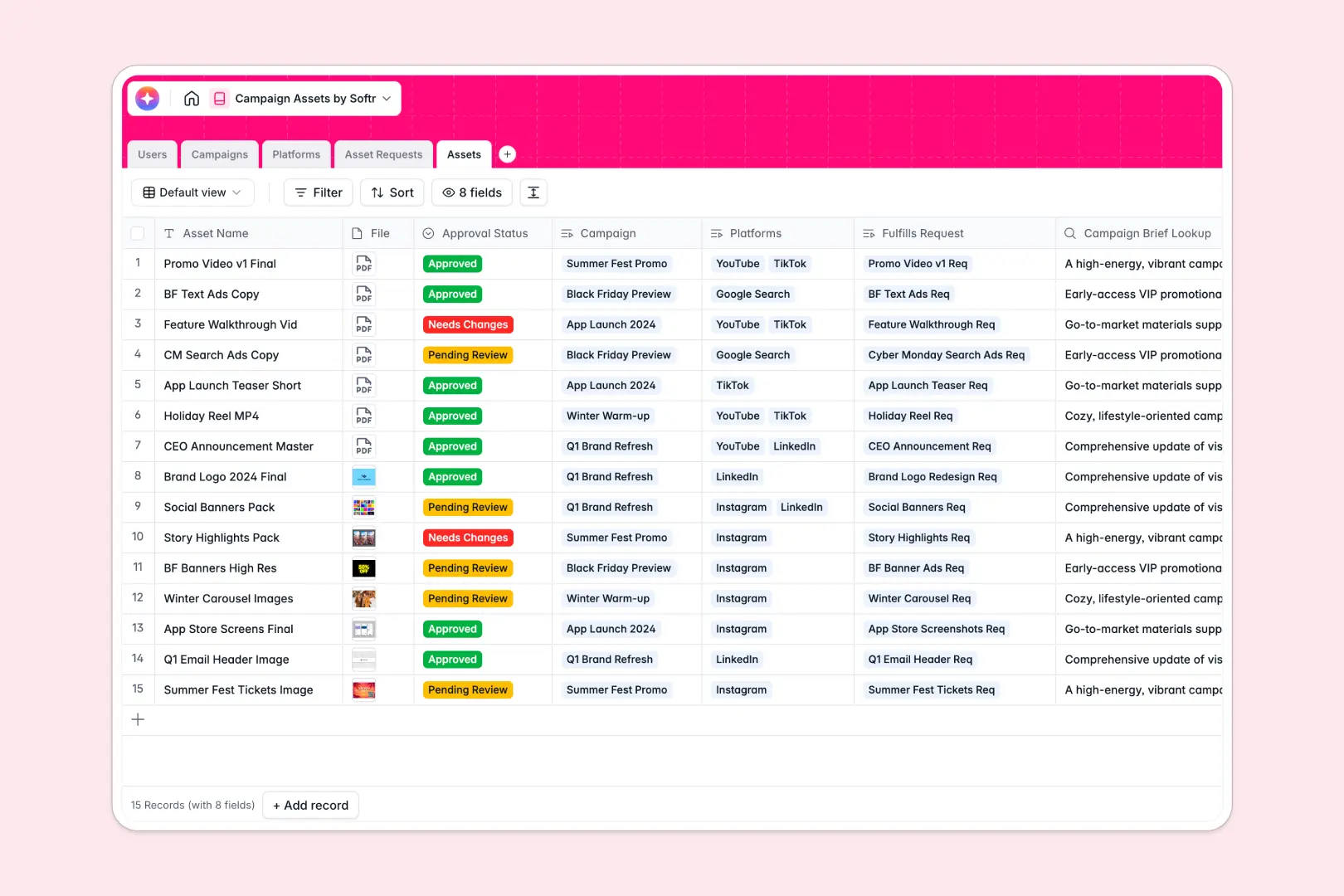
Your Campaign Assets database at a glance
This template gives your marketing team a central source of truth for planning campaigns, tracking creative requests, and storing final deliverables. It seamlessly replaces the chaos of nested folders and messy spreadsheets.
It connects everything natively: users, campaigns, platforms, asset requests, and finalized files. When a designer completes an asset request, it systematically ties that visual to the broader campaign and its designated distribution channels.
Built-in AI features handle the heavy lifting by automatically prioritizing urgent requests and summarizing long campaign briefs. It can even research platform formats and intuitively draft tailored social media copy for your final deliverables.
Why campaign assets get messy in spreadsheets
Trying to run a content pipeline in a spreadsheet inevitably ends in broken links, duplicated files, and missing overarching context. Spreadsheets simply aren't built to process heavy file attachments, track multi-step approvals, or map single visuals across multiple distribution platforms.
What a structured database changes
A structured database strictly enforces organization. Instead of pasting Google Drive links into random cells, real files live securely next to their approval statuses, and every single column reliably holds the exact data type it's supposed to.
Relational tables connect a specific design request to its overarching campaign without requiring fragile VLOOKUP formulas. When a campaign updates, related assets instantly reflect the new context, which is exactly why Softr Databases are built for this type of scale.
What you can do with this template
Use this system out of the box to accurately log requests, organically assign creators, and confidently track deliverables from "To Do" to "Approved." Everything stays highly connected and impossibly easy to locate across your entire organization.
You can also heavily leverage Database AI agents to automatically draft social media captions when a new asset is approved. They can even read through complex requirement text to neatly classify exactly which design requests are high priority.
-
Users
Manage team roles and access levels for marketing campaign stakeholders
-
Campaigns
Organize marketing initiatives with AI-generated strategy executive summaries
-
Platforms
Catalog marketing channels and use AI to research specific platform features
-
Asset Requests
Process creative tickets and use AI to auto-classify request priority levels
-
Assets
Store creative deliverables and generate social copy using AI automation
Who is this Campaign Assets database for
This template acts as a central hub for fast-moving teams that urgently need to streamline their creative production and track deliverables.
- Marketing Managers: Confidently track overall campaign progress, ensure assets match strategic briefs, and monitor active workflows.
- Creative Directors: Effectively manage team workloads, systematically prioritize urgent design ticketing, and oversee the complete asset approval process.
- Content Creators: Clearly see exactly what needs to be produced, securely upload deliverables, and instantly access overarching campaign context.
- Social Media Managers: Rapidly locate approved files and actively use AI to instantly draft platform-specific posting copy.
How to take it further
This database is entirely customizable right from the start. You can effortlessly modify the "Approval Status" fields to perfectly match your team's specific workflow, or easily add new platform channels unique to your marketing mix.
If you currently track your creative pipeline elsewhere, you can quickly import your existing data via CSV or neatly connect via API to automatically sync your historical campaigns.
When your team is completely ready, you can logically turn this database into a full-scale portal simply by building an app directly on top of it. You can confidently set up highly specific users and permissions to strategically ensure completely external freelancers only view their uniquely assigned design requests.
Because the backend database natively maintains perfect structure, building a fully custom tracking app around it is incredibly fast and totally seamless.
-
1
-
2
-
3
-
4
Frequently asked questions
-
What is a campaign assets database?
-
Why use a no-code database to build a campaign assets system?
-
How can AI help managing data for campaign assets?
-
Can I build an app with this campaign assets database?
-
Is this Campaign Assets template free?
-
Why do campaign assets naturally get messy in Google Sheets or Excel?
Start building today. It's free!
Build and launch your first app in under 30 minutes.