


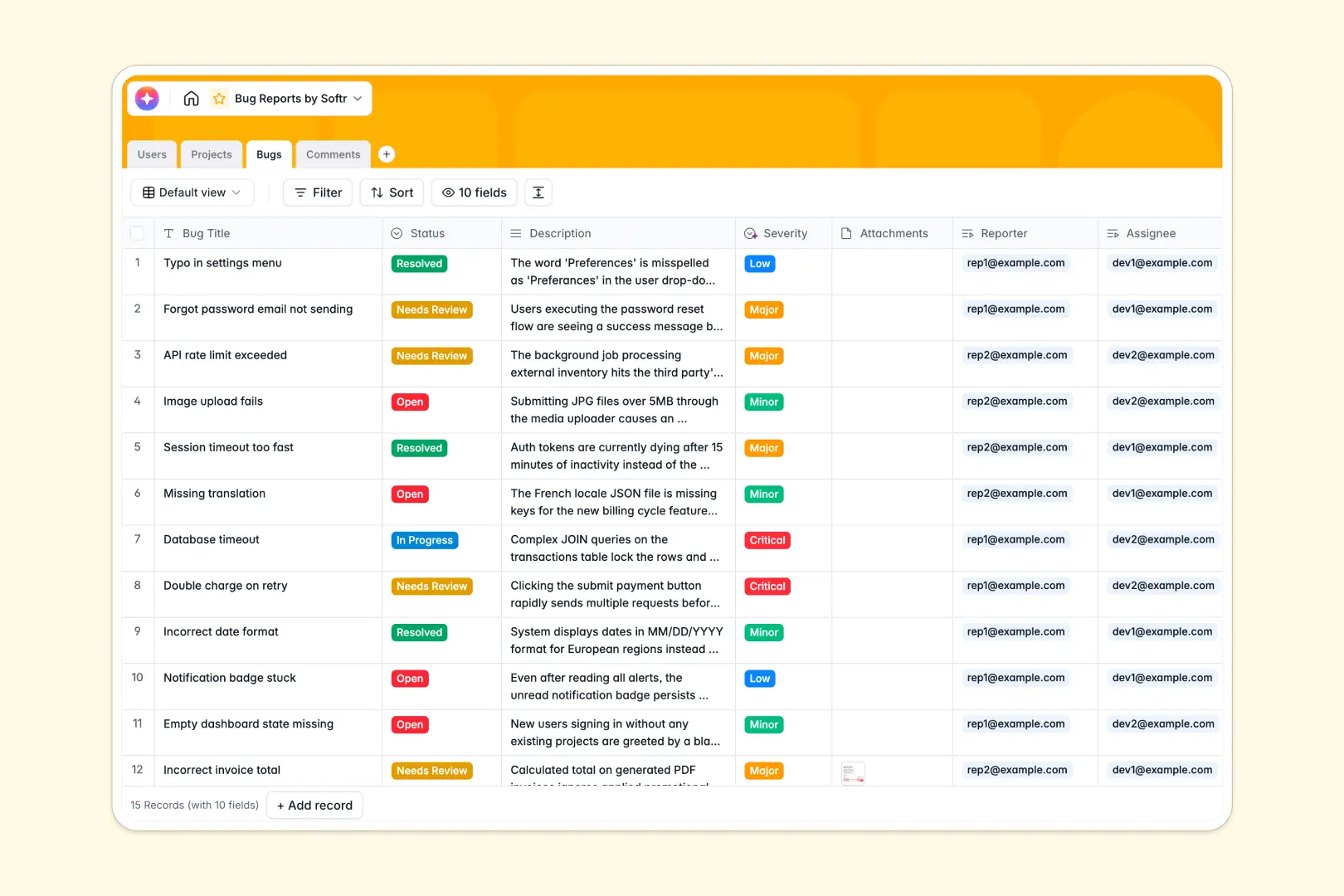
Your Bug Reports database at a glance
This template replaces scattered spreadsheets with a clear, reliable system to track bugs from discovery to resolution. It connects reporters, developers, and projects in one automatically organized workspace.
The database is divided into simple, connected tables: Bugs links directly to Users (as reporters or assignees) and Projects, while a dedicated Comments table logs all activity. This means no more lost tickets, broken formatting, or fragile VLOOKUP formulas.
It also includes intelligent fields that automatically categorize bug severity and summarize long descriptions into brief bullet points, saving your team hours of manual triaging.
Why tracking bug reports gets messy in spreadsheets
Spreadsheets are great for quick lists, but when multiple users start logging bugs, adding comments, and updating statuses, rows inevitably get deleted and critical details slip through the cracks.
What a structured database changes
In a structured system, columns enforce strict rules so data stays clean. Attachments remain neat, severity ratings are perfectly standardized, and one bug easily links to a specific project lead without you ever having to copy-paste names.
This is exactly what Softr Databases are designed for. As your software scales, your data avoids formatting chaos, relationships between tables remain intact, and teams always know exactly what to fix next.
What you can do with this template
You can completely ditch manual ticket sorting. Filter open tickets by developer, automatically roll up the total number of open bugs per project, and track timestamped comments without digging through endless spreadsheet cells.
Thanks to natively built Database AI agents, new bug descriptions are instantly analyzed to assign an accurate severity level (from Low to Critical). It also translates dense user submissions into quick summaries, helping developers tackle urgent issues faster.
-
Users
Manage system profiles including reporters and admins with their assigned work
-
Projects
Organize high-level software modules and track total open bug counts per project
-
Bugs
Manage tickets using AI to automatically classify severity and generate summaries
-
Comments
Centralize discussion logs and updates for specific bug tickets chronologically
Who is this Bug Reports database for
This system is built for software and product teams who need a reliable, scalable way to squash bugs without heavy configuration.
- Product Managers: Maintain a clear overview of total open bugs rolled up instantly by project and project lead.
- QA Testers & Reporters: Easily log issues, attach screenshots, and track status updates in an organized, structured format.
- Developers: See exactly which major and critical bugs are assigned to them, complete with AI-generated task summaries.
How to take it further
Customize this database effortlessly to match how your team works. You can easily add new status options like "Blocked" or modify the user roles to fit your exact engineering department structure.
If you have an existing backlog, you can import your spreadsheets immediately. Simply upload your current data via CSV to instantly populate your new bugs, users, and projects tables in minutes.
When your team needs a dedicated portal, you can easily build an app on top of this structured foundation. Create a custom interface where external beta testers can securely log issues, while internal developers manage the backend.
By leveraging customized users and permissions, you guarantee each role only sees the tickets and projects relevant to them—which is incredibly simple given how perfectly organized your underlying database is.
-
1
-
2
-
3
-
4
Frequently asked questions
-
What is a bug reports database?
-
Why use a no-code database to build a bug tracking system?
-
How can AI help managing data for bug reports?
-
Can I build an app with this bug reports database?
-
Is this Bug Reports template free?
-
Why is a database better than a bug reports spreadsheet?
Start building today. It's free!
Build and launch your first app in under 30 minutes.