


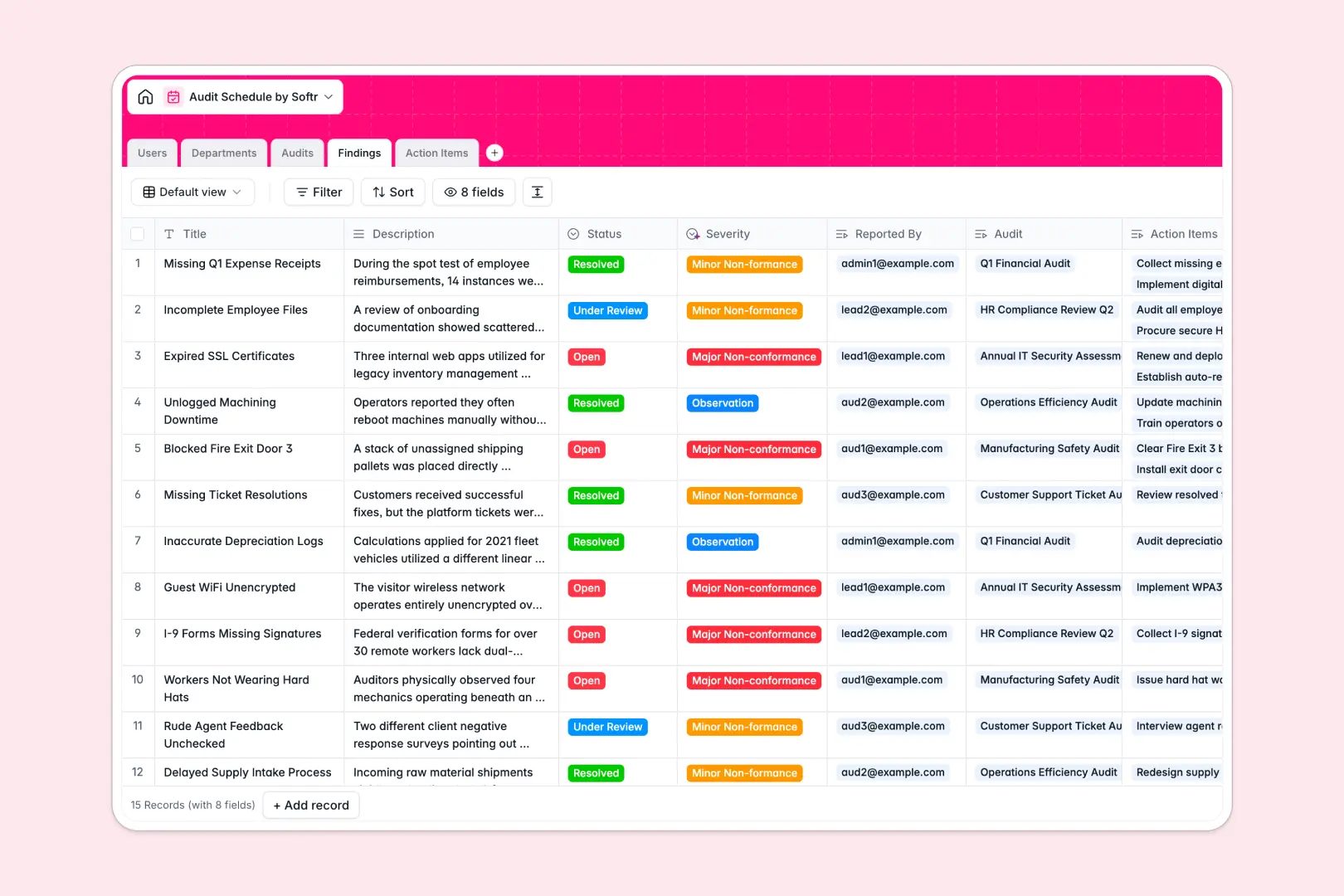
Your Audit Schedule Database at a glance
This template replaces messy spreadsheets with a structured central system to track scheduled audits, log non-conformances, and assign remediation tasks. Everything is connected natively, giving your team complete visibility from the initial schedule to the final resolved action item.
It organizes data across distinct tables for Audits, Findings, Action Items, Departments, and Users. Instead of duplicating data, you simply link a finding directly to the relevant audit and assign specific users to handle the follow-up tasks.
Built-in AI features automatically summarize audit execution details and categorize the severity of reported findings based on your descriptions. They can even search the live web to generate quick department summaries, saving your compliance team hours of manual data entry.
Why audit schedules get messy in spreadsheets
What a structured database changes
Tracking audits in spreadsheets quickly breaks down as you try to link findings, assign multiple tasks, and maintain clear schedules across different tabs. Rows get accidentally deleted, statuses become inconsistent, and fragile formulas break when you need robust reporting.
A structured database ensures every column has a strict type, so due dates stay as dates and severity levels are standardized across the board. This allows you to link specific non-conformances directly to audited departments effortlessly without error-prone copy-pasting.
This is exactly what Softr Databases are designed for. As your compliance requirements grow, the data remains clean, structurally sound, and infinitely scalable.
What you can do with this template
Start scheduling compliance events immediately and track their live status from the initial scheduling phase to final closure. You can log unlimited findings per audit and utilize automatic rollups to see total risk levels at a simple glance.
Connect those findings to actionable tasks with assigned due dates, ensuring no critical observation slips through the cracks. Using built-in AI agents, the system will actively analyze your descriptions and categorize them automatically as an Observation, Minor, or Major Non-conformance in real time.
-
Users
Manage auditor profiles and system permissions for tracking team assignments
-
Departments
Organize business units with AI-generated summaries based on department names
-
Audits
Schedule events using AI to synthesize status and findings into audit summaries
-
Findings
Log issues using AI to automatically analyze and categorize finding severity
-
Action Items
Track remediation tasks with assignees and due dates to resolve audit findings
Who is this Audit Schedule Database for
This template provides a reliable foundation for teams managing internal compliance, continuous quality assurance, or rigid external regulatory checks.
- Quality Managers: Schedule routine departmental checks and monitor the detailed status of all resulting action items.
- Lead Auditors: Log non-conformances on the fly and let AI automatically summarize the final audit execution results.
- Department Heads: Track past audits for their specific teams and ensure assigned remediation tasks are swiftly completed.
- Compliance Officers: Maintain a pristine, structured history of all observations and resolved issues for regulatory reviews.
How to take it further
Adapting this database to your specific compliance needs is completely intuitive as a native no-code system. You can easily add new fields, tweak the predefined finding severities, or update the audit status options to match your internal operational workflow.
If you already track compliance data elsewhere, bringing it into this template takes just minutes. You can bulk upload your existing scheduled audits and open findings via CSV, or map them through an API to establish immediate organizational value.
When your team is ready to scale, you can transform this raw data into a secure management portal for external auditors and internal department leads. Full-stack apps combine this exact database with interfaces and workflows flawlessly connected together.
Granular users and permissions ensure that a department head only sees audits related to their specific team, while Lead Auditors can access everything. Starting with a well-structured database makes building these robust, secure compliance apps completely effortless.
-
1
-
2
-
3
-
4
Frequently asked questions
-
What is an audit schedule database?
-
Why use a no-code database for audit tracking?
-
How can AI help managing data for audit schedules?
-
Can I build an app with this database?
-
How is a database better than a spreadsheet for audits?
Start building today. It's free!
Build and launch your first app in under 30 minutes.