


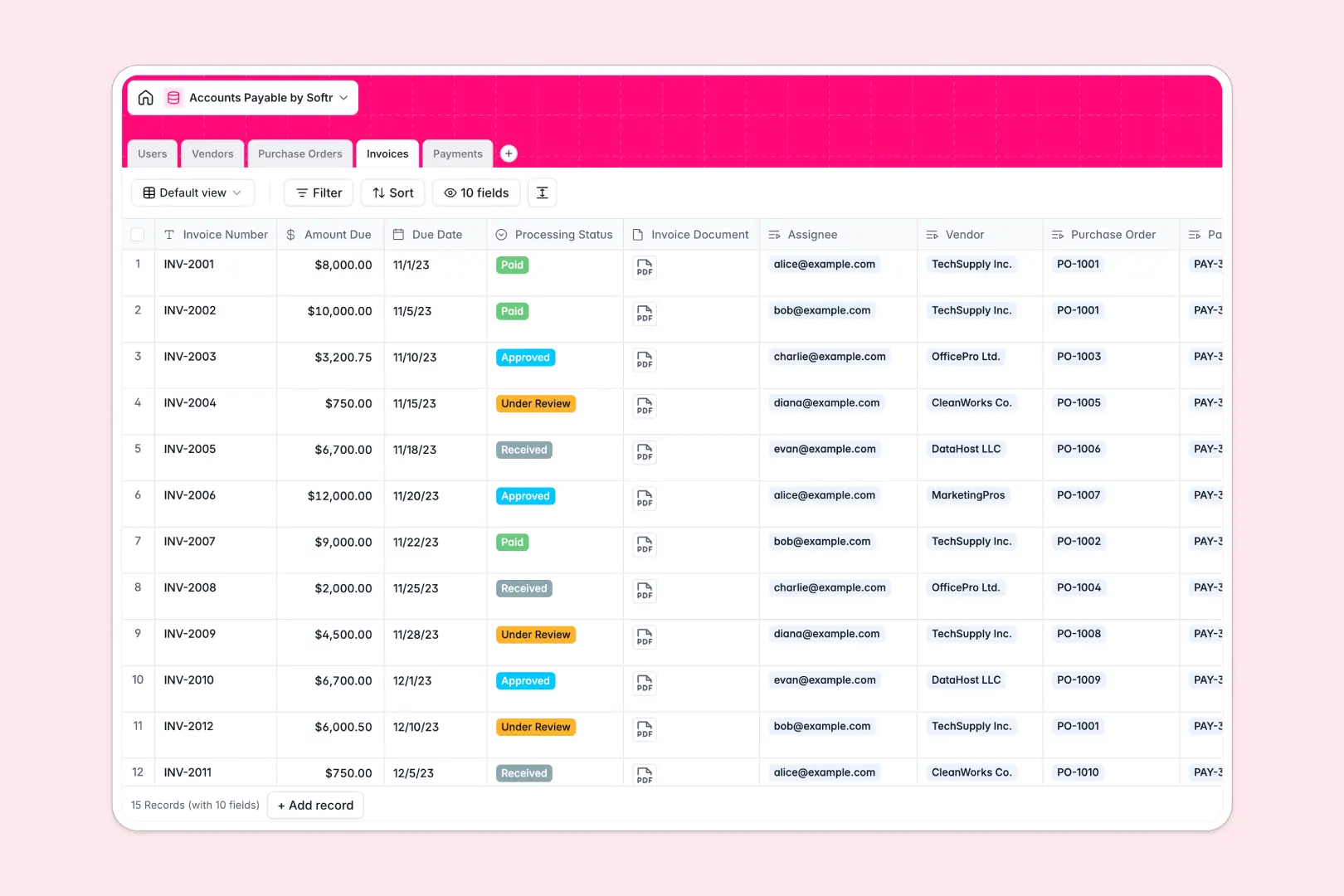
Your Accounts Payable Database at a glance
This Accounts Payable database helps you track every vendor bill, purchase order, and payment in one dependable system. It automatically links related records so you never lose track of what is owed and what is disbursed.
The template comes with dedicated tables for Users, Vendors, Invoices, Purchase Orders, and Payments. Instead of copying and pasting data, invoices natively connect to the correct vendor and purchase order so your records instantly align.
Built-in AI fields immediately summarize invoice statuses and generate payment receipt notes without any manual data entry.
Why accounts payable gets messy in spreadsheets
Managing vendor payments in a spreadsheet quickly becomes a nightmare of mismatched rows, broken formulas, and lost invoice files.
What a structured database changes
In a spreadsheet, linking an invoice to a specific vendor requires fragile VLOOKUPs that break when rows are moved. Columns easily get cluttered with mixed text and numbers, making it incredibly hard to see actual pending balances.
A structured database changes this by enforcing clean columns for dates, currencies, and attachments like invoice PDFs. This is exactly what Softr Databases are designed for, keeping your financial records organized and perfectly linked as your transaction volume grows.
What you can do with this template
You can instantly view all outstanding invoices tied to specific vendors through automated rollups. Drop in an invoice document and assign it directly to the right team member for immediate review and approval.
This template also includes AI features that automatically write company descriptions by searching the web via vendor URLs. It is completely ready to use out of the box to streamline your entire payment workflow.
-
Users
Manage system users with defined roles for invoice processing and approval
-
Vendors
Store supplier profiles with AI-generated research and outstanding totals
-
Purchase Orders
Track authorized purchase requests and their fulfillment status across vendors
-
Invoices
Process incoming bills using AI to summarize status and financial urgency
-
Payments
Log disbursements to vendors with AI-automated payment receipt generation
Who is this Accounts Payable database for
This template provides immediate structure for teams handling external purchases and vendor payments.
- Finance Teams: Track outstanding invoices, monitor due dates, and manage cash flow concisely.
- AP Clerks: Process incoming bills and link them to the correct purchase orders without data entry errors.
- Department Heads: Review and approve pending invoices quickly with fully attached documentation.
How to take it further
You can easily customize this database to fit your exact financial workflow. Add new vendor payment terms, adjust the invoice processing statuses, or modify columns to track department budgets.
Stop manually copying data out of old files. Import your existing accounts payable spreadsheets directly via CSV to instantly populate vendors, open purchase orders, and historical payment records.
When your team is ready, turn this dataset into a secure internal application. With granular users and permissions, you can ensure that AP clerks can draft payments while only administrators have the authority to mark them as paid.
-
1
-
2
-
3
-
4
Frequently asked questions
-
What is an accounts payable database?
-
Why use a no-code database to build an accounts payable system?
-
How can AI help managing data for accounts payable?
-
Can I build an app with an accounts payable database?
-
Is this Accounts Payable Database free?
-
Why is an accounts payable database better than a spreadsheet?
Start building today. It's free!
Build and launch your first app in under 30 minutes.