


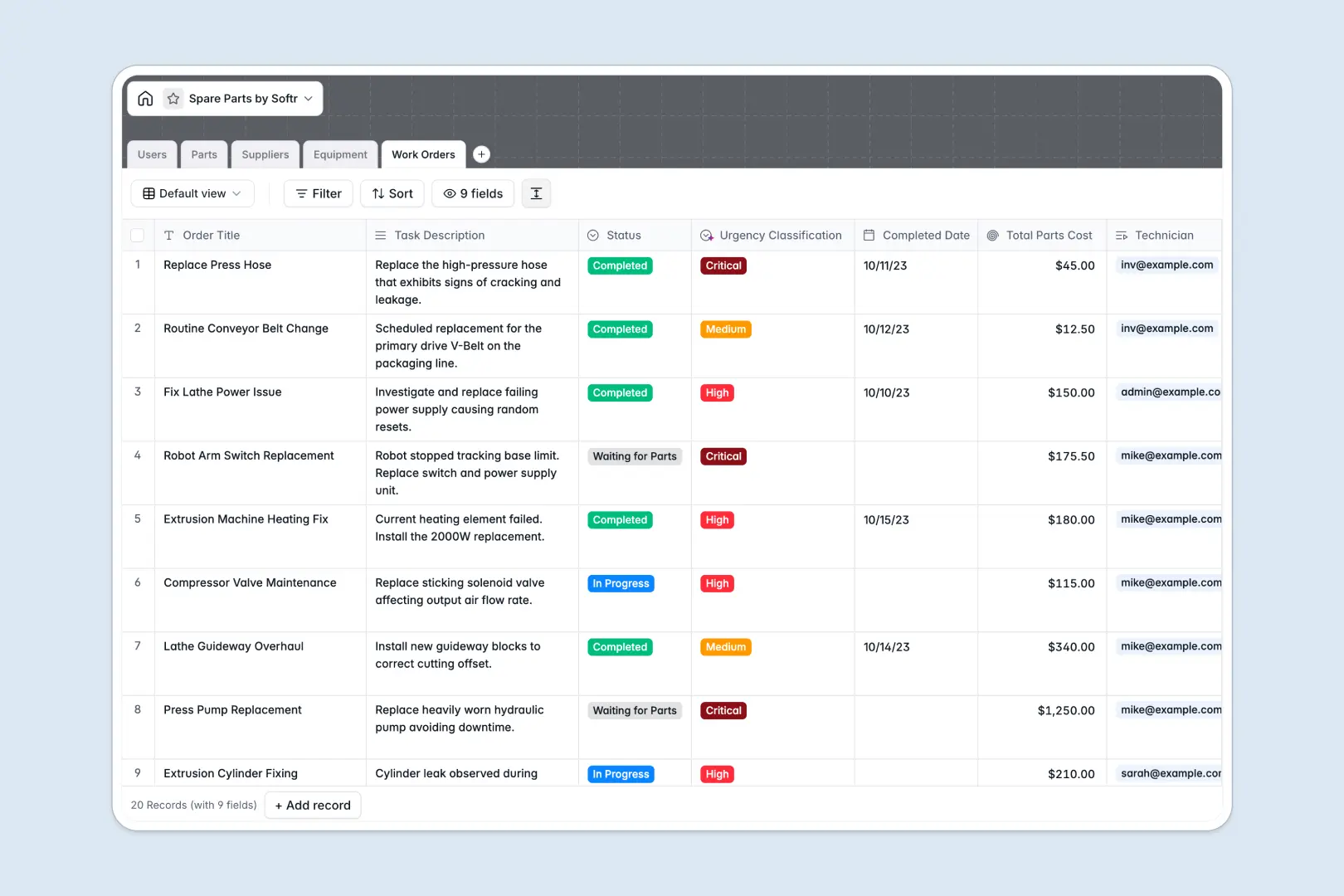
Your Spare Parts database at a glance
This template gives your team a clear, organized way to track component inventories, vendor details, and maintenance operations in one place. You can monitor live stock levels, avoid unexpected stockouts, and keep critical equipment running without supply delays.
Everything connects natively across structured tables for Parts, Suppliers, Equipment, and Work Orders. When a technician logs a repair, consumed parts automatically link to the specific machine and calculate total maintenance costs.
Built-in AI fields help summarize technical specifications, classify work order urgency from task notes, and research supplier profiles from their websites automatically.
When blank sheets fail to connect parts, machines, and maintenance
Tracking technical components across static rows quickly breaks down when a single component fits multiple machines or suppliers. Important details get lost, stock numbers fall out of sync, and maintenance teams end up waiting on parts that were never ordered.
What a structured database changes
A structured database enforces clean data types so stock quantities stay numeric, serial numbers remain unique, and supplier contacts are never overwritten.
Instead of copy-pasting SKUs across rows, tables link directly to each other. You can connect a single part to every compatible machine and trace every work order where it was consumed.
This is exactly what Softr Databases are designed for, giving you a reliable system that keeps inventory counts accurate and maintenance logs tied directly to equipment.
What you can do with this template
You can track stock counts by category, monitor equipment operational status, and assign work orders directly to technicians with automatic urgency ratings.
With native Database AI agents, you can extract vendor details directly from their websites and generate clear technical descriptions for incoming parts on autopilot.
The template is ready to use immediately, allowing your operations team to start managing inventory and maintenance without complex setup.
-
Users
Track system operators managing inventory and maintenance with role assignments
-
Parts
Manage spare parts inventory levels with AI generating technical summaries automatically
-
Suppliers
Maintain vendor directory featuring AI web-researched company overview profiles
-
Equipment
Catalog machinery assets and track operational status linked to spare parts
-
Work Orders
Schedule maintenance tasks using AI to classify operational urgency levels
Who is this Spare Parts database for
This database helps maintenance and operations teams maintain full visibility over physical assets and replacement parts:
- Maintenance managers: Keep preventative servicing on schedule and ensure critical replacement components are always in stock.
- Inventory controllers: Track SKU quantities, monitor reorder points, and maintain accurate vendor contact information.
- Field technicians: Log work orders, see compatible equipment instantly, and record consumed components directly from the floor.
- Plant operations heads: Monitor equipment downtime and calculate aggregate maintenance and parts costs across all facilities.
How to take it further
Customize the database
You can easily tailor fields to match your exact inventory classification. Add custom categories for specialized tooling, adjust status options for maintenance workflows, or add storage bin location numbers in minutes.
Import your existing data
Bring your current part catalogs and vendor spreadsheets into the database with a fast CSV upload. You can also connect external systems via API to keep live inventory numbers synced across warehouses automatically.
Build a full app around it
When you are ready to give your team dedicated interfaces, you can build an app directly on top of this data. Describe what you need in one prompt, and Softr generates technician portals, inventory dashboards, and work order workflows that connect to this database.
With granular users and permissions, technicians see only their assigned work orders while warehouse managers get full access to reorder supplies and edit costs.
-
1
-
2
-
3
-
4
Frequently asked questions
-
What is a spare parts database?
-
Why use a no-code database to build a spare parts tracking system?
-
How can AI help managing data for spare parts?
-
Can I build an app with this spare parts database?
-
Is this Spare Parts database free?
-
Can I link spare parts to specific machinery and work orders?
Start building today. It's free!
Build and launch your first app in under 30 minutes.