


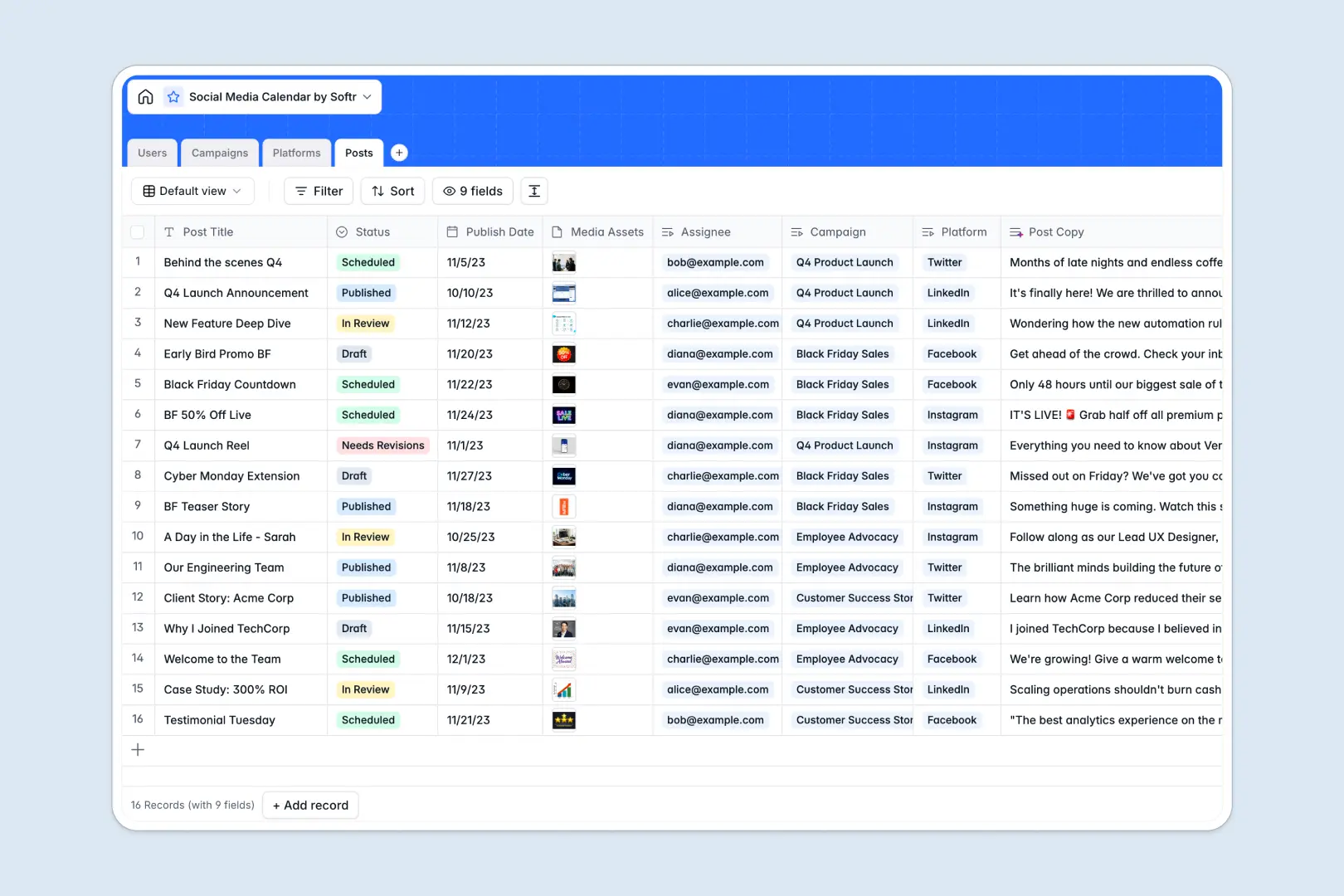
Your Social Media Calendar database at a glance
This ready-to-use template helps marketing teams plan, track, and publish content across every channel without missing deadlines. It centralizes your production pipeline, creative assets, and cross-channel schedules in one place.
The system links Posts directly to Campaigns, Platforms, and Users. This allows you to monitor draft approvals, attach media assets, and view platform requirements without re-entering data.
Built-in AI fields automatically draft engaging post captions based on campaign context and create quick executive summaries of your campaign briefs.
Why social content plans break without relational structure
Managing scheduled posts and assets across multiple platforms quickly breaks down when dates, files, and assigned creators live in disconnected tables.
What a structured database changes
In a structured setup, every post links natively to its parent campaign, target channel, and assignee. You never have to manually copy campaign themes across rows or guess which image asset matches which draft.
Columns enforce real data types: publish dates remain chronological, attachments stay linked to their drafts, and status updates trigger clear handoffs. This is exactly what Softr Databases are designed for.
What you can do with this template
Track every update from draft to published status while maintaining complete visibility over campaign timelines and channel requirements.
With native Database AI agents, you can generate tailored social captions from your post titles and extract structured campaign summaries instantly.
-
Users
Manage team members with roles, contact info, and assigned content tasks
-
Campaigns
Track marketing initiatives with schedules and AI-powered campaign summaries
-
Platforms
Configure target social networks with character limits and publishing URLs
-
Posts
Organize individual updates with status tracking and AI-generated copy creation
Who is this Social Media Calendar database for
This database is built for marketing and creative teams managing multi-channel editorial schedules.
- Social Media Managers: Coordinate publication dates, review creator drafts, and track channel requirements across accounts.
- Content Creators: Access clear briefs, upload creative media assets, and track post feedback in real time.
- Marketing Leads: Monitor overarching campaign statuses, timelines, and post coverage from a single view.
- Agencies: Organize multi-client content schedules and assign deliverables to team members without overlap.
How to take it further
You can easily adapt this template as your editorial process evolves. Add custom fields for target audience segments, adjust status stages like legal reviews, or include new social channels.
Import your existing content backlog in seconds using CSV upload or sync data automatically from other tools via API.
When you are ready, use Softr to build an app on top of this database. You can generate a visual editorial portal where creators see only their assigned tasks while managers approve drafts, configured entirely with granular users and permissions.
-
1
-
2
-
3
-
4
Frequently asked questions
-
What is a Social Media Calendar database?
-
Why use a no-code database to build a social media calendar tool?
-
How can AI help managing data for social media planning?
-
Can I build an app with this Social Media Calendar database?
-
Is this Social Media Calendar template free?
-
Can I customize the platforms and post statuses in this template?
Start building today. It's free!
Build and launch your first app in under 30 minutes.