


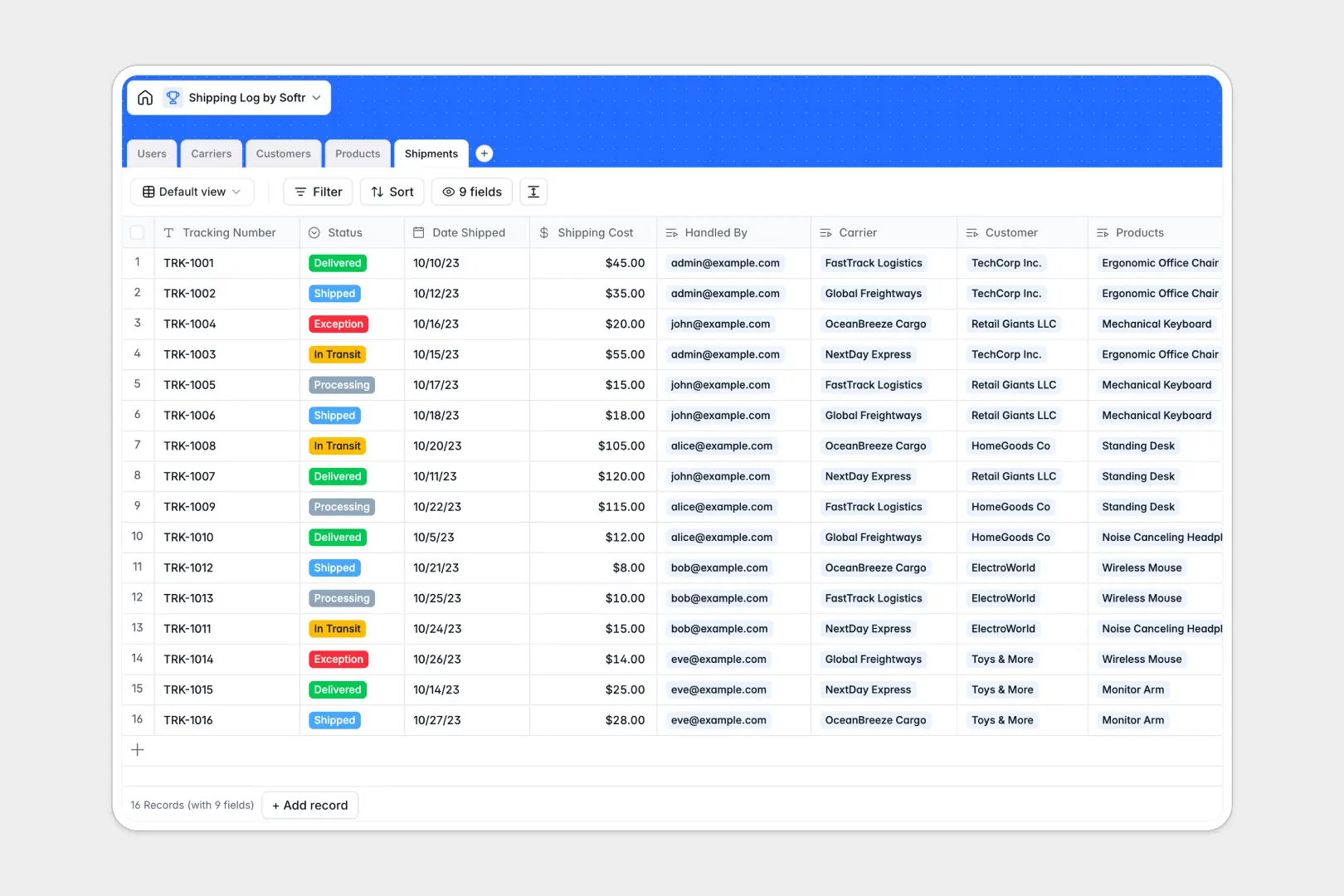
Your Shipping Log database at a glance
This template centralizes your entire dispatch workflow, helping logistics teams monitor package statuses, shipping costs, and carrier assignments in real time.
It connects five dedicated tables: Shipments, Customers, Products, Carriers, and Users. Linking individual packages directly to specific customer records and product SKUs ensures full dispatch transparency without redundant data entry.
Built-in AI fields automatically draft clear customer notification summaries based on updated shipment statuses and enrich carrier profiles directly from web URLs.
When loose dispatch sheets fail to keep packages on schedule
Managing outbound freight in disconnected rows quickly leads to broken formulas, misplaced tracking numbers, and mismatched customer addresses.
What a structured database changes
In a relational setup, fields maintain strict data integrity so shipping dates, tracking codes, and status tags remain consistent across all entries.
Instead of retyping client addresses or pasting tracking links repeatedly, each shipment links directly to carrier and customer profiles. This is exactly what Softr Databases are designed for, giving you reliable data structures that scale effortlessly.
Rollups calculate total shipments per customer automatically, giving your operations team instant clarity across all open orders.
What you can do with this template
Log package details, assign warehouse handlers, monitor real-time shipping costs, and track carrier performance across every delivery route.
Native Database AI agents automatically generate ready-to-send update messages for customers whenever a shipment status changes to In Transit or Delivered.
The database is ready to use immediately, allowing your fulfillment team to organize outbound logistics within minutes.
-
Users
Manage internal logistics staff, contact profiles and shipment assignments
-
Carriers
Track courier partners with contact info and AI web-generated descriptions
-
Customers
Store recipient contact details, addresses, and delivery volume history
-
Products
Maintain item inventory catalog with SKU details and unit weight specifications
-
Shipments
Monitor package deliveries and draft AI customer notification summaries
Who is this Shipping Log database for
This system helps fulfillment and logistics operators keep order tracking structured and accurate.
- E-commerce Brands: Manage daily outbound orders, monitor carrier performance, and keep customer delivery histories organized.
- Warehouse Managers: Assign fulfillment tasks to specific team members and track package dispatch statuses accurately.
- Logistics Coordinators: Consolidate carrier contacts, evaluate freight costs, and resolve delivery exceptions quickly.
- Operations Leads: Maintain unified oversight over dispatched inventory, customer recipients, and overall logistics performance.
How to take it further
Customize the database by modifying shipment statuses, adding custom parcel dimensions, or creating priority tags for express deliveries. Because it lives in a native Softr Database, you can adjust field structures and views in seconds.
Import your historical shipping data instantly using CSV uploads or connect external inventory tools via API to sync new dispatches automatically.
When your operations expand, build an app on top of this database. Use Softr's AI Co-Builder to generate an internal dispatch dashboard or customer tracking portal from a single prompt, then refine your layouts visually.
Apply granular users and permissions so warehouse shippers only edit tracking details while managers access cost analytics and carrier agreements.
-
1
-
2
-
3
-
4
Frequently asked questions
-
What is a shipping log database?
-
Why use a no-code database to build a shipping log system?
-
How can AI help managing data for shipping logs?
-
Can I build an app with shipping log database?
-
Is this Shipping Log database free?
-
How do I import existing shipping records into this template?
Start building today. It's free!
Build and launch your first app in under 30 minutes.