


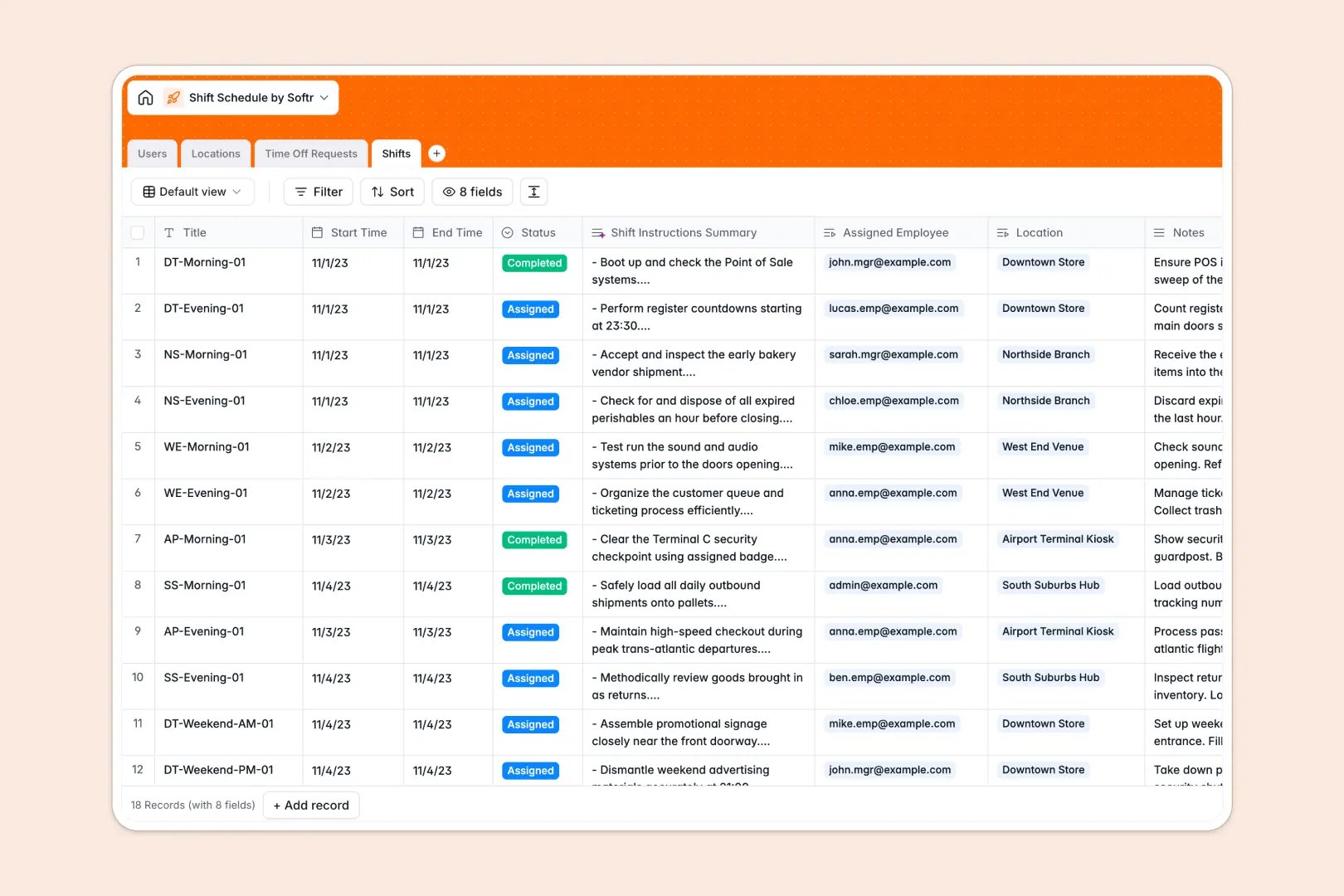
Your Shift Schedule database at a glance
This template gives managers and business operators a centralized system to schedule shifts, manage staff availability, and handle leave requests. It keeps staffing levels balanced across every venue without manual cross-checking.
Everything is connected through structured tables for Users, Locations, Shifts, and Time Off Requests. When you assign an employee to a shift at a specific location, totals and linked schedules update instantly.
Built-in AI fields automatically summarize complex shift notes into clear worker instructions and categorize time off requests directly from submitted notes.
Moving past static rosters to keep shifts covered
Scheduling staff across multiple venues quickly becomes chaotic when relying on basic grid files. Overlapping availability, unread leave requests, and unrecorded shift swaps create understaffed locations and payroll headaches.
What a structured database changes
In a structured database, every column enforces data integrity so shift start times, staff roles, and location addresses stay consistent. Tables link directly to each other, allowing you to tie an employee to their assigned shifts and pending leave without broken formulas or manual lookups.
This eliminates double-booking and gives team leads instant visibility into location capacity. This is exactly what Softr Databases are designed for, providing a flexible foundation that keeps operational data reliable.
What you can do with this template
Assign shifts to team members across distinct physical locations while tracking open, assigned, and completed statuses in real time. Automatic rollups instantly calculate total assigned shifts per employee and total open slots per venue.
Native Database AI agents analyze leave reasons to auto-tag categories like Sick Leave or Vacation, and condense detailed shift notes into concise task briefs for on-duty staff.
-
Users
Manage staff profiles, roles, managed locations, and shift assignments
-
Locations
Track physical venues, assigned managers, and open shift counts
-
Time Off Requests
Handle leave requests with AI-powered leave type categorization
-
Shifts
Coordinate work schedules and generate AI task instruction summaries
Who is this Shift Schedule database for
This template is tailored for teams managing frontline staff, multi-location rotas, and recurring shift work:
- Retail and Restaurant Managers: Schedule floor staff, manage shift handovers, and track branch coverage across locations.
- Healthcare and Care Providers: Keep critical shift rotations covered and monitor time off without scheduling overlaps.
- Event Operations Leads: Assign temporary crew and venue staff while generating concise shift instructions instantly.
- Hospitality Operators: Coordinate hotel and kitchen teams with live visibility into open and assigned shifts.
How to take it further
1. Customize the database
Adapt the database structure in minutes by adding custom fields like hourly pay rates, role certifications, or check-in timestamps. You can also adjust the status options to fit your team's specific shift lifecycle.
2. Import your existing data
Quickly bring in your current staff rosters and location records using CSV imports. You can also connect external systems via API to sync real-time attendance and payroll data.
3. Build a full app around it
When you are ready to give employees self-service scheduling, you can build an app on top of your database. Use Softr's AI Co-Builder to generate an employee portal where workers view upcoming shifts and submit time off from their phones.
Granular users and permissions ensure employees only see their assigned shifts while branch managers manage schedules strictly for their assigned locations.
-
1
-
2
-
3
-
4
Frequently asked questions
-
What is a shift schedule database?
-
Why use a no-code database to build a shift scheduling system?
-
How can AI help managing data for shift schedules?
-
Can I build an app with this Shift Schedule database?
-
Is this Shift Schedule database free?
-
Can I import our current employee roster via CSV?
Start building today. It's free!
Build and launch your first app in under 30 minutes.