


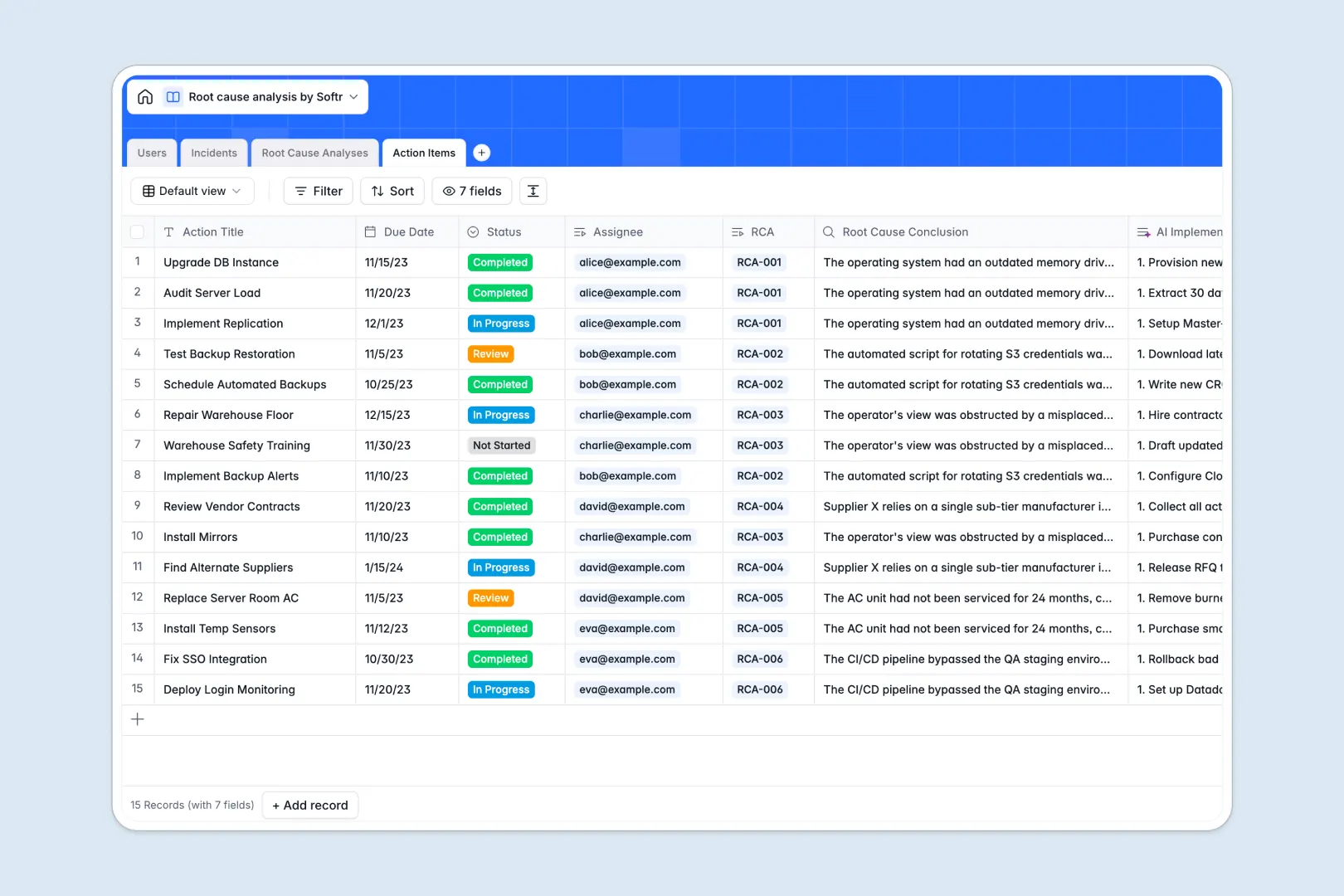
Your Root Cause Analysis database at a glance
This template provides a highly reliable structure to track incidents from their initial report to the final resolution without losing vital context. It ensures teams don't just patch symptoms, but systemically investigate and solve underlying issues.
The system runs on four connected tables linking your Users, Incidents, Root Cause Analyses, and Action Items together. You can assign an investigator to an active incident, run a deep-dive analysis, and instantly link the resulting preventive tasks back to the original problem.
Built-in AI features automatically summarize lengthy incident reports and apply the "5 Whys" methodology to uncover the root cause. The system can even generate step-by-step implementation plans for your corrective action items instantly.
Why managing root cause analysis in spreadsheets breaks down
Investigating a critical issue is stressful enough without digging through messy, disorganized spreadsheet rows to find past context.
What a structured database changes
Spreadsheets force you to mix incident logs, deep-dive investigations, and tasks into one chaotic view. Eventually, formulas break and vital historical context gets permanently lost.
A structured setup keeps data clean: incidents, investigations, and action items live in separate tables but remain logically connected. You can link a corrective action directly to a root cause conclusion without fragile formulas or copy-pasting across rigid tabs.
This is exactly what Softr Databases are designed for. Your data stays reliable, standardized, and extremely easy to navigate as your operations scale.
What you can do with this template
Log operational incidents with clear severity levels and automatically assign them to designated internal investigators.
Use built-in Database AI agents to automatically generate formal problem statements and "5 Whys" questions the moment a new incident is logged.
Track the exact statuses of corrective and preventive tasks to ensure every root cause is properly addressed and closed out.
-
Users
Manage system investigators, roles, and assigned analysis tasks
-
Incidents
Log issues with severity and AI-generated executive summaries
-
Root Cause Analyses
Investigate issues using AI to define problems and the 5 Whys
-
Action Items
Execute AI-powered implementation plans for corrective actions
Who is this Root Cause Analysis database for
This template provides a ready-to-use foundation for teams that need to systematically investigate, track, and solve complex problems.
- IT Service Management (ITSM): Log system outages and track post-mortem investigations clearly.
- Quality Assurance Teams: Identify the fundamental reasons behind manufacturing or product defects systematically.
- Operations Managers: Analyze workflow bottlenecks, assign corrective actions, and prevent recurring delays.
- Compliance & Safety Officers: Maintain a rigid, auditable log of workplace incidents and safety resolutions.
How to take it further
Customize this database effortlessly by adding custom fields, tweaking severity drop-downs, or adjusting the AI prompts to match your exact industry standards. Because the database is fully native, shaping it to fit your exact workflow is completely intuitive.
You can easily import your existing logs via a quick CSV upload to bring past data into this structured environment. To fully automate issue tracking, connect external monitoring tools via API to automatically create new incident records.
When your team is ready to scale, use an interface builder to turn this database into a complete operational portal. You can create a simple form for employees to report new issues safely, and a dedicated dashboard for investigators to manage complex analyses.
Applying users and permissions ensures that standard staff only see the tickets they reported, while leadership gets full visibility over the action items pipeline. Starting with a perfectly structured database makes building these custom business apps incredibly fast.
-
1
-
2
-
3
-
4
Frequently asked questions
-
What is a root cause analysis database?
-
Why use a no-code database to build a root cause analysis system?
-
How can AI help managing data for root cause analyses?
-
Can I build an app with this root cause analysis database?
-
Is this Root Cause Analysis database free?
-
How is a database different from tracking root causes in Excel or Google Sheets?
Start building today. It's free!
Build and launch your first app in under 30 minutes.