


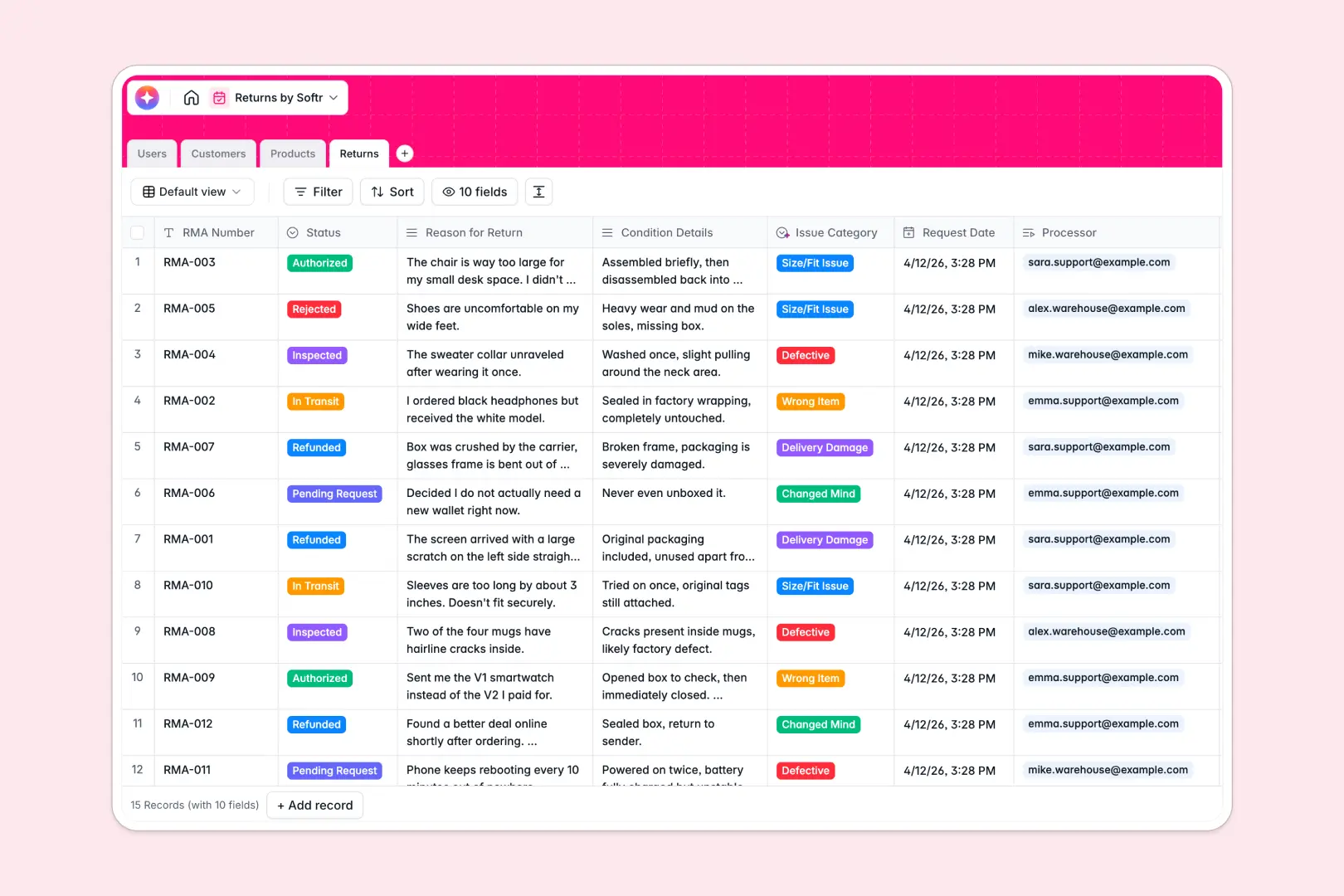
Your Returns Database at a glance
This template gives your team a centralized system to track RMAs, inspect items, and issue refunds efficiently. It turns chaotic support requests into an organized pipeline where nothing gets lost.
The setup is built on four connected tables: Users, Customers, Products, and Returns. Instead of messy formulas, every return is perfectly linked to its respective customer and product catalog entry.
This template also features native AI fields that auto-categorize return issues and write quick case summaries based on customer explanations.
Why tracking returns in spreadsheets breaks down
When your operation relies on spreadsheets, tracking reverse logistics quickly becomes a mess of mixed statuses, lost context, and broken customer links.
What a structured database changes
In a true database, every column enforces a specific data type so your statuses, request dates, and IDs never break. You can link a pending RMA directly to a specific customer without copying and pasting data across rows.
This is exactly what Softr Databases are designed for. They provide the reliable architecture your team needs as order and return volumes scale.
What you can do with this template
You can log new RMAs, track their exact status—from "In Transit" to "Refunded"—and instantly see how many returns a specific customer has made. Everything lives in one clean, connected view.
You can also rely on AI to read a requested return reason and automatically categorize the issue as "Defective" or "Size/Fit Issue." The template is completely ready to use right out of the box.
-
Users
Manage system staff profiles, roles, and linked return transactions
-
Customers
Track client contact details and history of initiated return requests
-
Products
Inventory catalog with AI-generated descriptions to highlight benefits
-
Returns
Manage RMA workflows with AI classification and automated case summaries
Who is this Returns Database for
This structure is designed for e-commerce and logistics teams managing reverse supply chains.
- Support Agents: Quickly log return requests and monitor refund eligibility criteria.
- Warehouse Crew: Update inspection statuses the moment a returned package arrives at the loading dock.
- Operations Admins: Oversee overarching RMA volumes, track defective products, and manage staff workload.
How to take it further
You can easily customize this database to match your exact shipping operations. Rename the return statuses, add new product categories, or adjust the AI extraction prompts natively.
To get started quickly, sync your existing inventory or historical RMAs by uploading a CSV. You can also connect to external sources via API to keep catalog data fresh.
When your team needs dedicated views, you can use our interface builder to turn this database into a full internal tool. You could build a web portal where warehouse staff only see items awaiting inspection statuses.
By activating strict access control, you can ensure reps only view the tickets assigned to them while admins see the global financial dashboard. Because your data is already highly structured, building this app on top is effortless.
-
1
-
2
-
3
-
4
Frequently asked questions
-
What is a returns database?
-
Why use a no-code database to build a returns system?
-
How can AI help managing data for returns?
-
Can I build an app with a returns database?
-
Is this Returns Database free?
-
Why shouldn't I use spreadsheets for processing returns?
Start building today. It's free!
Build and launch your first app in under 30 minutes.