


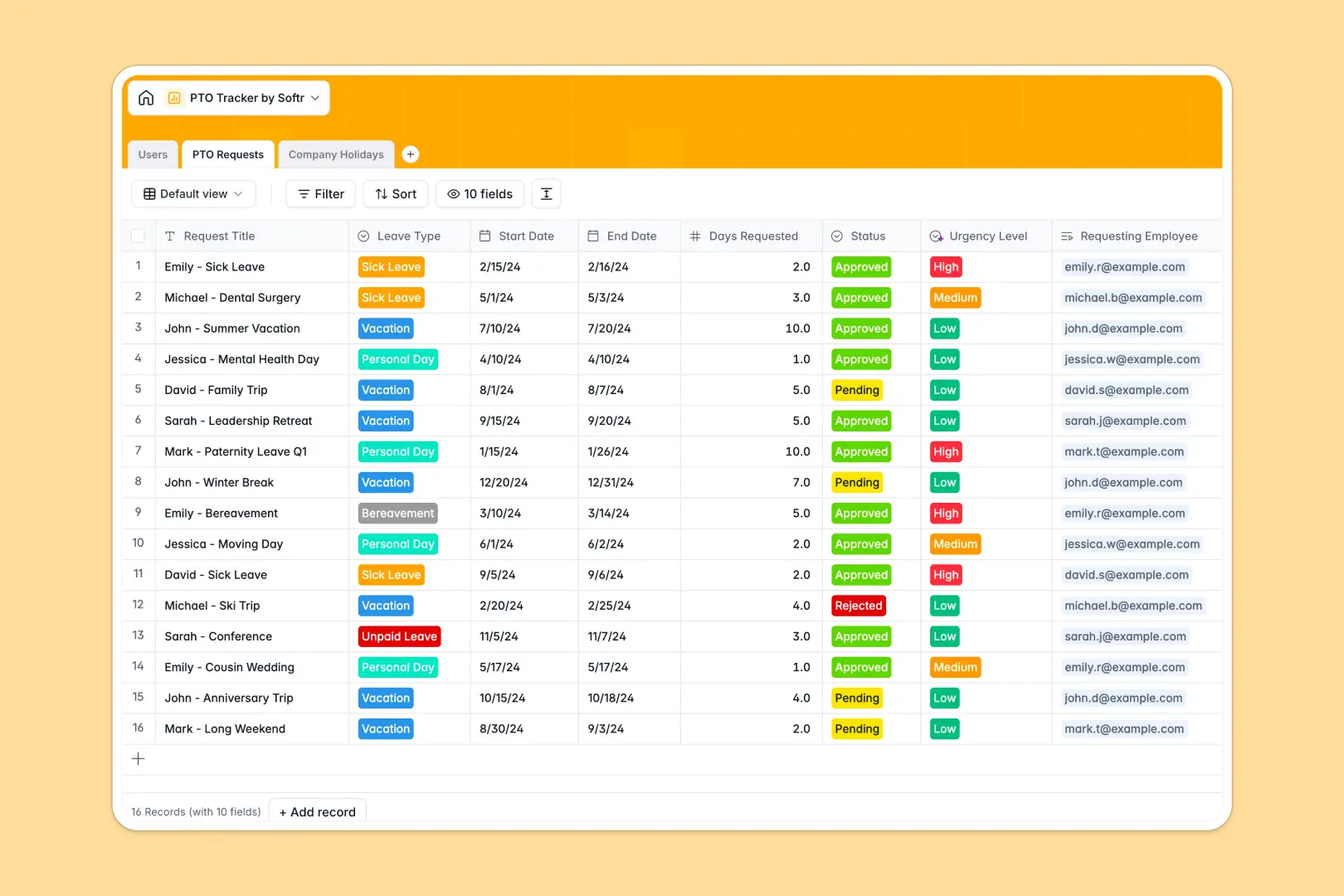
Your PTO Tracker database at a glance
This template centralizes employee time off, automatically calculating remaining allowances as requests are approved. It eliminates the back-and-forth of emails and ensures your team always knows who is out of the office.
The system seamlessly connects Users, PTO Requests, and Company Holidays together. When an employee logs a request, their remaining balance automatically updates based on their structured allowance and their total approved days.
Built-in AI features automatically summarize lengthy leave justifications and categorize request urgency for quicker manager reviews. It even pulls public holiday information straight from the web to keep your schedule accurate and highly contextual.
Why managing time off in spreadsheets breaks down
Tracking employee leave in spreadsheets quickly turns into a mess of broken formulas and outdated balance sheets. As your team grows, keeping track of who approved what—and when—becomes nearly impossible without a rigid system.
What a structured database changes
In a database, every piece of data is strictly organized and firmly connected. Employee profiles link directly to their time-off requests, meaning remaining balances update instantly via secure formulas instead of fragile VLOOKUPs.
This is exactly what Softr Databases are designed for. You get the strict structure of professional software while keeping the visual simplicity your team needs to move fast without errors.
What you can do with this template
You can instantly log vacation, sick leave, or personal days while automatically tracking each employee's remaining limits. Managers can easily filter pending requests and approve them with absolute confidence in the math.
Thanks to native AI agents, this template practically manages itself. It automatically scans leave justifications to flag highly urgent requests and generates one-line summaries so HR teams can approve time off faster and focus on strategic work.
-
Users
Manage employee profiles, hierarchy, and real-time PTO balance tracking
-
PTO Requests
Process leave requests using AI to summarize justifications and assess urgency
-
Company Holidays
Store official holidays with AI-powered web insights on their significance
Who is this PTO Tracker database for
This template is perfect for growing teams looking to standardize their time-off processes without buying complex enterprise software.
- HR Managers: Automatically track accrued balances and leave history without manual spreadsheet math.
- Department Leads: Quickly view pending requests and team availability to ensure proper project coverage.
- Business Owners: Centralize all employee absences and public holidays in one clean, reliable source of truth.
How to take it further
You can completely customize this database to fit your company's exact leave policy. Easily add new leave types like "Sabbatical," adjust total PTO allowances, or add extra columns to track doctor's notes and attachments.
If you already have a list of employees and their current balances, you can import them instantly via CSV or an API integration. This lets you transition from your old messy system to this clean tracker in minutes, without losing precious historical data.
When you're ready, you can turn this database into a complete employee portal with automated workflows. Instead of purely managing data on the backend, you can create a front-end gateway where employees log in securely to request time off themselves.
By setting up users and permissions, you ensure that employees exclusively see their own PTO balances, while managers can view and approve requests for their specific direct reports. Starting with a perfectly structured database makes building this automated approval app absolutely straightforward.
-
1
-
2
-
3
-
4
Frequently asked questions
-
What is a PTO tracker database?
-
Why use a no-code database to build a time-off tracking system?
-
How can AI help managing data for PTO systems?
-
Can I build an app with this PTO tracker database?
-
Is this PTO Tracker template free?
-
How is a PTO database different from an Excel spreadsheet?
Start building today. It's free!
Build and launch your first app in under 30 minutes.