


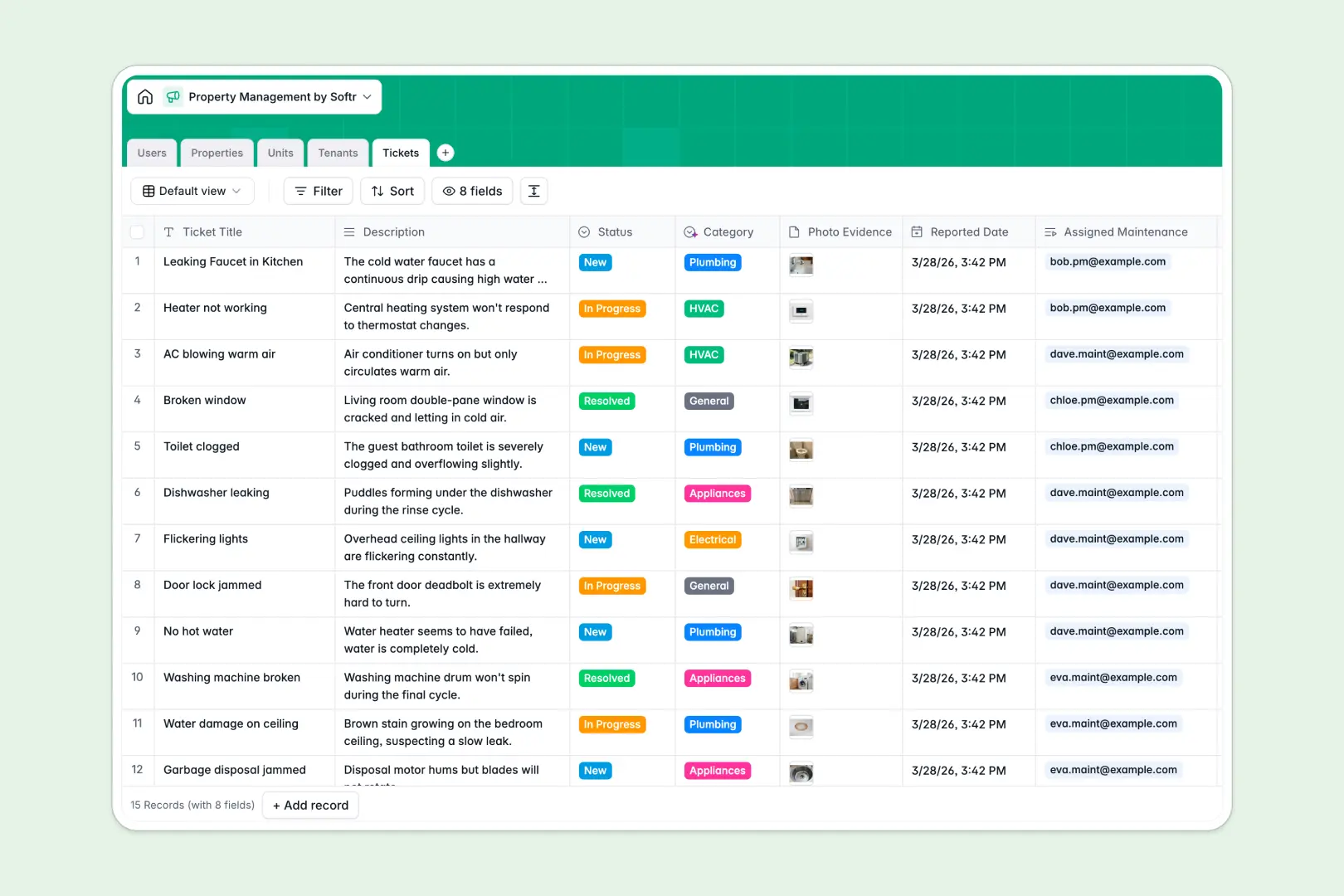
Your Property Management database at a glance
This template gives you an organized system to manage your real estate portfolio, occupancy, and daily operations. It centralizes your properties, unit inventory, active leases, and repair requests so nothing slips through the cracks.
Everything is connected natively across five dedicated tables: Properties, Units, Tenants, Tickets, and Users. Linking a maintenance ticket to a specific unit automatically ties it to the assigned property manager, tenant details, and contractor without double data entry.
Built-in AI fields draft marketing property descriptions, generate instant tenant profiles, and automatically classify incoming repair requests by trade category.
When disconnected property rows hide the real state of your units
Managing rental units across disconnected sheets makes it difficult to see what is vacant, who owes lease renewals, or which open repair tickets belong to which building.
What a structured database changes
A structured database gives every record a clear home and strict data types, ensuring dates remain dates, rent amounts remain numbers, and photos stay attached directly to the right unit or ticket.
Because tables link to each other natively, you can associate a tenant with a unit and instantly view its entire maintenance history without fragile lookup formulas breaking.
This is exactly what Softr Databases are designed for, keeping your entire property inventory and operational history unified and accurate as your portfolio expands.
What you can do with this template
Monitor occupancy rates and track lease terms effortlessly while keeping direct lines of communication open with assigned managers and maintenance staff.
Native Database AI agents automatically categorize maintenance tickets into trades like plumbing, electrical, or HVAC as soon as a request is logged, saving valuable triage time.
You can use this template immediately out of the box or adapt its fields, statuses, and unit types to mirror your exact property management operations.
-
Users
Manage staff roles, contact information, and property assignments
-
Properties
Track real estate assets with units, photos, and AI descriptions
-
Units
Manage individual spaces, rental pricing, occupancy, and issues
-
Tenants
Track occupants with contact info, lease terms, and AI summaries
-
Tickets
Process repair requests with automated AI categorization and logs
Who is this Property Management database for
This template is designed for real estate operators and teams looking for a reliable way to organize units, leases, and repairs:
- Independent Landlords: Track multiple residential units, tenant contact details, and incoming repair tickets in one unified view.
- Property Management Companies: Coordinate multiple property managers, assign maintenance crews, and oversee portfolio-wide occupancy seamlessly.
- Maintenance Teams: Receive categorized repair tasks with photo evidence linked directly to the specific unit and manager.
- Real Estate Investors: Monitor portfolio assets, aggregate unit counts, and review active lease dates across all properties.
How to take it further
Customize this database to match your exact portfolio requirements. You can add fields for security deposits, create custom maintenance priorities, or adjust unit status options like renovation or scheduled turnover in just a few clicks.
If you have existing portfolio records, import them instantly using CSV upload or sync your properties, tenants, and contractor contacts through the API to get started without manual re-entry.
When your team is ready, you can build an app on top of this database using Softr's AI Co-Builder. Generate tenant portals, landlord dashboards, or maintenance request apps in minutes by describing what you need in plain text.
With granular users and permissions, tenants only see their assigned unit and tickets, while property managers and contractors access only the tools and records relevant to their roles.
-
1
-
2
-
3
-
4
Frequently asked questions
-
What is a property management database?
-
Why use a no-code database to build a property management system?
-
How can AI help managing data for property management?
-
Can I build an app with property management database?
-
Is this Property Management template free?
-
Can I customize the tables and fields in this template?
Start building today. It's free!
Build and launch your first app in under 30 minutes.