


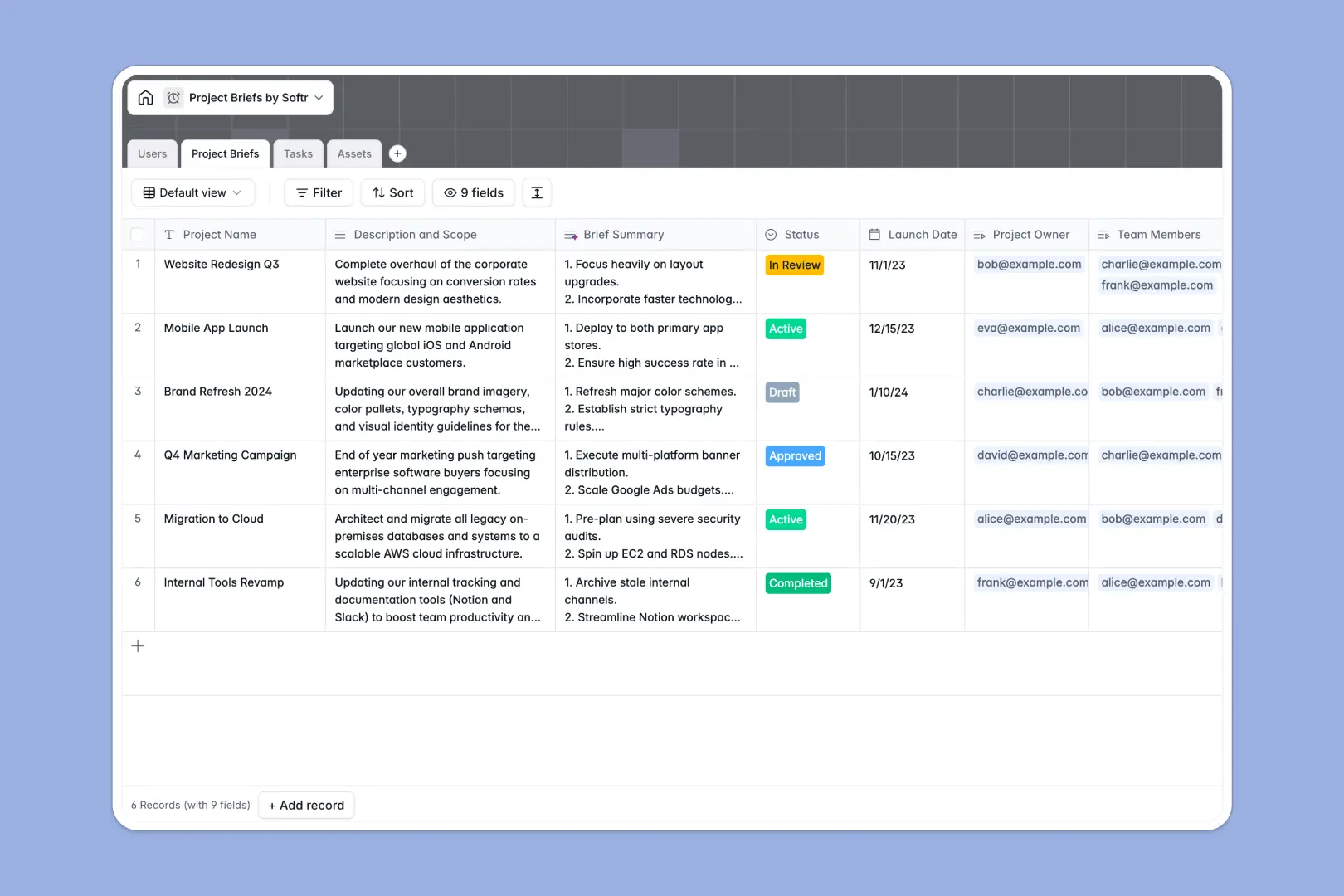
Your Project Briefs database at a glance
This template centralizes your project scopes, timelines, and deliverables in a single truth source. It keeps project managers and team members perfectly aligned from the initial draft to final launch.
The database connects four core tables: Users, Project Briefs, Tasks, and Assets. When you assign a team member to a brief, they instantly see their related tasks and required files without digging through folders.
Built-in AI automatically generates concise, 3-bullet summaries from long project descriptions. It also evaluates task urgency from descriptions, assigning low, medium, or high priority levels instantly so your team knows exactly what to tackle first.
Why managing project briefs in spreadsheets breaks down
Tracking evolving project scopes and shifting deliverables in a spreadsheet quickly becomes a chaotic mess of outdated versions and broken links.
What a structured database changes
A rigid structure ensures clarity: statuses stay consistent, due dates remain strict calendar inputs, and relevant files attach directly to the brief.
Instead of brittle VLOOKUPs, you use native connections to effortlessly link a specific project to its owner, actionable tasks, and brand assets.
This is exactly what Softr Databases are designed for—keeping related project data connected, searchable, and intact as your company scales.
What you can do with this template
You can immediately track project phases from "Draft" to "Active," assigning specific deliverables clearly. It keeps every document, image, and external URL tied directly to the parent brief.
Thanks to native Database AI agents, you also eliminate manual triage. The system automatically summarizes long project scopes and categorizes task priorities in real time as data is entered.
-
Users
Manage team profiles, roles, and project ownership for efficient collaboration
-
Project Briefs
Centralize project scopes with AI-generated summaries for rapid initiative reviews
-
Tasks
Track project deliverables with AI-powered priority assessment for better focus
-
Assets
Store and organize project materials, branding guidelines, and essential files
Who is this Project Briefs database for
This structured system is built for teams that need to turn complex collaborative requirements into clear, actionable workflows.
- Project Managers: Oversee overall project health, track task progress, and manage resources effortlessly.
- Marketing Teams: Centralize campaign briefs, design assets, and external links in one accessible hub.
- Agencies: Keep client deliverables, status updates, and team assignments perfectly organized.
- Operations Leaders: Standardize how new initiatives are scoped, assigned, and launched across departments.
How to take it further
You can easily customize this database to fit your exact workflow. Add new dropdown options for task statuses or modify user roles without any complex configuration.
Bring your existing work to life instantly. Upload an ongoing project list via CSV or use the API to sync tasks directly from your current tracking tools.
When your team is ready, you can build an app directly on top of this data. Transform these internal tables into a clean project portal where team members only see their assigned responsibilities.
Because Softr includes native users and permissions, you can ensure managers oversee all projects while external freelancers only access assigned tasks. A well-structured database makes launching these custom team portals incredibly fast.
-
1
-
2
-
3
-
4
Frequently asked questions
-
What is a project briefs database?
-
Why use a no-code database to build a project management system?
-
How can AI help managing data for project briefs?
-
Can I build an app with this project briefs database?
-
Is this Project Briefs Database free?
-
How is this database better than managing projects in spreadsheets?
Start building today. It's free!
Build and launch your first app in under 30 minutes.