


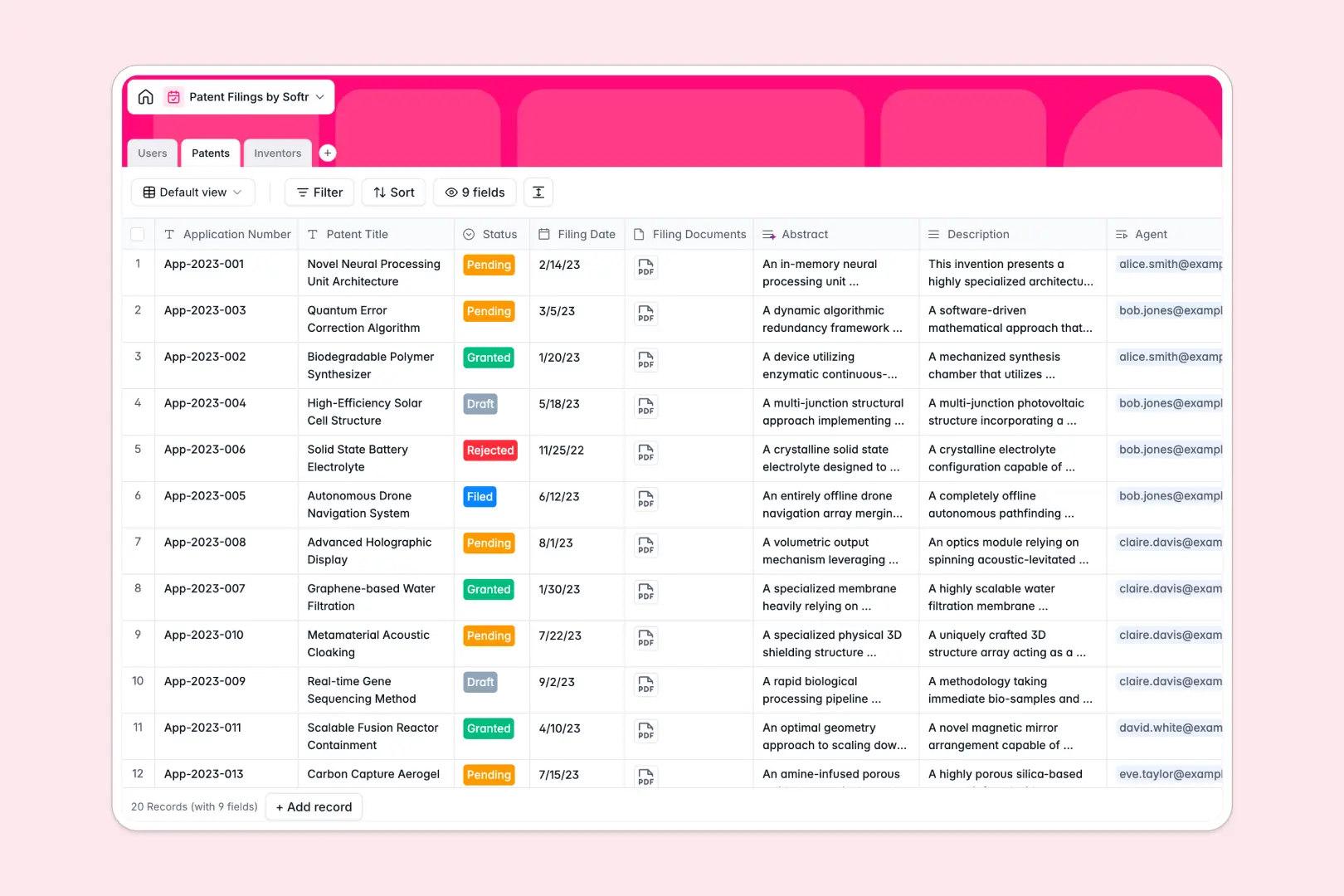
Your Patent Filings Database at a glance
Track your intellectual property automatically from draft to granted status. This template provides a reliable source of truth, keeping your team of patent agents and legal reviewers perfectly aligned.
The system works by connecting your patent records directly to internal staff and external inventors. You can instantly see which agent is managing what filing, and calculate the total applications per inventor without any manual sorting.
Best of all, this database works for you. Native AI agents automatically read your long technical descriptions and generate concise patent abstracts on the fly.
Why tracking patent filings in spreadsheets breaks down
Managing IP portfolios in spreadsheets quickly turns into a liability. It's too easy to overwrite critical filing dates, misplace attachment links, or lose track of application statuses.
What a structured database changes
Every column enforces a clear data type—so filing dates remain formatted correctly and attachments stay securely attached to the right row. You can link a single patent application directly to a reviewer and an inventor without fragile VLOOKUPs or duplicating data across different sheets.
This is exactly what Softr Databases are designed for. As your IP portfolio scales, your records stay pristine, interconnected, and fully auditable.
What you can do with this template
Start logging technical applications immediately with pre-configured statuses ranging from Pending to Rejected. You can keep all your critical filing documents and legal descriptions securely attached to one clean record.
Thanks to built-in Database AI agents, you can also automate the heavy lifting. The template is ready to instantly summarize your lengthy technical descriptions into clean, professional abstracts.
-
Users
Manage internal staff profiles including patent agents and access roles
-
Patents
Track applications with AI-powered abstracts summarizing core inventions
-
Inventors
Maintain directory of patent creators and their organizational affiliations
Who is this Patent Filings Database for
This system is built for legal, R&D, and administrative teams who need to track intellectual property securely.
- Law Firms: Track application statuses and connect agents directly to specific client filings effortlessly.
- In-house Legal Teams: Centralize your company's IP portfolio and assign internal reviewers to pending patents.
- R&D Departments: Log internal inventions and automatically track how many patents each staff inventor contributes.
How to take it further
You can easily customize this database to match your exact legal process. Simply add new custom status choices, or add specific text fields to track filing jurisdictions and application identifiers.
Bringing in your historical IP portfolio is just as easy. You can import a CSV file to map your existing spreadsheet records straight into this clean, structured format.
When your team is ready, you can move beyond the database layer and build a full app on top. By using Softr's interface builder, you can create a custom IP dashboard for your team.
Because your data is natively structured, you can easily deploy advanced users and permissions. This lets you ensure that inventors only see the filings they are attached to, while admins can oversee the entire firm's pipeline.
-
1
-
2
-
3
-
4
Frequently asked questions
-
What is a patent filings database?
-
Why use a no-code database to build a patent tracking system?
-
How can AI help managing data for patent filings?
-
Can I build an app with this Patent Filings database?
-
Is this Patent Filings database free?
-
How does this template connect agents and inventors?
Start building today. It's free!
Build and launch your first app in under 30 minutes.