


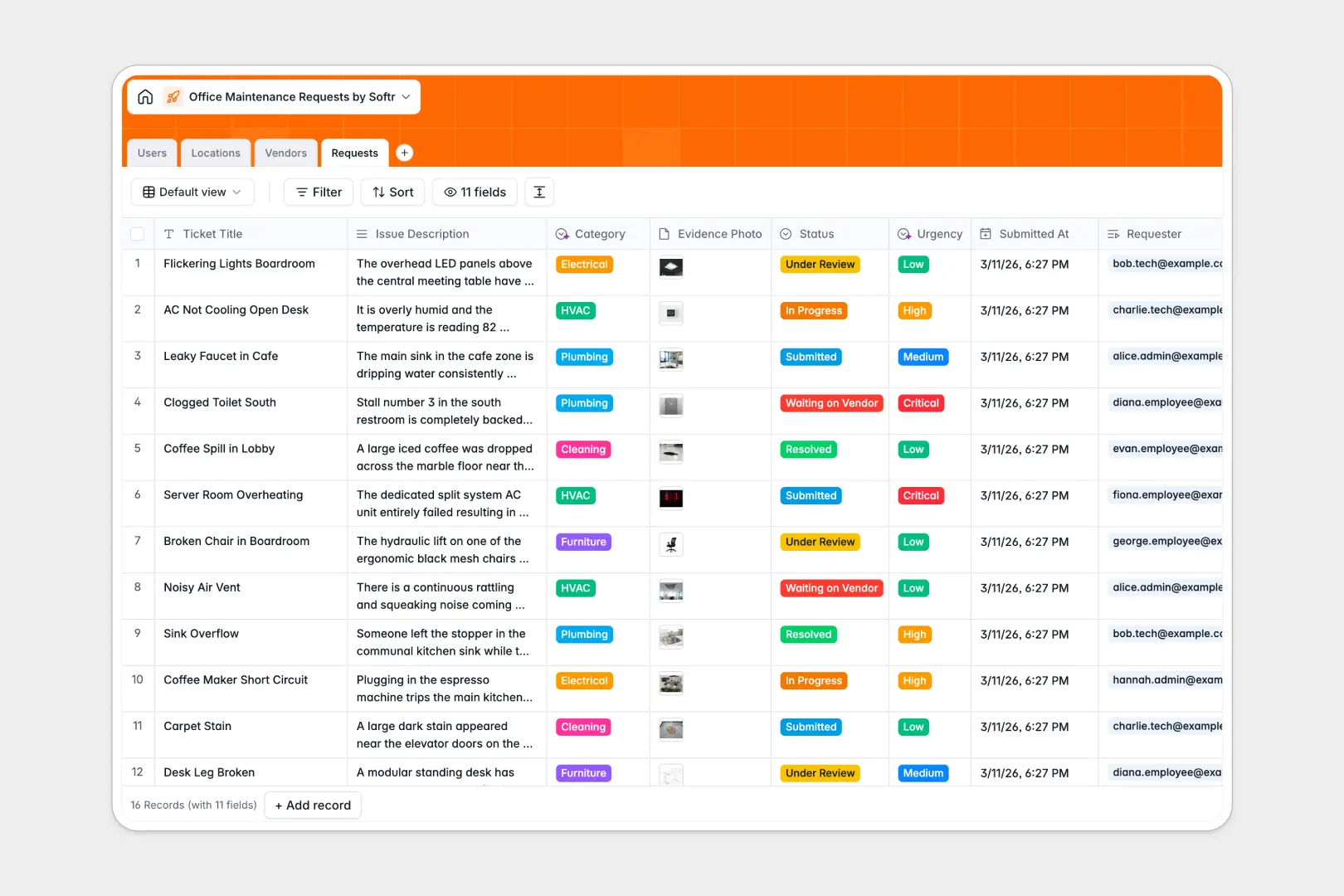
Your Office Maintenance Requests Database at a glance
This template gives your team a centralized hub to track every broken chair, AC issue, or plumbing leak. It ensures maintenance teams know exactly what needs fixing, where it is, and who reported it.
The system connects four core tables: Users, Locations, Vendors, and Requests. When an employee logs an issue, it links directly to the specific room and can be assigned to either an internal technician or an external contractor.
Built-in AI instantly analyzes new tickets to categorize the problem and set the operational urgency. The system also researches external vendors automatically, pulling company descriptions straight from the web.
Why tracking maintenance tickets in spreadsheets breaks down
Managing building repairs in a spreadsheet quickly becomes chaotic. Columns get mixed up with unstandardized urgency levels, photos of broken equipment are impossible to attach cleanly, and tracking vendor assignments turns into a confusing mess of fragile formulas.
What a structured database changes
A true database keeps your facility operations strictly organized. Every request has clear statuses, dedicated attachment fields for evidence photos, and standardized priority levels that cannot be accidentally modified in a cell.
You can seamlessly link a broken AC unit to a specific office floor and the external HVAC contractor handling it, without duplicating data. This is exactly what Softr Databases are designed for—giving you reliable structure as your ticket volume grows.
What you can do with this template
Log incoming issues and instantly route them to the right internal technician or external vendor based on the required specialty. You can also track the total issue count per room to proactively identify recurring problems.
Automatically categorize requests and assess their operational urgency the second they are submitted. You can even auto-research new contractor backgrounds natively, without ever leaving your workspace.
-
Users
Manage office staff and technicians including contact details and task assignments
-
Locations
Track specific office zones and rooms to monitor total maintenance issue frequency
-
Vendors
Store external contractor details with AI-powered summaries of their business profiles
-
Requests
Handle tickets using AI to automatically classify request categories and urgency
Who is this Office Maintenance Requests database for
This system is built for operations teams and facility managers who need to keep the workplace running safely and smoothly.
- Facility Managers: Monitor all open tickets and ensure hazards are resolved promptly.
- Office Administrators: Coordinate efficiently with external vendors for specialized repairs.
- Employees: Submit clear maintenance requests with evidence photos in just a few clicks.
- Maintenance Technicians: View exactly which rooms need attention and prioritize daily tasks.
How to take it further
Customize this database to match your exact building layout and operational policies. You can easily add new floor zones, adjust the vendor specialty dropdowns, or modify the urgency levels naturally.
Bring your existing records into the system instantly. Use a simple CSV upload to populate your current employee directory, room locations, and approved contractor list in minutes.
When you are ready to scale, you can easily turn this database into a full self-serve portal. Create a mobile-friendly frontend where staff can log new tickets on the go without ever seeing the admin backend.
By configuring detailed users and permissions, technicians will only see their assigned tasks, while admins get a comprehensive view of all operations. Starting with a structured database makes launching this customized system completely effortless.
-
1
-
2
-
3
-
4
Frequently asked questions
-
What is an office maintenance requests database?
-
Why use a no-code database to build a maintenance tracking system?
-
How can AI help manage data for office maintenance requests?
-
Can I build an app with this office maintenance database?
-
Is this office maintenance template free?
-
How is a maintenance database different from a spreadsheet?
Start building today. It's free!
Build and launch your first app in under 30 minutes.