


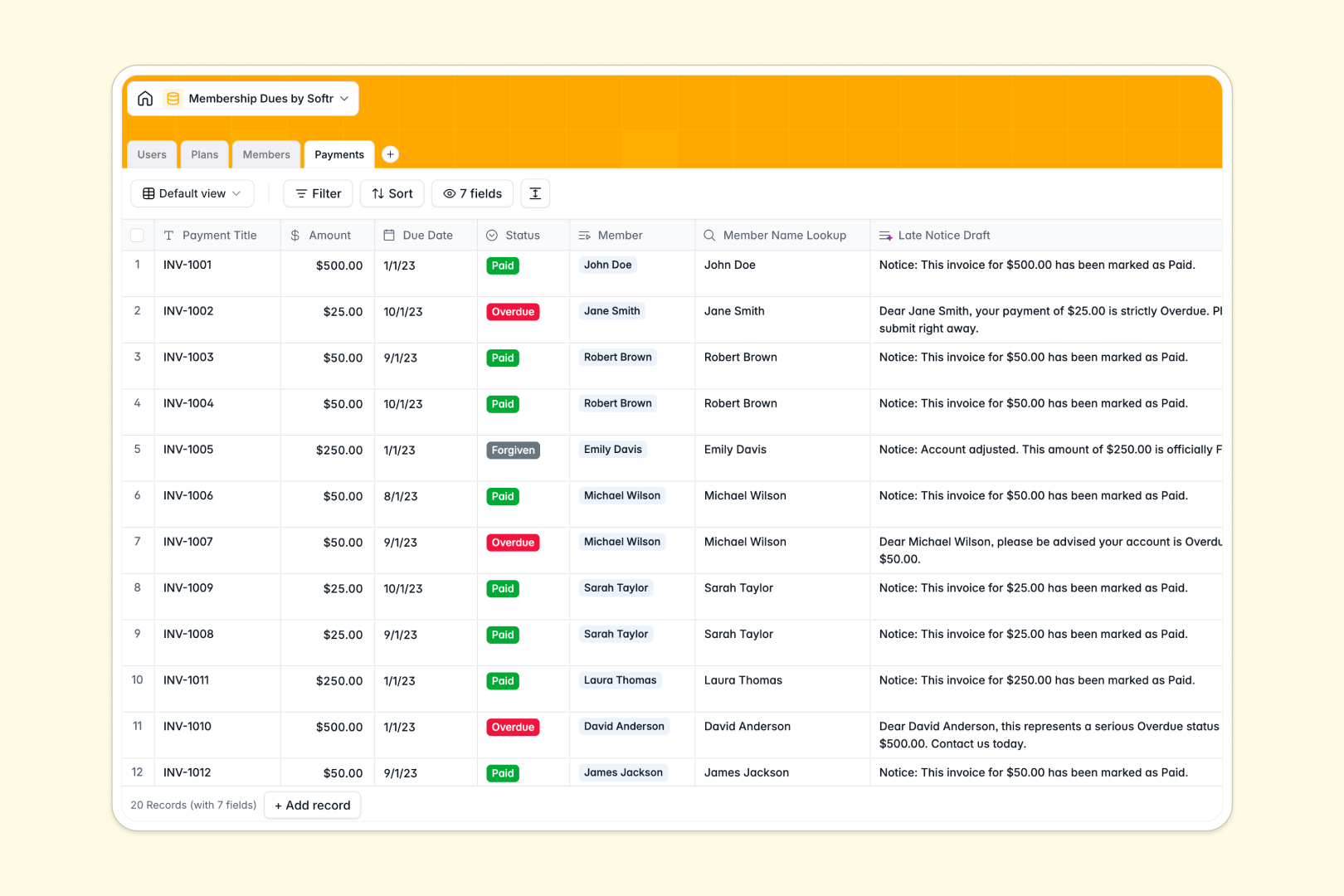
Your Membership Dues database at a glance
This template gives your team a centralized system to track member accounts, manage recurring subscription tiers, and log payment statuses without manual recalculations.
It connects four dedicated tables: Members link directly to Plans for automatic pricing context, Payments record transaction history per person, and Users assign clear internal account managers.
Built-in AI fields automatically draft personalized late notices for overdue payments and generate member profile summaries whenever account details change.
Why tracking membership dues in flat rows breaks down
When membership tiers, payment schedules, and member records live in a static grid, updating a plan price or checking overdue balances requires manually editing dozens of disconnected rows.
What a structured database changes
A relational database keeps your plans, individual members, and transaction logs separate while linking them seamlessly.
When a member's payment is marked overdue, their balance and status update across the system without breaking lookup formulas or requiring manual cross-referencing.
This is exactly what Softr Databases are designed for, giving you typed fields like currency, relational lookups, and automated calculations that stay reliable as your membership grows.
What you can do with this template
Assign account managers to specific members, track quarterly or annual billing cycles, and monitor revenue per plan with native rollup counts.
Use Database AI agents to generate sales pitches for your membership tiers and instantly write polite reminder drafts for overdue dues.
-
Users
Manage internal staff profiles, access roles, and member account assignments
-
Plans
Configure membership tiers and pricing with AI-generated sales pitches
-
Members
Track member status, assigned plans, dues, and AI profile summaries
-
Payments
Monitor dues, transaction statuses, and generate AI late notice drafts
Who is this Membership Dues database for
This system is built for organizations managing recurring membership revenue and member communications:
- Professional Associations: Track annual membership tiers, assign account managers, and monitor renewal deadlines accurately.
- Clubs and Gyms: Manage member contact records, oversee recurring billing cycles, and track active payment statuses.
- Coworking Spaces: Organize member desks, manage subscription plans, and review overdue invoices in one place.
- Nonprofit Communities: Maintain donor memberships, track dues contributions, and streamline administrative follow-ups.
How to take it further
Customize this database in seconds by adding custom membership statuses, modifying billing cycles, or adding custom fields for payment methods.
Import your existing member rosters and past invoice history in bulk using CSV uploads, or connect an external payment gateway via API for automated syncs.
When your team is ready, build an app on top of this database with Softr's AI Co-Builder. You can turn this data into a self-service member billing portal or a secure staff dashboard with granular users and permissions to control who sees financial details.
-
1
-
2
-
3
-
4
Frequently asked questions
-
What is a membership dues database?
-
Why use a no-code database to build a membership dues tool?
-
How can AI help managing data for membership dues?
-
Can I build an app with this membership dues database?
-
Is this Membership Dues template free?
-
How do I import existing member records into this template?
Start building today. It's free!
Build and launch your first app in under 30 minutes.