


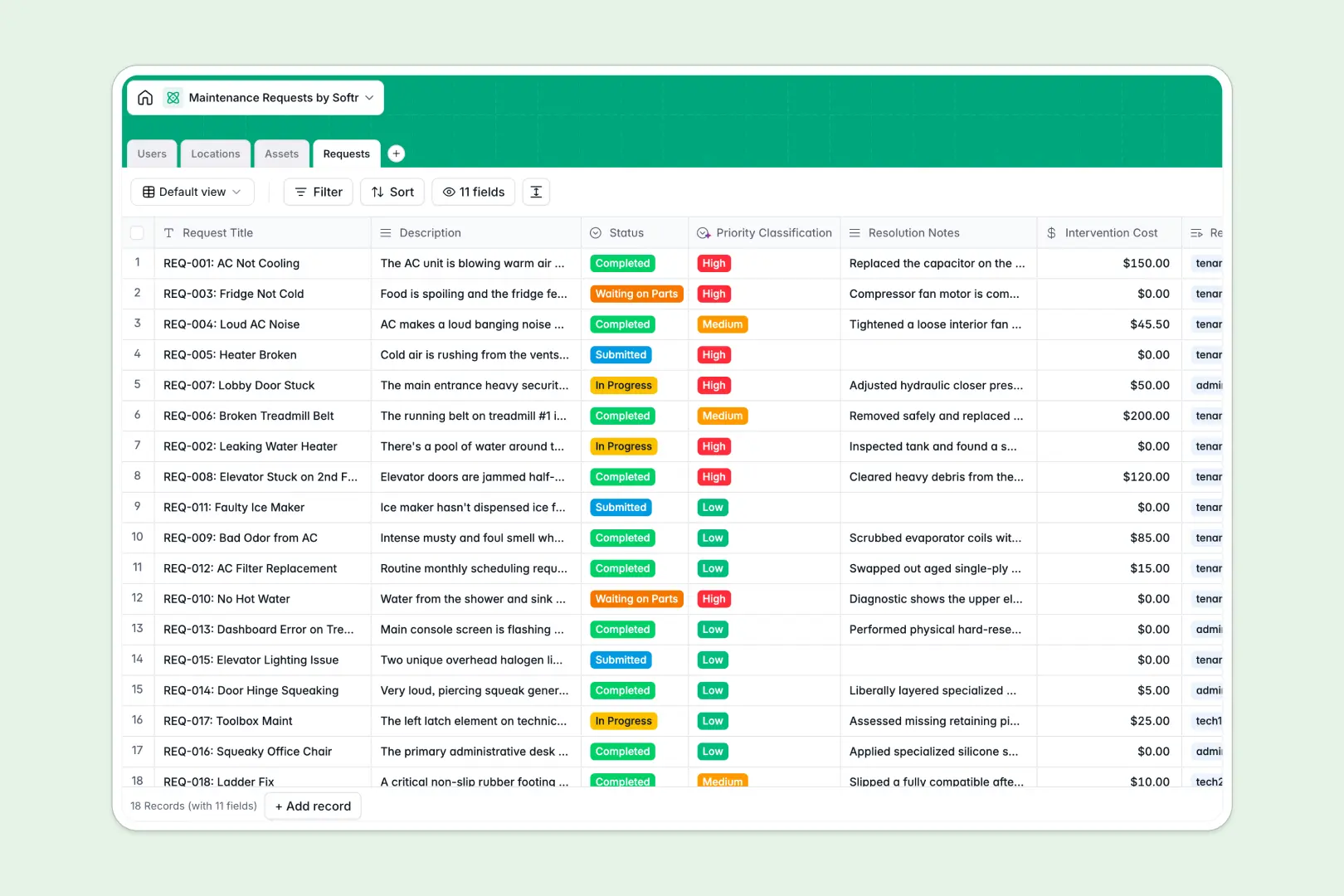
Your Maintenance Requests database at a glance
This template centralizes work orders, property assets, and tenant communications in one structured workspace. It keeps property managers, repair crews, and requesters updated on ticket progress without back-and-forth messaging.
Four interconnected tables handle your operational flow: Requests links directly to Users (tenants and technicians), Locations (units and common areas), and Assets (equipment and appliances). Rollup fields automatically tally open tickets per location and calculate total repair costs per asset.
Built-in AI automatically evaluates ticket descriptions to assign a priority level and generates concise two-sentence work summaries when tasks are resolved.
The relational link between work orders, equipment, and locations
A simple task list quickly falls apart when managing dozens of units and recurring equipment repairs. Without connected data, technicians lose context on appliance history, and managers struggle to track spend across properties.
What a structured database changes
A relational system separates your operational data into distinct tables while keeping them linked. When a tenant files a ticket, it attaches to their profile, the specific unit, and the exact appliance model.
Because every field is strictly typed, numbers stay numbers, attachments remain accessible, and repair costs roll up automatically into asset totals without brittle formulas. This is exactly what Softr Databases are designed for.
What you can do with this template
You can track work order lifecycles from submission to resolution while keeping complete asset maintenance histories. Automated rollups give you immediate visibility into problem locations and high-cost equipment.
With native Database AI agents, every new ticket gets classified by urgency automatically, helping your team triage critical repairs before minor fixes.
-
Users
Manage tenants, technicians, and admins with roles and assignments
-
Locations
Track units, common areas, and buildings with open maintenance counts
-
Assets
Monitor appliances and equipment with service history and repair costs
-
Requests
Manage work orders using AI for priority classification and summaries
Who is this Maintenance Requests database for
This system is built for property operations teams that need clear visibility over work orders and equipment upkeep.
- Property Managers: Track unit repairs, monitor maintenance spend, and resolve tenant issues without delays.
- Facility Operators: Manage equipment maintenance histories, track repair manuals, and schedule technician visits efficiently.
- Maintenance Teams: Receive assigned tasks with full location details, update statuses, and log resolution notes.
- Residential Landlords: Maintain multiple rental properties and track asset repair costs in a single place.
How to take it further
You can easily adapt the database to fit your maintenance workflows. Add custom categories for specialized machinery, include warranty expiration dates on assets, or add new status stages like pending inspection.
If you have existing maintenance logs or tenant rosters, import them directly using CSV files or sync them via the API to get started immediately.
When your operations grow, you can turn this database into a complete portal. Describe the system you want in a single prompt and use Softr's AI app generator to generate a customized interface with workflows and user roles. Set up granular users and permissions so tenants submit tickets via a private portal while technicians access mobile task lists in the field.
-
1
-
2
-
3
-
4
Frequently asked questions
-
What is a maintenance requests database?
-
Why use a no-code database to build a maintenance requests system?
-
How can AI help managing data for maintenance requests?
-
Can I build an app with maintenance requests database?
-
Is this Maintenance Requests database free?
-
Can I track repair costs across specific assets?
Start building today. It's free!
Build and launch your first app in under 30 minutes.