


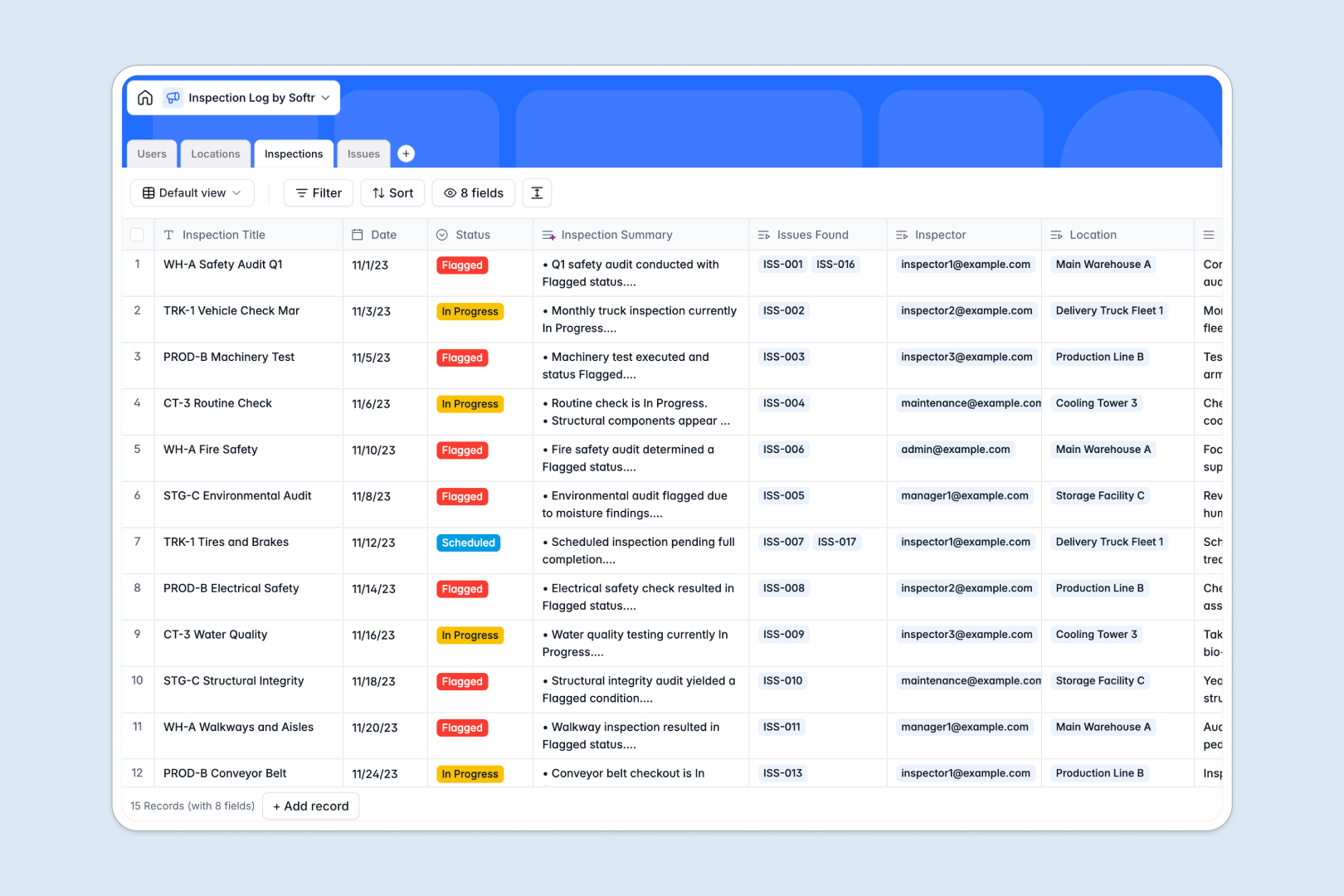
Your Inspection Log database at a glance
This template helps field teams and facility managers record audits, track non-compliance issues, and assign corrective tasks in one structured place. It eliminates lost notes and fragmented checklists by keeping every audit history tied directly to the relevant asset.
Four dedicated tables organize Users, Locations, Inspections, and Issues. Linking an audit to a specific location and inspector ensures that every safety issue or machinery defect remains connected to the exact event where it was discovered.
Built-in AI fields automatically draft concise inspection summaries from raw field notes, classify issue severity based on incident descriptions, and generate actionable step-by-step resolution plans.
Why blank spreadsheets fail when logging recurring inspections
Static spreadsheets quickly break down when managing ongoing compliance across multiple facilities, vehicles, and equipment. When inspectors paste photos and type unstructured notes into rows, tracking recurring defects across visits becomes nearly impossible.
What a structured database changes
A relational system separates locations, audit records, and reported issues into distinct tables while linking them together automatically. An inspector can log multiple safety issues under a single audit without duplicating location addresses or breaking lookup formulas.
Typed fields ensure dates remain valid timestamps, evidence photos stay attached directly to records, and status dropdowns prevent mislabeled entries. This clean foundation is exactly what Softr Databases provide for operational teams.
What you can do with this template
You can schedule upcoming audits, log real-time findings from the field, and track corrective actions through to resolution. Rollup fields automatically calculate total inspections completed per facility or asset, giving managers instant visibility into compliance rates.
Embedded Database AI agents analyze field descriptions to categorize severity levels from Low to Critical and instantly draft remediation guides for maintenance crews.
-
Users
Manage inspectors and team members with assigned issues and roles
-
Locations
Track inspection sites, facilities, machinery, and inspection counts
-
Inspections
Log inspection events and auto-generate AI summaries of outcomes
-
Issues
Classify defect severity and auto-draft resolution plans using AI
Who is this Inspection Log database for
- Safety Officers: Track compliance audits, document hazard violations, and oversee corrective action plans.
- Facility Managers: Monitor building inspections, maintain equipment logs, and view historical maintenance records.
- Quality Assurance Leads: Standardize inspection criteria across teams and track defect resolution times.
- Operations Directors: Maintain complete audit trails for facilities, vehicles, and machinery across multiple sites.
How to take it further
Customize your fields and categories
Add specific inspection types to your dropdowns, tailor the issue severity levels to match industry standards, or add signature fields for formal sign-offs. You can adjust columns and relationships directly within the visual builder without touching any code.
Import your existing audit logs
Bring in historical inspection records and asset inventories using standard CSV file uploads or sync live entries via the API. Your existing spreadsheets instantly map into clean, linked relational records across all four tables.
Build a full app around your database
When you are ready to give your team dedicated web portals, turn this database into an interactive application. With Softr's AI app generator, describe the workflow you need in a single prompt to generate tailored inspector forms, manager dashboards, and automated status alerts.
Configure role-based users and permissions so field inspectors only edit their assigned checklists while managers review organization-wide analytics and approve resolutions.
-
1
-
2
-
3
-
4
Frequently asked questions
-
What is an inspection log database?
-
Why use a no-code database to build an inspection log system?
-
How can AI help managing data for an inspection log?
-
Can I build an app with this inspection log database?
-
Is this Inspection Log template free?
-
How do I import existing inspection data into this template?
Start building today. It's free!
Build and launch your first app in under 30 minutes.