


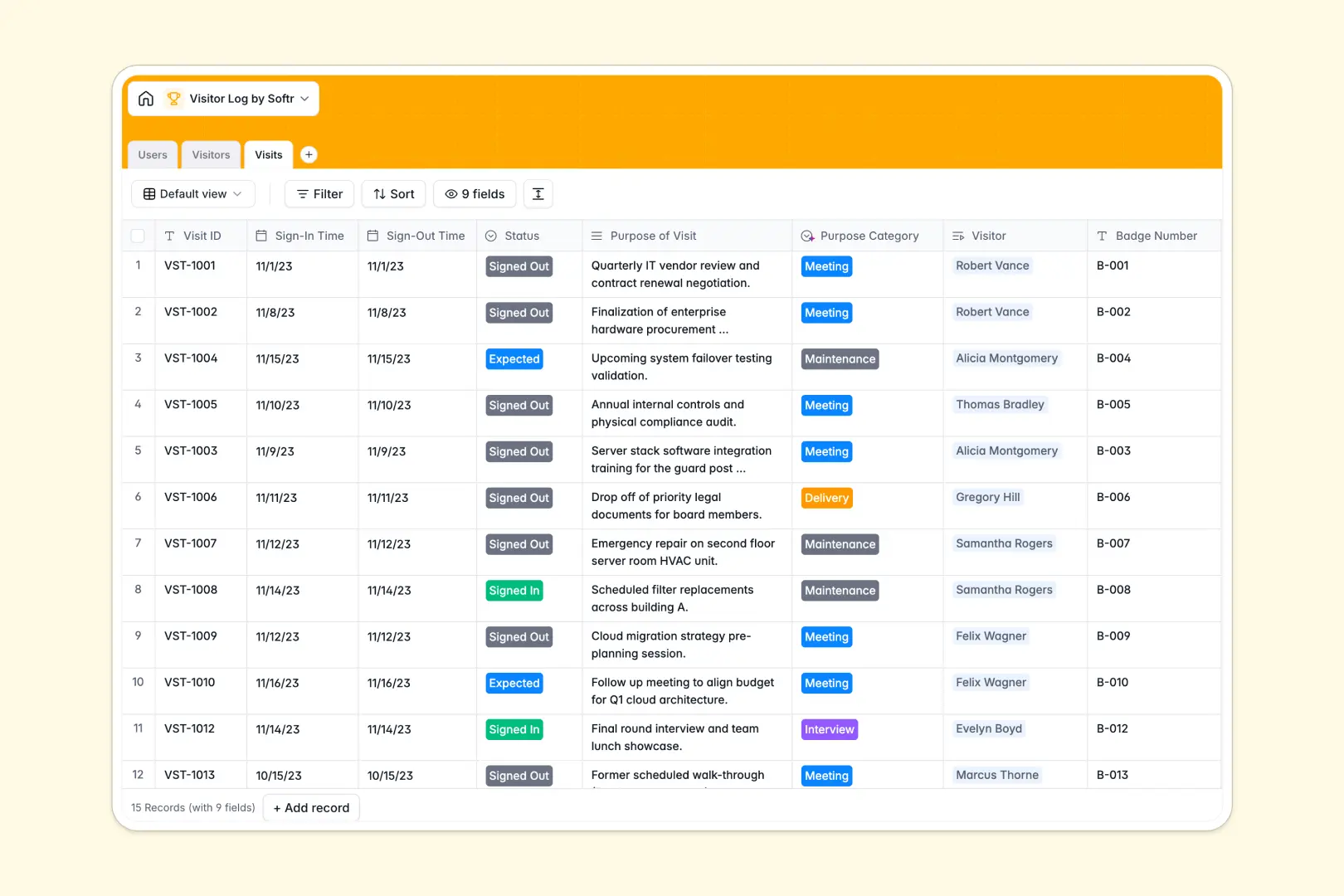
Your Visitor Log database at a glance
This ready-to-use visitor log replaces messy spreadsheets with a secure, automated system. It helps you track every guest, manage internal hosts, and maintain clear compliance records without friction.
The template connects three clean tables: Users (staff and guards), Visitors, and specific Visits. When a guest arrives, you log the sign-in time and link it instantly to their profile and their designated host.
Built-in AI automatically summarizes visitor profiles and categorizes the specific purpose of their visit. This saves your front desk valuable time and keeps security logs instantly organized.
Why tracking visitor logs in Google Sheets breaks down
Using a spreadsheet for front-desk security quickly turns into chaos as daily foot traffic grows. Rows get accidentally overwritten, linking a recurring guest to multiple visits requires fragile formulas, and handling photo ID attachments is notoriously clunky.
What a structured database changes
A relational structure fixes these exact pain points by enforcing strict input types for every column. Sign-out dates stay valid dates, badge numbers stay formatted, and status dropdowns remain consistent.
You can easily link a specific visit to an existing guest profile without duplicating data across dozens of rows. This is exactly what Softr Databases are designed for.
What you can do with this template
Start instantly logging sign-ins, managing active guest statuses (like Allowed or Banned), and tracking who is hosting whom. Keep compliance tight with connected records instead of scattered tabs.
By leveraging native Database AI agents, this system automatically scans the raw purpose of a visit and assigns standardized categories (like Meeting or Delivery). Your logs stay perfectly categorized without manual data entry.
-
Users
Manage internal staff and security personnel authorized to host visitors
-
Visitors
Track guest profiles with AI-generated background summaries for check-in
-
Visits
Log entry and exit times while using AI to categorize the purpose of visit
Who is this Visitor Log database for
This template is perfectly suited for teams that need strict facility security without slowing down the reception desk workflow.
- Facility Managers: Ensure building compliance by keeping accurate, highly searchable logs of who entered and exited the premises.
- Security Guards: Quickly check guest photo IDs, update sign-in statuses, and monitor internal host connections in real time.
- Office Administrators: Automate daily front-desk data entry by auto-categorizing visit purposes and streamlining recurring guest check-ins.
How to take it further
Easily customize this database by tweaking the host role dropdowns or adding custom text fields for vehicle license plates. Because it functions as a native, structured database, these modifications take only seconds to implement.
If your front desk is transitioning from an older legacy system, you can securely upload your existing guest directory via CSV. This instantly populates your historical visitor data so your team skips the manual entry.
When you are ready to give specialized access to guards and hosts, you can build a full internal tool using the interface builder. A connected app keeps everyone aligned on today's facility traffic.
Softr handles this seamlessly by letting you configure custom users and permissions right out of the box. General staff will only see their own scheduled guests, while security teams maintain full oversight of every active visitor.
-
1
-
2
-
3
-
4
Frequently asked questions
-
What is a visitor log database?
-
Why use a no-code database to build a visitor tracker?
-
How can AI help managing data for visitor logs?
-
Can I build an app with a visitor log database?
-
Is this visitor log template free?
-
How is a visitor log database different from Google Sheets?
Start building today. It's free!
Build and launch your first app in under 30 minutes.