


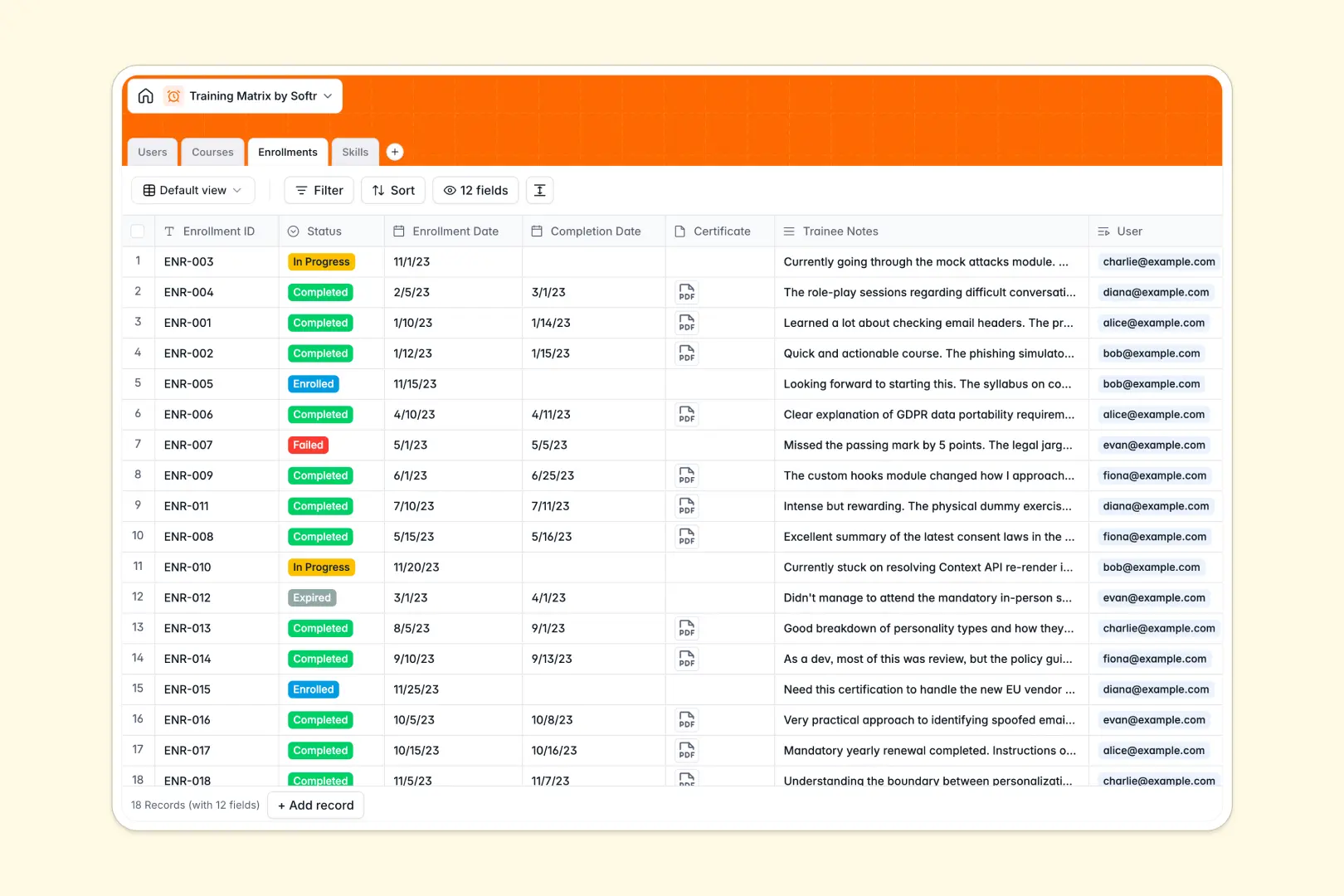
Your Training Matrix database at a glance
This template centralizes employee learning, course catalogs, and compliance tracking into a structured, audit-ready system.
It connects four dedicated tables: Users, Courses, Enrollments, and Skills. Linking enrollments directly to employees and courses ensures real-time progress rollups and zero duplicate data entry.
Built-in AI fields auto-generate course descriptions, define skill competencies, and summarize trainee feedback automatically.
When a training grid in Sheets outgrows its grid
Google Sheets makes sharing easy, but using it to manage cross-department compliance quickly leads to broken formulas, untyped dates, and accidental edits.
What a structured database changes
In a spreadsheet, anyone with edit access can see every salary, note, or certification across the company. Formulas linking user rows to course columns snap the moment someone inserts a new row.
Dedicated relational tables enforce real data types: completion dates stay dates, certificates stay secure attachments, and skills link directly to specific modules. Softr Databases provide this structure natively, so your compliance records remain consistent and reliable.
While Softr can connect an existing Google Sheet, moving to a native database gives your training data real stability.
What you can do with this template
Assign mandatory training programs, log completion dates, and monitor team skill coverage through native rollup metrics.
With Database AI agents, you can automatically draft course syllabi from basic topics and extract key takeaways from trainee notes upon completion.
Everything is pre-configured and ready to use immediately, giving you an organized training system in one click.
-
Users
Manage employee profiles, departmental roles, and overall training progress
-
Courses
Catalog training modules with auto-generated AI syllabi and completion counts
-
Enrollments
Track course progress and certifications with AI-generated trainee note summaries
-
Skills
Define core competencies by category with AI-generated skill descriptions
Who is this Training Matrix database for
This system helps teams maintain compliance, track skill growth, and streamline onboarding.
- HR & People Ops: Track mandatory compliance certifications, renewal deadlines, and employee training histories.
- Department Leads: Monitor team competency gaps and assign role-specific upskilling courses.
- Operations Managers: Ensure field and safety teams maintain up-to-date health and safety certifications.
- Learning & Development Teams: Manage course catalogs, formats, and trainee feedback in one place.
How to take it further
Customize your training structure. Add custom departments to the Users table, create new competency categories in Skills, or add pass/fail score criteria to Enrollments. Customizing fields takes seconds in the visual editor.
Import your existing records. Upload your current roster and course list using CSV import to populate your database instantly, or sync live records using the API.
Build a training portal. Use the AI app generator to turn this database into an interactive employee portal in one prompt. Configure granular users and permissions so employees only view their own courses while managers oversee entire department matrices.
-
1
-
2
-
3
-
4
Frequently asked questions
-
What is a training matrix database?
-
Why use a no-code database to build a training matrix system?
-
How can AI help managing data for training matrices?
-
Can I build an app with this training matrix database?
-
Is this Training Matrix database free?
-
How is this database different from a training matrix in Google Sheets?
Start building today. It's free!
Build and launch your first app in under 30 minutes.