


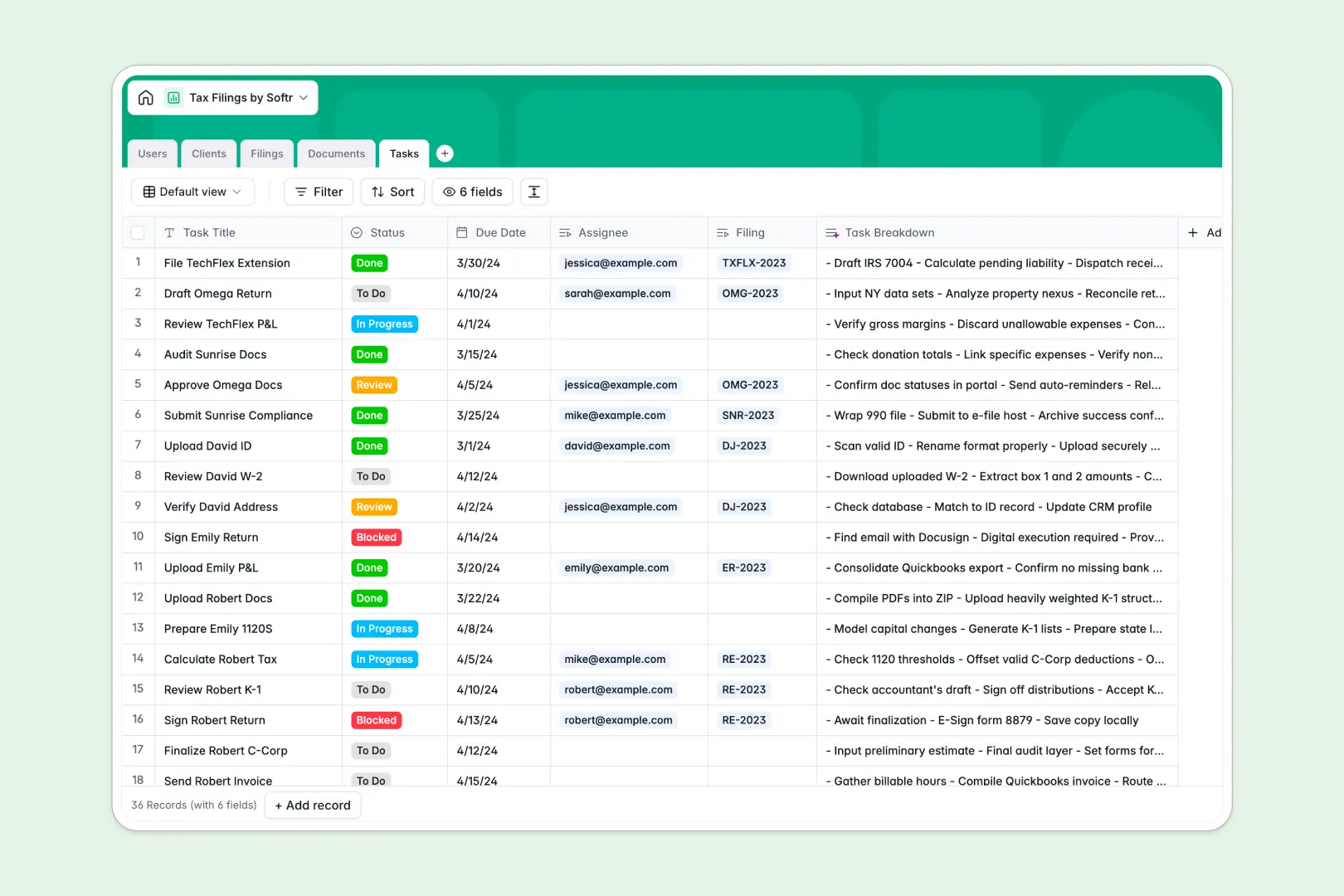
Your Tax Filings database at a glance
Manage client tax returns from initial intake to final submission without losing track of critical forms or deadlines. Keep your accounting team aligned on filing statuses and document collection in one centralized system.
Relational tables connect each tax return in Filings directly to Clients, Documents, Tasks, and assigned Users. This ensures all W-2s, 1099s, and review stages stay linked to the correct taxpayer.
Native AI fields summarize client profiles automatically, create task checklists, and draft internal state filing memos to keep prep work moving fast.
Why a tax return tracker outgrows Google Sheets
Google Sheets makes sharing simple, but treating it as a practice management system leaves sensitive tax data exposed and creates messy rows across multiple tabs.
What a structured database changes
Tax preparation requires strict data validation and privacy. In a spreadsheet, any collaborator can accidentally edit a formula, misplace a client's tax ID, or view confidential financial figures meant for other preparers.
With relational tables, every column enforces data types like dates, secure attachments, and structured statuses. You can link a W-2 or 1099 directly to a filing without messy copy-pasting.
This is exactly what Softr Databases are designed for: giving accounting teams clean structure, strict data integrity, and dedicated relational views.
What you can do with this template
Track every filing lifecycle from engagement to IRS acceptance while keeping associated client documents organized in secure attachment fields.
Use Database AI agents to generate task breakdowns, draft filing review memos, and summarize client entities in real time.
Softr can also connect an existing Google Sheet as a data source if needed, but starting directly with this dedicated database template provides the speed and reliability tax season demands.
-
Users
Manage staff, accountants, and client portal profiles with role access
-
Clients
Track client entities, tax IDs, assignments, and AI-generated profiles
-
Filings
Oversee tax return progress, tax years, and AI-powered memo digests
-
Documents
Store tax forms and financial records with automated AI summaries
-
Tasks
Organize filing preparation steps with AI-generated action checklists
Who is this Tax Filings database for
Designed for accounting teams managing high volumes of tax returns across multiple clients:
- Accounting firms: Track seasonal tax returns, preparer assignments, and missing client documents.
- Solo CPAs: Keep corporate and individual client tax filings organized without spreadsheet errors.
- Tax preparation clinics: Standardize document intake and task tracking across volunteer preparers.
- Bookkeeping agencies: Coordinate annual tax readiness and pass organized schedules to CPAs.
How to take it further
Customize your database by modifying filing statuses, adding new entity types, or creating extra document categories to match your firm's exact workflow. Native editing in Softr Databases makes updating fields fast and intuitive.
Import your existing client lists and historical return records in bulk using CSV uploads or connect external tools directly via API.
When you are ready, turn your database into a full client portal or internal practice app. You can use an AI app generator to describe your ideal tax portal in a single prompt and automatically generate the interface, custom dashboards, and business workflows connected to this database.
Configure granular users and permissions so clients only see their own uploaded documents and filing statuses, while accountants manage review tasks securely.
-
1
-
2
-
3
-
4
Frequently asked questions
-
What is a tax filings database?
-
Why use a no-code database to build a tax filing system?
-
How can AI help managing data for tax filings?
-
Can I build an app with tax filings database?
-
Is this Tax Filings template free?
-
How is a tax filings database different from Google Sheets?
Start building today. It's free!
Build and launch your first app in under 30 minutes.