


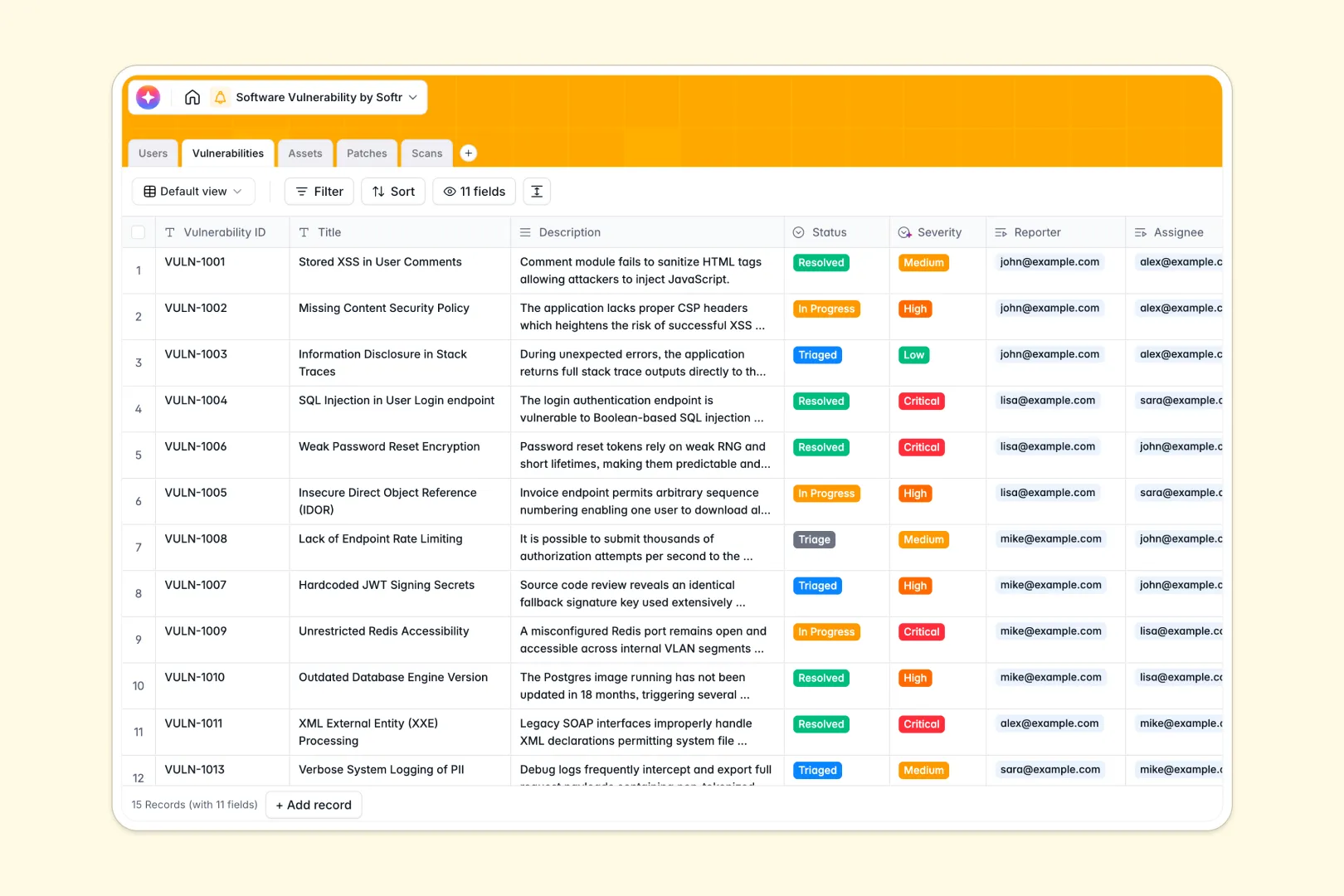
Your Software Vulnerability database at a glance
This template helps security engineers and IT teams centralize vulnerability remediation across all production and staging infrastructure. It replaces chaotic trackers with an organized, relational system designed for incident response.
Five linked tables connect Vulnerabilities to affected Assets, deployed Patches, automated Scans, and team members in the Users table. Every flaw stays mapped to its precise owner and remediation timeline without messy duplicate entries.
Built-in AI fields automatically classify severity into Low, Medium, High, or Critical, generate executive summaries, and search the live web for vendor security advisories.
When a shared spreadsheet exposes critical flaws to the wrong eyes
Google Sheets makes collaboration easy, but tracking security vulnerabilities in a shared tab creates severe operational risk. Because standard sheets cannot enforce row-level privacy, external contractors, developers, or casual viewers end up seeing unpatched critical exploits they were never meant to access.
What a structured database changes
In a dedicated database, security fields enforce strict data integrity so dates stay valid, attachments hold raw scan logs safely, and status tags cannot be corrupted. Relational links map an asset directly to its open vulnerabilities and patches, eliminating fragile VLOOKUP formulas that break during active triage.
This is exactly what Softr Databases are designed for: secure, structured records that keep critical data dependable. If your team already has legacy rows in Google Sheets, Softr can connect them as an external data source, though a native database provides far greater stability.
What you can do with this template
Assign discovered flaws to developers, monitor patch rollout dates, and review automated audit logs in one cohesive system. Rollup fields instantly calculate open vulnerability counts across your entire fleet of assets.
Native Database AI agents draft customer-facing release notes from patch details, summarize technical writeups for executive reviews, and fetch live vendor disclosure contacts automatically.
-
Users
Manage security researchers, admins, and developers handling vulnerabilities
-
Vulnerabilities
Track vulnerabilities with AI-generated executive summaries and severity levels
-
Assets
Monitor servers, software, and systems with web-enriched vendor threat intelligence
-
Patches
Record software updates and generate customer release notes using built-in AI
-
Scans
Log automated security audits, pentest sessions, and linked vulnerability logs
Who is this Software Vulnerability database for
This template is designed for technical and operations teams managing infrastructure security:
- Security Engineers: Triage incoming vulnerability reports and assign remediation tasks immediately.
- DevOps Leads: Track affected production assets and monitor patch deployment timelines.
- IT Compliance Managers: Maintain clean audit trails of security scans and resolved CVEs.
- Engineering Directors: Review AI-generated executive summaries and high-level risk exposure.
How to take it further
Customize your database layout in seconds by tailoring the severity ratings, adding custom scan tool tags, or creating unique environment stages. Since it runs as a native Softr Database, adding new columns or renaming fields requires zero code.
Import your historical incident logs and asset inventories directly using CSV uploads or connect automated vulnerability scanners via API to sync real-time audit findings.
When your team is ready, use the AI app generator to turn this database into a full internal security portal. Set granular users and permissions so researchers only edit reported bugs while executives view high-level remediation dashboards.
-
1
-
2
-
3
-
4
Frequently asked questions
-
What is a software vulnerability database?
-
Why use a no-code database to build a software vulnerability tool?
-
How can AI help managing data for software vulnerabilities?
-
Can I build an app with this software vulnerability database?
-
Is this Software Vulnerability database template free?
-
How is a database different from tracking vulnerabilities in Google Sheets?
Start building today. It's free!
Build and launch your first app in under 30 minutes.