


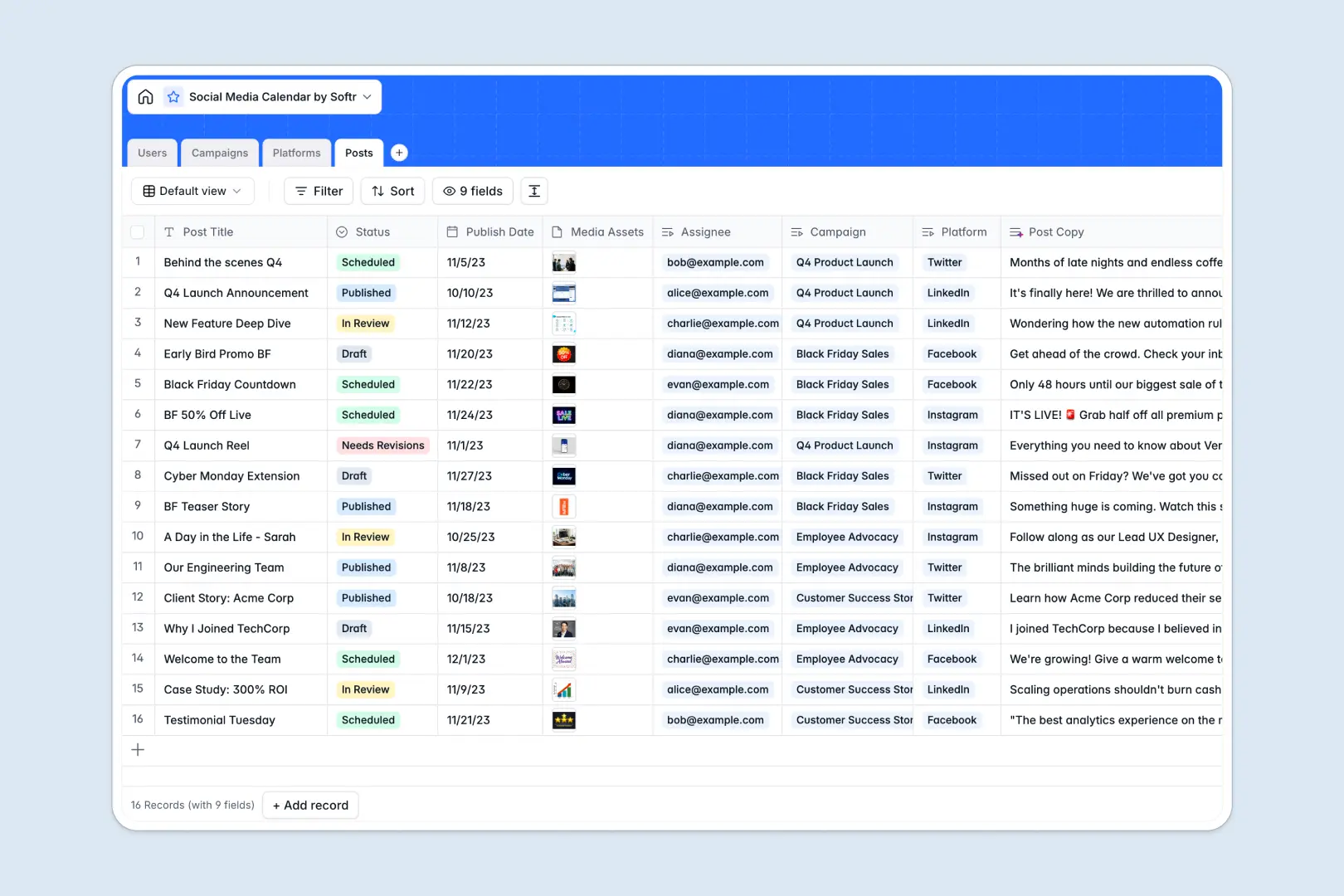
Your Social Media Calendar database at a glance
This template gives your team a single home to organize multi-channel campaigns, track publication dates, and manage creative approvals. Instead of juggling loose links, you can store visual media assets right alongside copy drafts and target platforms.
Everything connects logically across four tables: Campaigns, Posts, Platforms, and Users. Assign creators to specific posts, link those updates to broader campaign goals, and view character limits per channel without jumping between tabs.
Built-in AI fields help you move faster by generating ready-to-use captions from campaign briefs and condensing long strategies into scannable summaries.
When a shared spreadsheet turns your content schedule into a free-for-all
Google Sheets makes sharing a list easy, but it was never built to govern a live publishing schedule. Once multiple creators, managers, and clients collaborate in the same tab, formulas break, image links rot, and accidental edits overwrite approved copy.
What a structured database changes
In a structured database, fields enforce their own rules so dates remain clean calendar timestamps, files stay attached directly to records, and statuses like "In Review" or "Scheduled" cannot be mistyped.
Relational links connect posts directly to high-level campaigns and user profiles, eliminating repetitive copy-pasting across rows.
This is exactly what Softr Databases are designed for: giving your marketing operations strict data integrity while remaining effortless to update.
What you can do with this template
Every post record keeps your platform requirements, assignees, target dates, and creative assets unified in a single view. You can filter by platform or campaign instantly to spot scheduling gaps.
Native Database AI agents automatically draft engaging social captions from your post titles and campaign descriptions whenever a record is created.
While Softr can connect an existing Google Sheet if needed, starting directly with a dedicated database keeps your editorial workflow reliable and organized.
-
Users
Manage content creators and managers with roles and post assignments
-
Campaigns
Coordinate marketing initiatives with timelines and AI brief summaries
-
Platforms
Configure social network channels, character limits, and visual assets
-
Posts
Track publication schedules and draft engaging captions with AI copy
Who is this Social Media Calendar database for
This system is built for teams producing consistent content across several networks:
- Social Media Managers: Keep scheduled dates, asset approvals, and campaign goals aligned across all channels.
- Content Creators: Access clear creative briefs, draft copy with AI assistance, and attach final graphics.
- Marketing Agencies: Organize multiple client campaigns with structured permissions and clear review pipelines.
- Growth Teams: Monitor cross-platform initiatives and maintain high-volume publishing without missed deadlines.
How to take it further
1. Customize your fields and workflows. Adjust channel select options to include emerging platforms like TikTok or Threads, add custom approval stages, or tailor character limits to match your specific publishing guidelines.
2. Import existing content logs. Bring over previous editorial records using CSV import or connect live marketing feeds via API to preserve your content history seamlessly.
3. Build a full app around it. Transform this database into an interactive portal when your team expands. Using Softr's AI app generator, describe the publishing workspace you need to instantly create a visual interface on top of these tables. Configure granular users and permissions so external freelance writers only access their assigned posts while managers retain full control over campaign launches.
-
1
-
2
-
3
-
4
Frequently asked questions
-
What is a Social Media Calendar database?
-
Why use a no-code database to build a social media calendar?
-
How can AI help managing data for social media scheduling?
-
Can I build an app with this Social Media Calendar database?
-
Is this Social Media Calendar database free?
-
How is this database different from a social media calendar in Google Sheets?
Start building today. It's free!
Build and launch your first app in under 30 minutes.