


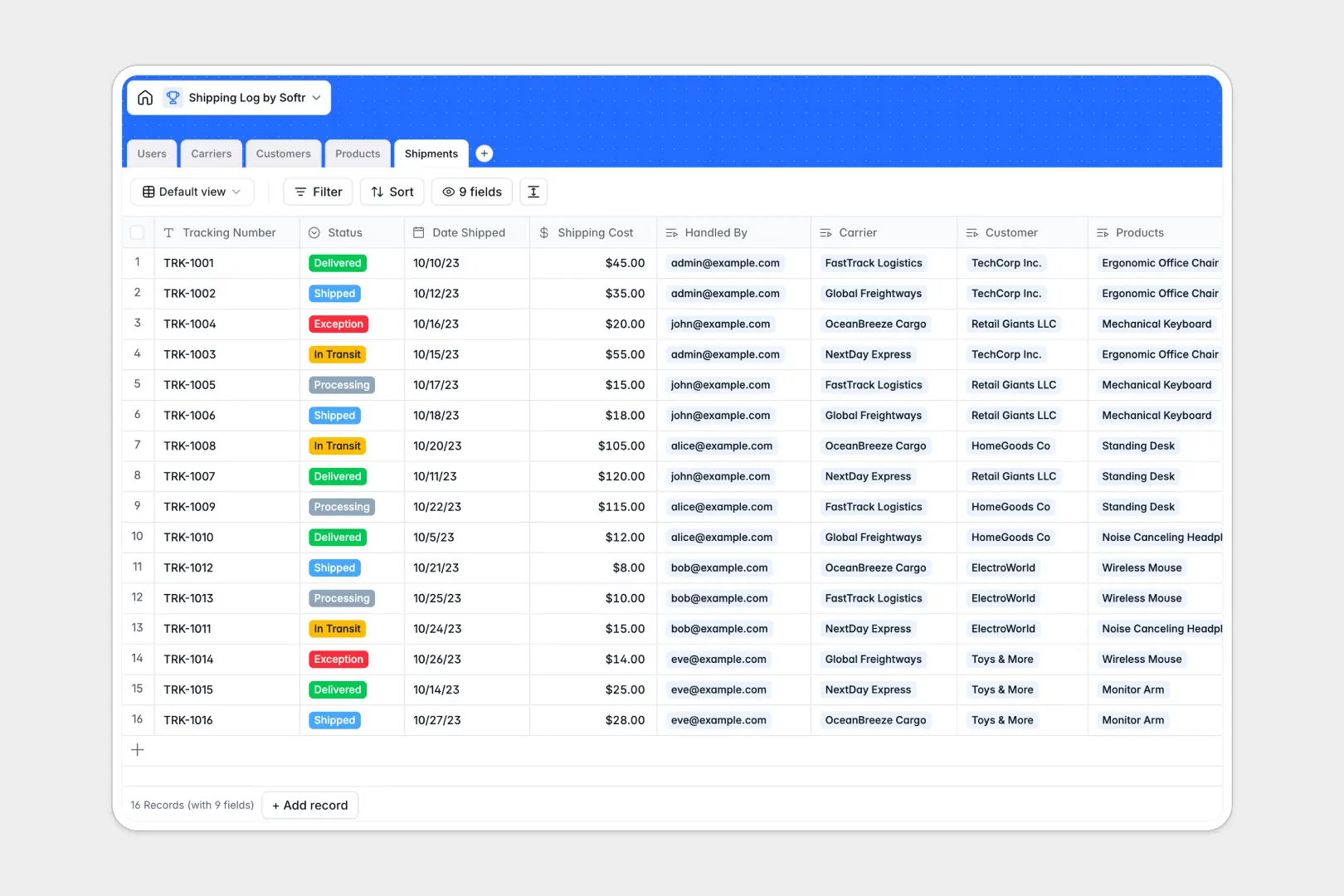
Your Shipping Log database at a glance
This template gives logistics teams, warehouse managers, and fulfillment coordinators a centralized system to track outbound packages from processing to delivery. It keeps every tracking number, carrier contact, and customer address structured and organized.
Five relational tables connect Shipments, Customers, Products, Carriers, and internal Users. When you log a dispatched shipment, it links directly to the customer receiving it, the products inside, and the carrier moving it without duplicating records.
Built-in AI automatically drafts customer notification updates based on shipment status and tracking numbers, and enriches carrier profiles directly from their website URLs.
When a shared spreadsheet becomes your logistics backend
Google Sheets makes it easy to collaborate on day-one dispatch lists, but it was never built to operate as a reliable fulfillment backend. Anyone can accidentally overwrite a tracking number, type an invalid date, or break lookup formulas when sorting columns.
What a structured database changes
A structured database enforces strict data integrity across your entire dispatch operation. Dates stay formatted, currency values calculate correctly, and linked records connect shipments to customers without fragile cross-sheet lookups.
Because permissions and tables are isolated, team members only edit what they need to. This is exactly what Softr Databases are designed for, giving you a structured foundation that scales cleanly. You can also connect an existing Google Sheet as an external source if your team still keeps raw logs there.
What you can do with this template
Connect shipments directly to product SKUs and customer records so every order history stays accurate. Rollups calculate total expected shipments per customer automatically, giving your team instant visibility into account activity.
Native Database AI agents research carrier details via live web search and automatically write delivery status notification summaries ready to send to clients.
-
Users
Manage internal logistics staff, roles, and assigned shipment tasks
-
Carriers
Track courier partners with contact info and AI web-generated bios
-
Customers
Maintain client directory, delivery addresses, and shipment counts
-
Products
Catalog dispatchable inventory items with SKU codes and unit weights
-
Shipments
Log parcel dispatches, transit statuses, and AI update drafts
Who is this Shipping Log database for
This template helps dispatch and logistics teams replace fragile shared sheets with structured fulfillment workflows.
- E-commerce Brands: Manage daily outbound orders, link products to parcels, and maintain real-time status updates.
- Warehouse Managers: Assign fulfillment tasks to specific staff members and monitor package processing stages.
- Logistics Coordinators: Keep direct carrier phone lines, websites, and tracking details organized in one hub.
- Customer Support Leads: Quickly pull up customer delivery histories and accurate tracking numbers to resolve tickets.
How to take it further
Customize this database by adding custom shipment statuses like "Delayed" or "Returned", modifying SKU weight units, or adding delivery signature attachments. You can edit fields and reorder views directly within the Softr workspace.
Import your existing dispatch records easily through a standard CSV upload or sync data automatically via the API to keep inventory tools aligned.
When you need an operational portal, use the AI app generator to turn this database into an interactive logistics app in seconds. Softr generates customized interfaces, tracking forms, and users and permissions so warehouse staff update records while customers view only their own delivery statuses.
-
1
-
2
-
3
-
4
Frequently asked questions
-
What is a shipping log database?
-
Why use a no-code database to build a shipping log tool?
-
How can AI help managing data for shipping logs?
-
Can I build an app with this shipping log database?
-
Is this Shipping Log database free?
-
How is this database different from tracking shipments in Google Sheets?
Start building today. It's free!
Build and launch your first app in under 30 minutes.