


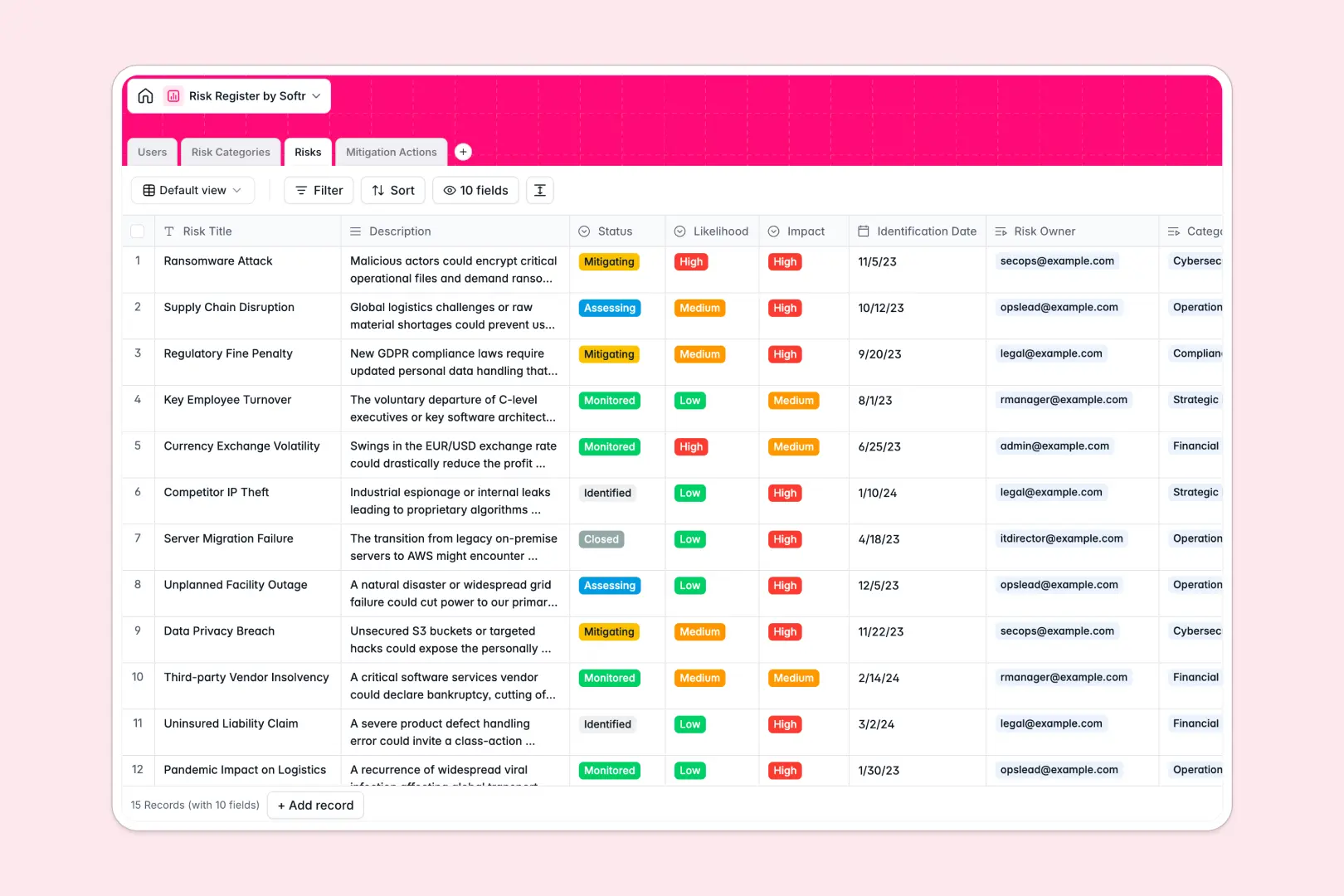
Your Risk Register database at a glance
This template provides a centralized system to log operational threats, evaluate severity, and coordinate mitigation efforts across departments. It helps leadership maintain visibility over ongoing exposure while giving teams clear accountability for resolution tasks.
Everything is connected across structured tables for Risks, Mitigation Actions, Risk Categories, and Users. Rather than tracking tasks in isolation, every mitigation action links directly to its associated risk and designated assignee.
Built-in AI fields automatically draft executive summaries from detailed risk descriptions and generate actionable five-step operational protocols for newly logged mitigation tasks.
When a single accidental edit breaks your risk formulas
Google Sheets is excellent for team brainstorming, but it was never designed to run as a secure risk management backend. When everyone has direct access to raw rows, formulas break, row-level permissions are impossible, and anyone can accidentally edit sensitive impact ratings.
What a structured database changes
In a structured database, data types are strictly enforced so dates remain dates and likelihood scores stay uniform. Tables connect natively, allowing you to link an action item to a risk without relying on fragile formulas that snap when someone inserts a row.
Sensitive risk assessments stay secure because team members interact with controlled records rather than a shared grid. This is exactly what Softr Databases are designed for: reliable, relational data management that easily supports workflows. While Softr can connect an existing Google Sheet, moving to a native database ensures strict integrity as your risk catalog expands.
What you can do with this template
This pre-configured template lets you immediately organize risks by categories, monitor likelihood and impact levels, and track task completion statuses.
Natively integrated Database AI agents streamline documentation by summarizing complex incident logs into brief executive briefs and outlining practical action plans automatically.
-
Users
Manage risk owners, action assignees, roles, departments and contacts
-
Risk Categories
Classify organizational threats and calculate aggregate risk counts
-
Risks
Track risk severities, owners, status and generate AI summaries
-
Mitigation Actions
Coordinate mitigation tasks and auto-draft action plans using AI
Who is this Risk Register database for
This database helps teams that need clear visibility into business vulnerabilities and structured remediation paths.
- Risk & Compliance Officers: Maintain unified oversight over organizational threats, regulatory requirements, and audit-ready remediation logs.
- Project Managers: Connect operational bottlenecks directly to team assignees and track task resolution dates in real time.
- Operations Leads: Standardize how departments report emerging incidents and coordinate cross-functional mitigation protocols.
- Executive Leadership: Review high-level risk summaries and category health rollups without sifting through messy spreadsheet cells.
How to take it further
Tailor the database to your exact risk taxonomy in minutes. You can easily modify likelihood scales, add custom fields for financial exposure, or introduce new categories to reflect specific industry standards.
Import your existing registry instantly using a standard CSV file or sync data programmatically via API to migrate your current tracking lists into a clean relational structure.
When your team is ready, build an app on top of this database in seconds with Softr's AI Co-Builder. Generate custom employee portals or stakeholder dashboards with granular users and permissions so contributors can only view and update their assigned mitigation tasks while managers oversee the entire register.
-
1
-
2
-
3
-
4
Frequently asked questions
-
What is a Risk Register database?
-
Why use a no-code database to build a risk register system?
-
How can AI help managing data for risk registers?
-
Can I build an app with this Risk Register database?
-
Is this Risk Register template free?
-
How is a database better than Google Sheets for managing risks?
Start building today. It's free!
Build and launch your first app in under 30 minutes.