


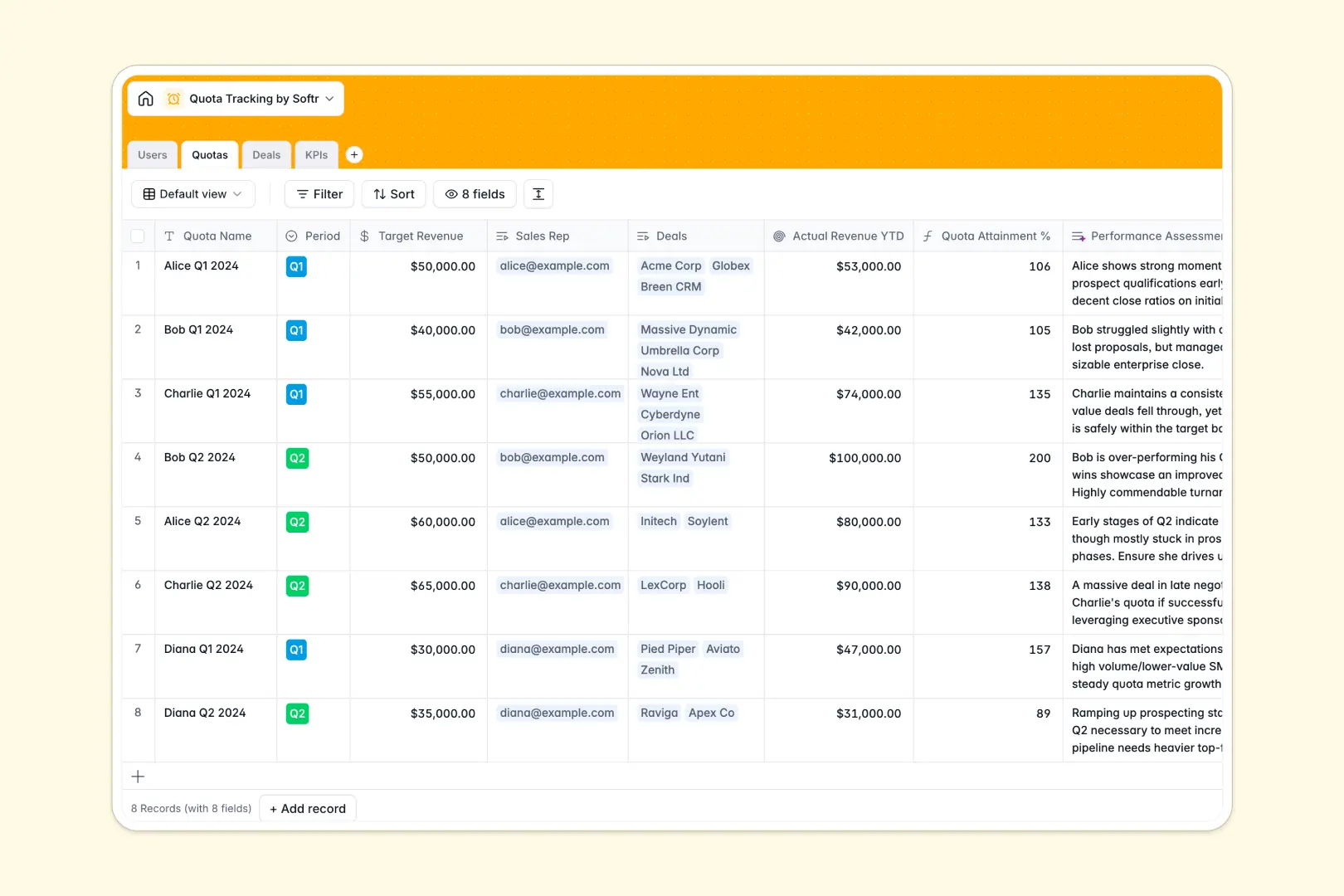
Your Quota Tracking Database at a glance
This template gives your sales team a reliable, centralized place to track revenue targets, active deals, and daily KPIs without manual data entry. It ensures everyone knows exactly where they stand against their goals.
The system intelligently connects tables for Users, Quotas, Deals, and KPIs. When a sales rep closes a deal, the actual revenue rolls up automatically to update their quota attainment percentage instantly.
Built-in AI agents automatically assess performance by comparing targets to actuals, classify KPI progress as "On Track" or "At Risk," and summarize deals, keeping your pipeline updated effortlessly.
Why tracking sales quotas in Google Sheets breaks down
Relying on spreadsheets to monitor sales quotas quickly becomes a chaotic mess of broken formulas and outdated numbers. As your team adds deals and updates metrics, keeping everything tied back to individual rep targets requires endless manual adjustments.
What a structured database changes
Instead of relying on fragile VLOOKUPs to connect a closed deal to a specific sales rep's Q2 quota, a structured system uses native relational connections. Every deal and KPI automatically links to the right person and target without breaking.
This ensures data integrity—amounts stay as currency values, dates remain formatted correctly, and formulas calculate attainment flawlessly as your team scales. This is exactly what Softr Databases are designed for.
What you can do with this template
You can instantly view a rep's actual YTD revenue alongside their target, with automated rollups eliminating the need for manual sums. Team members can easily log daily metrics like cold calls or demos booked right into their KPI tracker.
Plus, built-in Database AI agents run automatically in the background, assessing whether reps are meeting their goals and classifying their progress based on real-time data.
-
Users
Manage sales personnel profiles and roles while tracking individual performance
-
Quotas
Monitor revenue targets with AI-powered assessment of sales performance results
-
Deals
Track sales opportunities with AI summarization of deal stages and deal values
-
KPIs
Log activity metrics using AI to automatically classify progress status levels
Who is this Quota Tracking Database for
This template is designed for sales organizations that need clear visibility into pipeline performance and individual attainment.
- Sales Managers: Monitor team-wide quota attainment, deal stages, and daily KPIs in real time.
- Sales Representatives: Track personal progress toward targets and manage active deals without wrestling with spreadsheets.
- Revenue Operations: Maintain clean, reliable data structures that connect deals to overarching company goals.
How to take it further
Customizing the database for your specific sales cycle is simple. You can easily adjust the deal stage dropdowns to match your process or add new KPI metric types like "Emails Sent" with just a few clicks.
You can quickly bring your existing sales data into the template. Use a CSV upload to import historical quotas or connect via API to sync active deals directly from your current CRM.
When your team is ready, you can transform this database into a complete internal sales portal. Using the native interface builder, you can create specific dashboards for managers and reps.
By setting up proper users and permissions, you can ensure sales reps only see their own quotas and deals, while managers get a bird's-eye view of the entire team. A well-structured database makes building these custom applications incredibly straightforward.
-
1
-
2
-
3
-
4
Frequently asked questions
-
What is a quota tracking database?
-
Why use a no-code database to build a quota tracking tool?
-
How can AI help managing data for quota tracking?
-
Can I build an app with a quota tracking database?
-
Is this Quota Tracking Database free?
-
Why is a quota tracking database better than Google Sheets?
Start building today. It's free!
Build and launch your first app in under 30 minutes.