


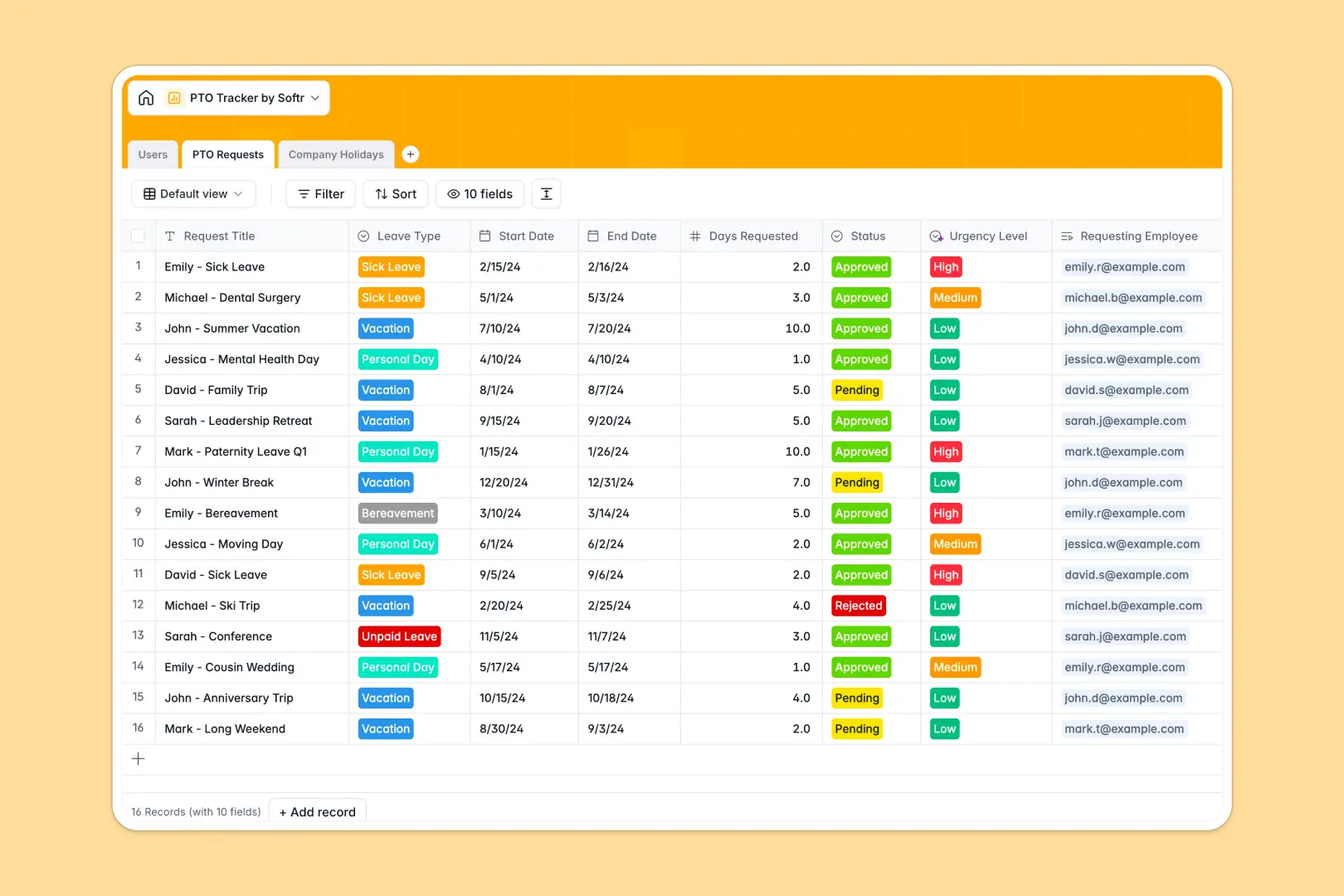
Your PTO Tracker database at a glance
This template provides a structured, automated way to manage employee time off without the chaos of spreadsheets. It gives HR and managers complete visibility into leave requests and remaining allowances.
It connects Users directly to their PTO Requests, automatically rolling up approved days to keep remaining balances completely accurate. A dedicated Company Holidays table ensures broad rest days are tracked without manual entry.
Built-in AI automatically evaluates the urgency of requests and summarizes justifications for fast managerial review. It also automatically enriches company holiday context directly from the web.
Why tracking PTO in Google Sheets breaks down
Relying on Google Sheets for time off requests quickly becomes a nightmare of broken formulas and manual updates.
What a structured database changes
In a spreadsheet, calculating remaining PTO requires fragile VLOOKUPs and manual deduction every time a request is approved. One accidental keystroke can mess up an employee's entire yearly allowance.
A relational structure prevents this by linking employee records directly to their respective leave requests. Allowances are calculated automatically using precise, unbreakable rollups and formulas.
This is exactly what Softr Databases are designed for. They enforce clean data types, so dates stay dates and vacation balances update instantly as approvals happen.
What you can do with this template
Instantly view every employee's total allowance, approved days, and remaining balance in one reliable snapshot.
Leverage Database AI agents to automatically categorize leave urgency and generate quick one-line summaries of request justifications.
Keep public holidays cleanly separated to ensure they never accidentally subtract from an employee's personal PTO bucket.
-
Users
Maintain employee profiles with roles and track real-time PTO balances
-
PTO Requests
Manage leave logs using AI to summarize justifications and assess urgency
-
Company Holidays
List public holidays featuring AI-generated context on their significance
Who is this PTO Tracker database for
This template is built for teams that need a reliable, error-free way to manage employee time off.
- HR Managers: Automatically calculate remaining balances and track leave trends across the organization.
- Team Leads: Quickly review time-off requests with AI-generated summaries to ensure optimal team coverage.
- Department Heads: Monitor team availability and manage direct report approvals without digging through messy rows.
- Operations: Maintain a central source of truth for all public holidays and staff schedules.
How to take it further
Customize the database
You can easily tweak the PTO allowance limits or modify the leave type options to match your company policy. Softr's native database lets you adapt the structure instantly.
Import your existing data
Bulk upload your current employee directory and historical leave records via CSV. You don't have to start from scratch to get automated tracking working today.
Build a full app around it
When you are ready, you can turn this database into a self-serve employee portal. This allows staff to log in and request time off securely through the interface builder.
By configuring users and permissions, employees only see their own PTO balances, while managers can approve requests for their specific team. A well-structured database makes creating these custom internal tools effortless.
-
1
-
2
-
3
-
4
Frequently asked questions
-
What is a PTO Tracker database?
-
Why use a no-code database to build a PTO tracking tool?
-
How can AI help managing data for PTO tracking?
-
Can I build an app with this PTO Tracker database?
-
Is this PTO Tracker database free?
-
How is a PTO tracker database different from Google Sheets?
Start building today. It's free!
Build and launch your first app in under 30 minutes.