


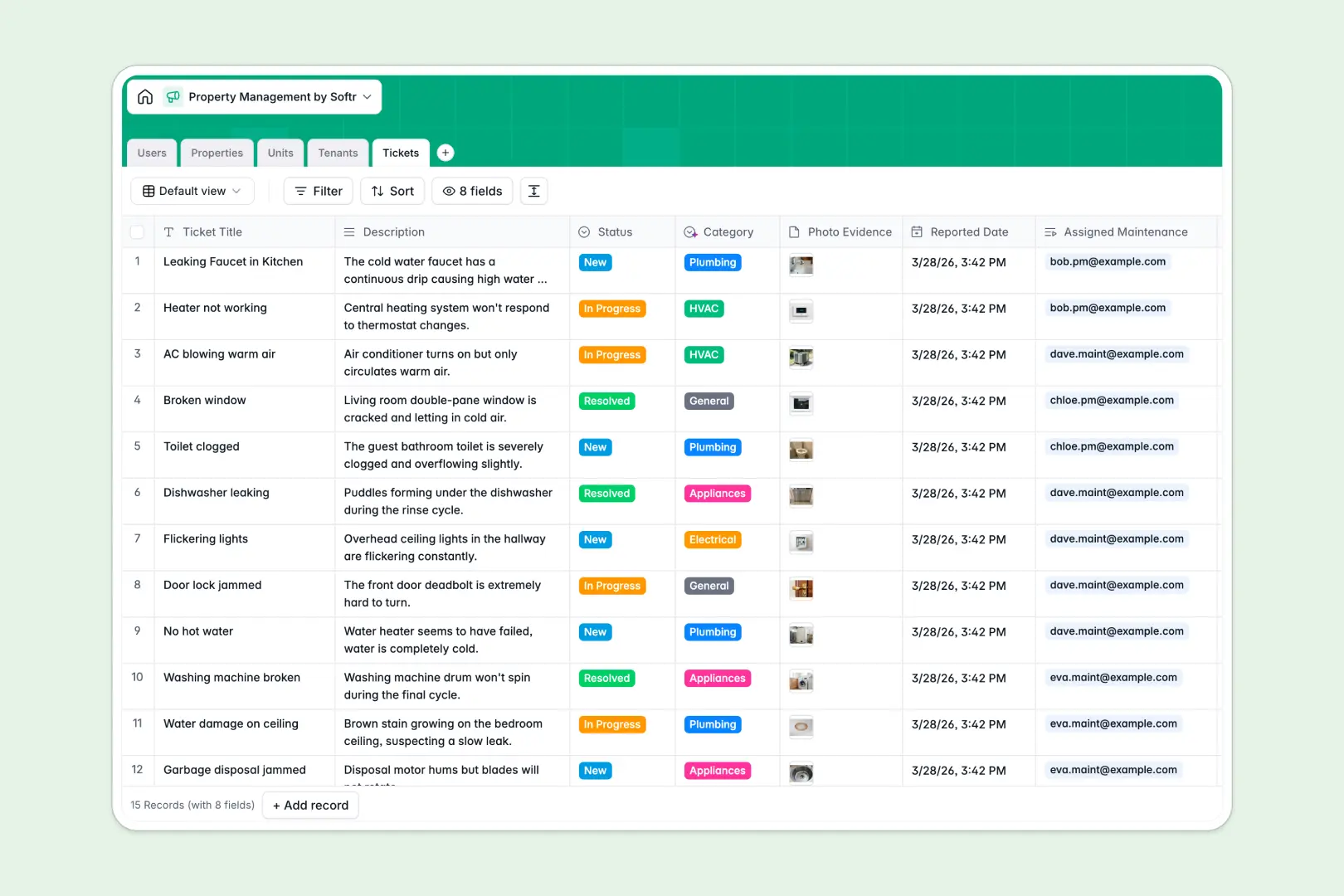
Your Property Management database at a glance
This template centralizes your real estate operations by connecting physical properties, individual rental units, active tenants, and repair tickets into one unified system. It replaces disjointed files with structured records so your team always knows unit occupancy and lease timelines.
Properties link directly to their units, units connect to specific tenants and open tickets, and maintenance staff are assigned tasks instantly. Everything updates dynamically across tables, eliminating manual re-entry and cross-sheet confusion.
Built-in AI automatically drafts marketing descriptions from addresses, summarizes lease agreements, and categorizes incoming maintenance requests based on problem descriptions.
When a tenant ticket breaks the shared sheet
Google Sheets makes it easy to share a list of properties, but it quickly breaks down when treated as an operational backend. Anyone with access can overwrite sensitive lease terms, sort a column and disconnect unit numbers from tenant contacts, or paste unformatted text into date fields.
What a structured database changes
A structured database enforces strict data integrity across your entire portfolio. Dates stay valid dates, rent values remain numeric currency, and linked records natively connect units to tenants without fragile formulas.
Instead of managing rows across separate tabs, each entity lives in its own dedicated table with defined relationships. This is exactly what Softr Databases are designed for, giving you a reliable backend where your team can collaborate safely.
While you can connect an existing Google Sheet to Softr as a data source, moving to a native database gives you built-in automation, relational stability, and secure record handling.
What you can do with this template
With this template, you can monitor property occupancy in real time, keep lease start and end dates organized, and assign maintenance personnel directly to tickets. Photo attachments allow tenants and staff to log repair evidence directly within the record.
Integrated Database AI agents handle routine administrative tasks, like reading maintenance descriptions to tag them as HVAC, Plumbing, or Electrical automatically. You get a self-maintaining workspace ready to run your day-to-day property operations immediately.
-
Users
Manage staff roles, contact info, managed properties, and tickets
-
Properties
Track buildings with auto-generated AI descriptions and unit counts
-
Units
Organize individual rental spaces with occupancy status and rent rates
-
Tenants
Manage tenant leases, contacts, and automated AI profile summaries
-
Tickets
Handle repair requests with AI automated category classification
Who is this Property Management database for
This template is designed for real estate teams needing a structured way to handle units, leases, and operations.
- Independent Landlords: Track rent amounts, lease renewals, and maintenance repairs across multiple properties without spreadsheet clutter.
- Property Management Agencies: Coordinate assigned managers, track tenant communications, and oversee unit turnover efficiently.
- Maintenance Teams: Receive assigned repair tickets with photos and clear problem categories to resolve issues faster.
- Real Estate Operators: Maintain clear portfolio visibility with linked tables for properties, spaces, and operational users.
How to take it further
Customize your database structure to match your exact portfolio requirements. You can add new single-select tags for property amenities, create custom status stages for unit turns, or add custom fields for security deposit tracking in seconds.
If you have existing unit rosters or tenant contact lists, import them instantly using CSV upload or sync your existing software through the API to populate your tables without manual data entry.
When your team is ready, you can build an app on top of this database to create dedicated tenant portals, vendor request dashboards, and staff workspaces. With granular users and permissions, tenants only see their own lease details and submit repair forms, while maintenance staff see only their assigned tickets. Full-stack business apps bring your database, interface, and automated workflows together on one platform.
-
1
-
2
-
3
-
4
Frequently asked questions
-
What is a property management database?
-
Why use a no-code database to build a property management tool?
-
How can AI help managing data for property management?
-
Can I build an app with this property management database?
-
Is this Property Management template free?
-
How is this database different from property management Google Sheets?
Start building today. It's free!
Build and launch your first app in under 30 minutes.