


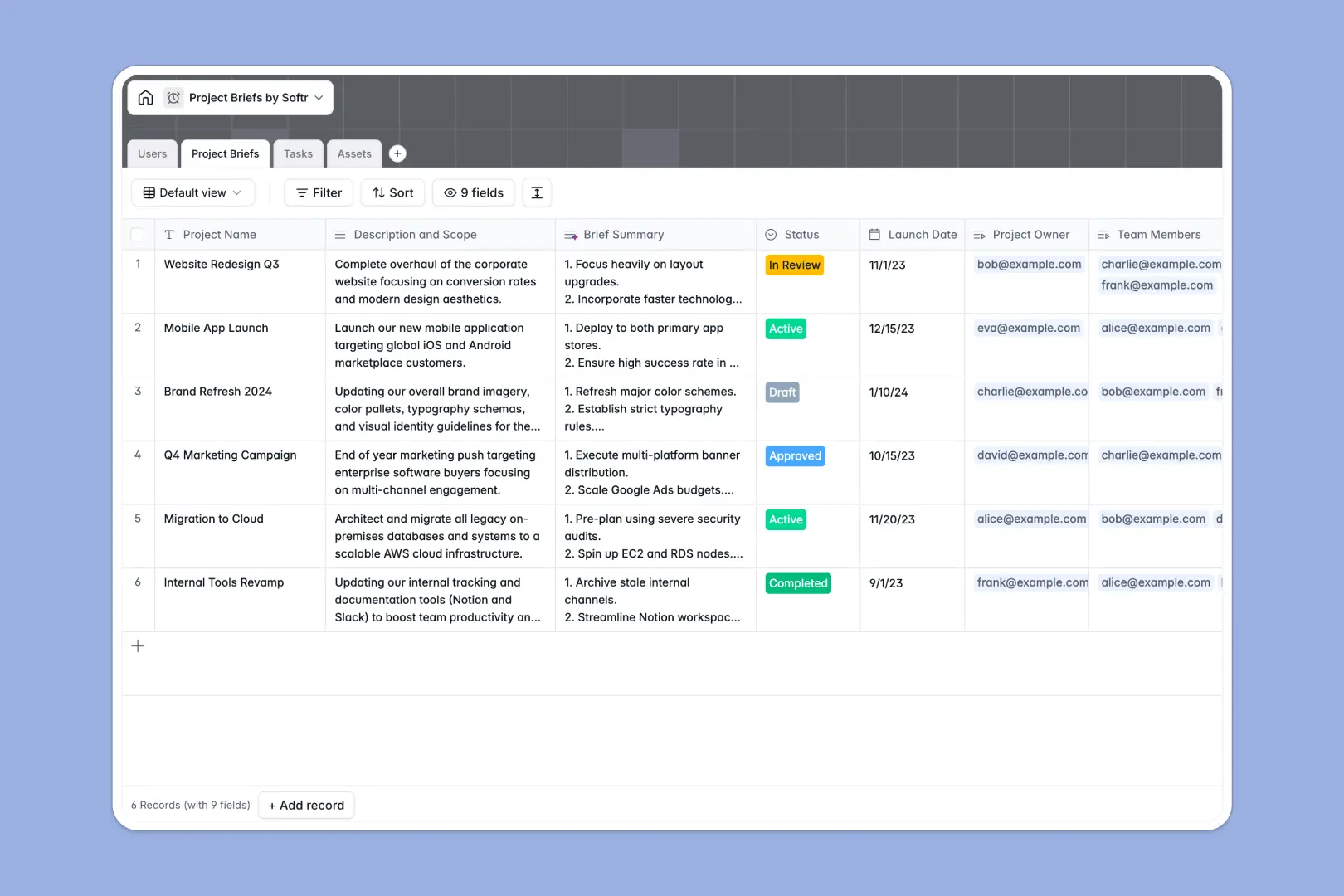
Your Project Briefs Database at a glance
This database centralizes every project scope, deliverable, and asset so your team always knows exactly what to execute without searching through disconnected documents.
It works by connecting Project Briefs to individual Tasks, Assets, and Users naturally. When you open a specific brief, you instantly see who is assigned, what is due next, and all related reference files in one clean view.
Built-in AI automatically summarizes lengthy scope descriptions into easily readable bullet points and assesses task urgency to set priority levels automatically.
Why project briefs get messy in Google Sheets
Managing complex project scopes in spreadsheets quickly turns into a scattered mess of broken formulas and outdated status updates.
What a structured database changes
In a spreadsheet environment, attaching design files, managing multiple assignees, and linking individual tasks to a parent brief requires endless copying and pasting across different tabs. It is simply not built to handle multi-layered operational data.
A relational structure fixes this by linking related records natively, meaning you can connect a granular task or large video asset directly to a project brief without fragile VLOOKUPs. This is exactly what Softr Databases are designed for, keeping your deliverable tracking clean as your agency or team grows.
What you can do with this template
Instantly standardize how project scopes are drafted, reviewed, and approved using structured status dropdowns. Everyone on the team follows the exact same format for every new initiative.
Stop wasting time manually summarizing briefs or guessing task urgency. Native AI fields auto-generate three-bullet summaries and assign priority levels to tasks for you based on their descriptions.
Track every deliverable efficiently with dedicated attachment fields for documents, images, and videos attached directly to the relevant project brief.
-
Users
Manage team members with profile details, organizational roles, and project ownership
-
Project Briefs
Organize project scopes and use AI to generate concise summaries of initiatives
-
Tasks
Track deliverables with due dates and AI-powered priority assessment based on urgency
-
Assets
Centralize branding guidelines, document files, and external links for project teams
Who is this Project Briefs database for
This template provides immediate operational structure for teams managing multiple deliverables and stakeholder approvals.
- Project Managers: Keep scopes, approvals, and resource allocation centralized instead of scattered across countless email threads.
- Creative Agencies: Tie client assets, reference links, and milestones directly to specific campaign briefs for visibility.
- Product Teams: Align feature launches cleanly by connecting high-level scope to specific technical tasks and assignees.
How to take it further
1. Customize the database
You can easily modify the template to fit your exact workflow in seconds. Add new priority categories to tasks, adjust the status dropdowns, or tweak the AI prompts to extract different information.
2. Import your existing data
Bring your existing project pipeline instantly inside to get immediate value. Upload a CSV file or use the built-in API to migrate your active briefs and pending tasks over without manual data entry.
3. Build a full app around it
When your team grows, you can easily turn this database into a robust project portal using a drag-and-drop frontend. This allows you to give external clients, freelancers, or internal stakeholders secure, custom views into project progress.
Because it's built on a structured database, setting up permissions to ensure people only see their specific assigned briefs or tasks takes just a few clicks.
-
1
-
2
-
3
-
4
Frequently asked questions
-
What is a project briefs database?
-
Why use a no-code database to build a project tracking tool?
-
How can AI help managing data for project briefs?
-
Can I build an app with this project briefs database?
-
Is this Project Briefs database free?
-
How is a project briefs database different from Google Sheets?
Start building today. It's free!
Build and launch your first app in under 30 minutes.