


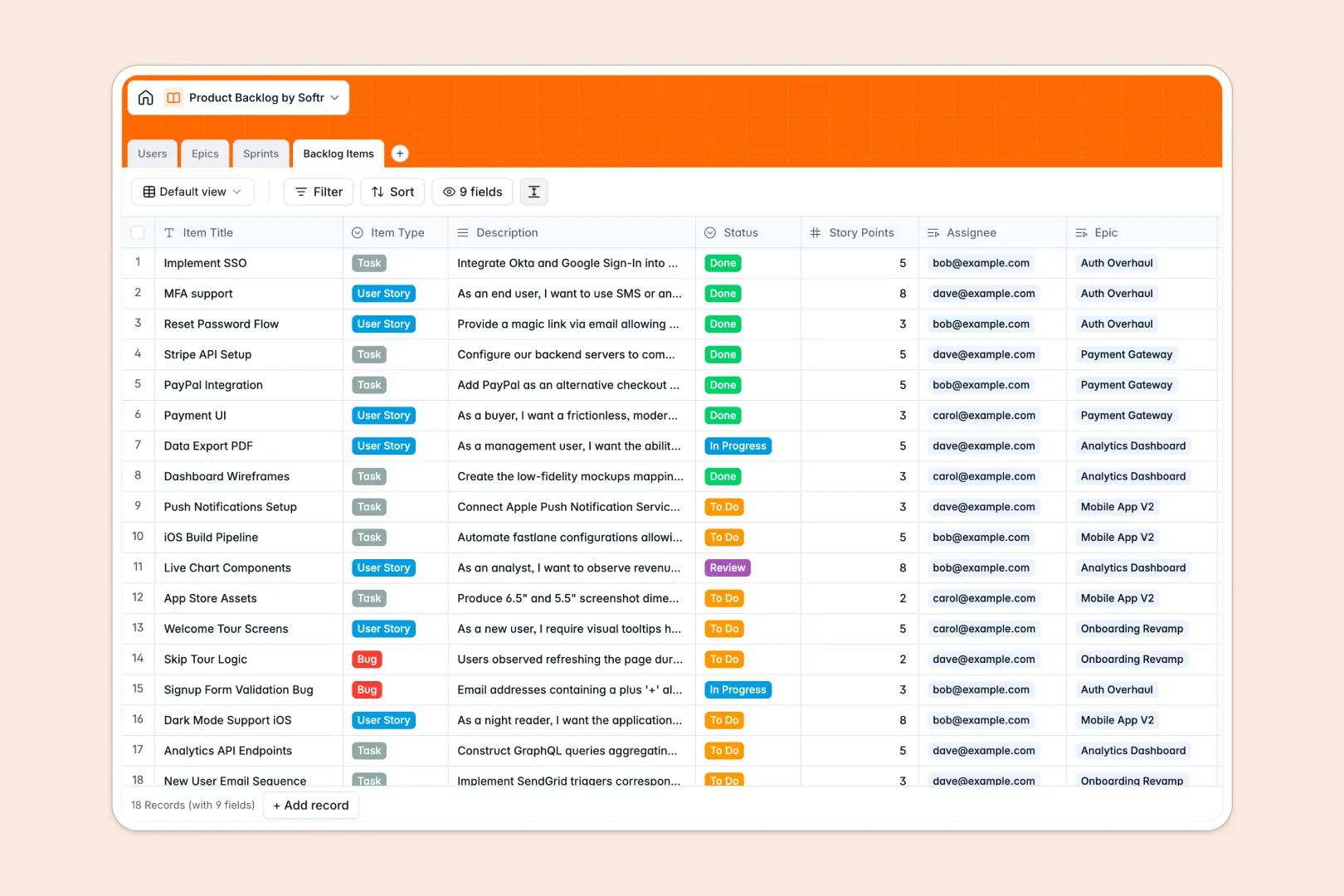
Your Product Backlog database at a glance
This template centralizes your product roadmap, connecting user stories, bug reports, and tasks directly to strategic epics and sprints. It gives engineering and product teams total clarity on ownership, sprint progress, and scope.
Everything operates through four interconnected tables: Users, Epics, Sprints, and Backlog Items. Story points roll up automatically into active sprints, while epic progress recalculates as individual items move from planning to completion.
Built-in AI fields automatically draft acceptance criteria for new stories and generate bulleted epic summaries as descriptions change, saving product managers hours of manual documentation.
When a shared grid becomes an accidental backlog backend
Google Sheets works well for real-time note-taking, but it quickly breaks down when used to manage complex product development workflows. Free-text cells allow mixed data types, and there is no native way to limit developer views strictly to their assigned tickets without giving away full edit permissions across every sprint.
What a structured database changes
A structured database enforces strict data integrity so story points remain numbers, release dates stay valid, and items cannot disappear due to an accidental cell overwrite.
Instead of fragile formulas connecting multiple tabs, records link natively. Assigning a story to an epic instantly updates total counts across your backlog.
This is exactly what Softr Databases are designed for: giving agile teams a reliable, relational backend with zero technical maintenance. You can also connect an existing Google Sheet as an external data source if your team needs to reference legacy rows.
What you can do with this template
Plan upcoming development cycles by assigning backlog items to distinct sprints while monitoring capacity with instant rollup calculations.
Use native Database AI agents to turn rough user story descriptions into clear, testable acceptance criteria the moment an item is created.
Keep designers, developers, and product managers aligned by categorizing work by type, priority, and epic ownership without messy spreadsheet formulas.
-
Users
Manage team members, define product roles, and track assigned backlog work
-
Epics
Coordinate high-level initiatives with AI bullet summaries and backlog links
-
Sprints
Plan development cycles with timelines, sprint goals, and point rollups
-
Backlog Items
Track stories and bugs with estimates and AI-generated acceptance criteria
Who is this Product Backlog database for
This database provides product and engineering teams with an intuitive, structured framework to manage workflows:
- Product Managers: Plan release roadmaps, track epic health, and automate acceptance criteria writing.
- Engineering Leads: Monitor sprint velocity, distribute story points, and balance developer workloads effectively.
- Scrum Masters: Run sprint planning and retrospectives with real-time visibility into task completion status.
- Agile Development Teams: Keep bugs, design tasks, and user stories organized in a shared source of truth.
How to take it further
1. Customize the database
Tailor the template to match your team's agile framework in seconds. Add custom select tags for bug severity, adjust story point estimation scales, or create new fields to capture user research links.
2. Import your existing data
Bring existing tasks and backlog items over in bulk using a simple CSV upload. You can also connect via API to automatically sync issues from customer support tools or bug trackers.
3. Build a full app around it
When your team is ready for dedicated views, you can build an app on top of this database with Softr's AI Co-Builder. Generate an entire sprint planning portal or developer dashboard from a single text prompt, then configure custom users and permissions so external stakeholders can submit feature requests without touching your raw engineering data.
-
1
-
2
-
3
-
4
Frequently asked questions
-
What is a product backlog database?
-
Why use a no-code database to build a product backlog system?
-
How can AI help managing data for product backlog?
-
Can I build an app with this Product Backlog database?
-
Is this Product Backlog database free?
-
How is a product backlog database different from Google Sheets?
Start building today. It's free!
Build and launch your first app in under 30 minutes.