


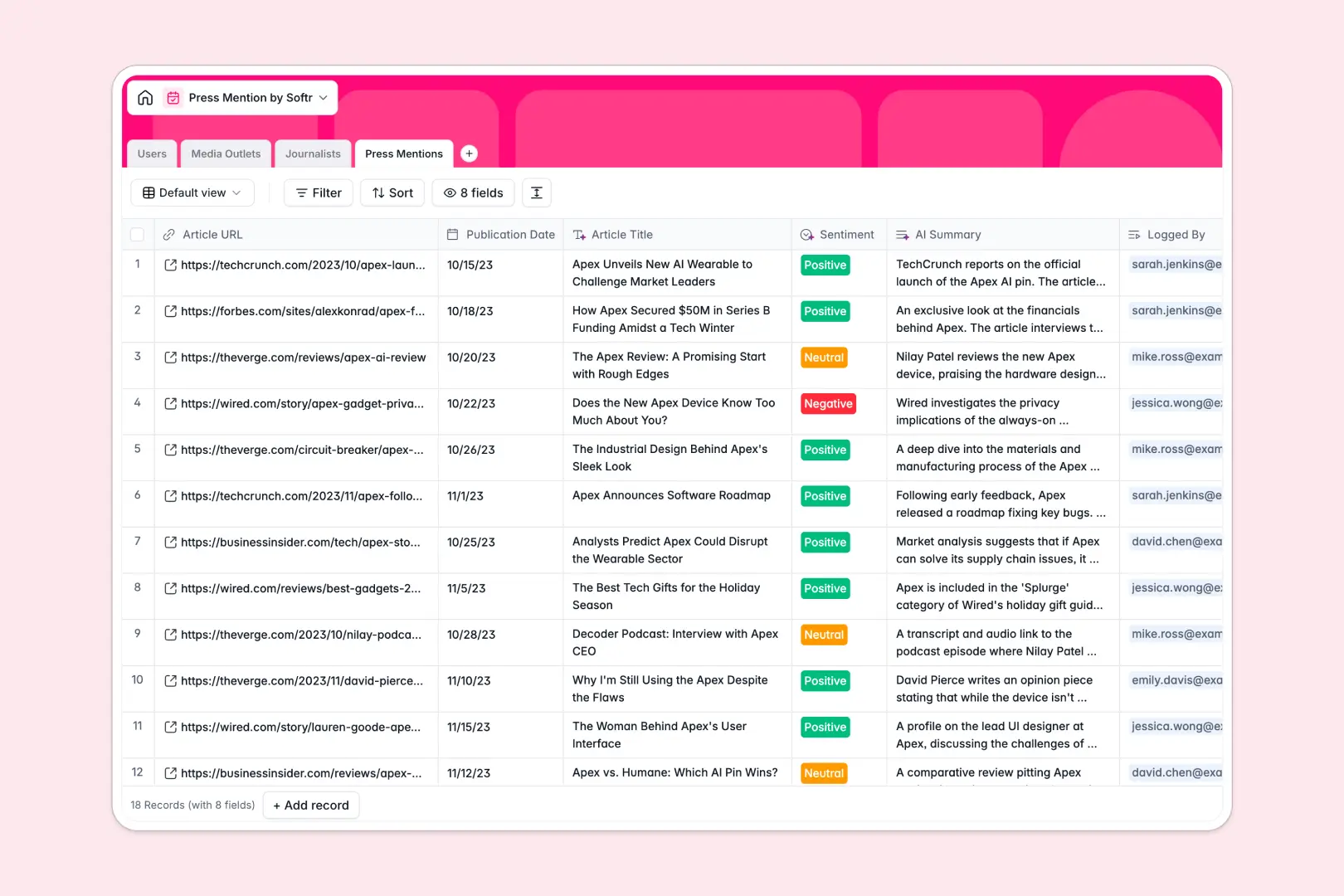
Your Press Mention Database at a glance
This template helps you track media coverage, manage PR contacts, and analyze article sentiment automatically. It gives your PR team a single source of truth for every article, journalist, and outlet.
The template uses connected tables to link individual press mentions directly to specific journalists and media outlets. When you view an author's profile, you instantly see every piece they've written about your brand.
Built-in fields automatically extract article titles from URLs, summarize coverage, and categorize sentiment as positive, neutral, or negative. You can also auto-generate journalist bios and media outlet descriptions directly from the web.
Why tracking press mentions in Google Sheets breaks down
Managing PR coverage in spreadsheets usually starts simple, but quickly turns into a copy-paste nightmare. You end up with duplicated names, lost article links, and no easy way to see historical relationships.
What a structured database changes
Instead of typing the same journalist details across multiple rows, a relational structure lets you create one profile and connect it to all their articles. Dates map instantly, URLs stay clickable, and contact details remain consistent as your list grows.
This is exactly what Softr Databases are designed for. They enforce clean data types, so you never have to worry about broken VLOOKUPs when connecting your authors to your media platforms.
What you can do with this template
Say goodbye to manually reading and tagging every single article your brand is mentioned in. Simply paste a URL, and AI agents will automatically browse the web to fetch the title, write a 3-paragraph summary, and grade the sentiment.
It is ready to use from day one. Your PR team can immediately start logging coverage, enriching journalist profiles, and sorting media outlets by categories without needing complex technical setup.
-
Users
Manage internal PR team members, their contact info and press tracking duties
-
Media Outlets
Catalog publications with AI-generated descriptions and automated categorization
-
Journalists
Track media contacts with professional profiles and AI-powered bio research
-
Press Mentions
Log media coverage using AI for content summaries and sentiment analysis
Who is this Press Mention database for
This system is designed for any team that needs to maintain clean, actionable records of their brand's public presence.
- PR Agencies: Track coverage efficiently across multiple clients and maintain a central database of key media relationships.
- In-house Marketing Teams: Monitor brand sentiment in real time and automatically summarize long-form press hits for executive reporting.
- Outreach Specialists: Keep tabs on journalist interactions, update relationship statuses, and avoid double-pitching the same contacts.
How to take it further
You can easily customize this template's fields to fit your specific PR workflows. Add new relationship phases for journalists, or tweak the AI prompts to extract specific competitor mentions instead of general summaries.
To get up and running instantly, use a CSV import to upload your historical PR coverage. You can also connect via API to sync new mentions automatically from your existing media monitoring tools.
When your team is ready, you can transform this database into a complete portal. Share a live dashboard of positive coverage with stakeholders, or use an interface builder to view assigned media targets.
Thanks to granular permissions, you can ensure executives only see the final dashboard while the PR team retains full editing access to the underlying records. Well-structured data makes building these apps completely effortless.
-
1
-
2
-
3
-
4
Frequently asked questions
-
What is a press mention database?
-
Why use a no-code database to build a PR tracking tool?
-
How can AI help manage data for press mentions?
-
Can I build an app with this press mention database?
-
Is this Press Mention database free?
-
How is a press mention database different from Google Sheets?
Start building today. It's free!
Build and launch your first app in under 30 minutes.