


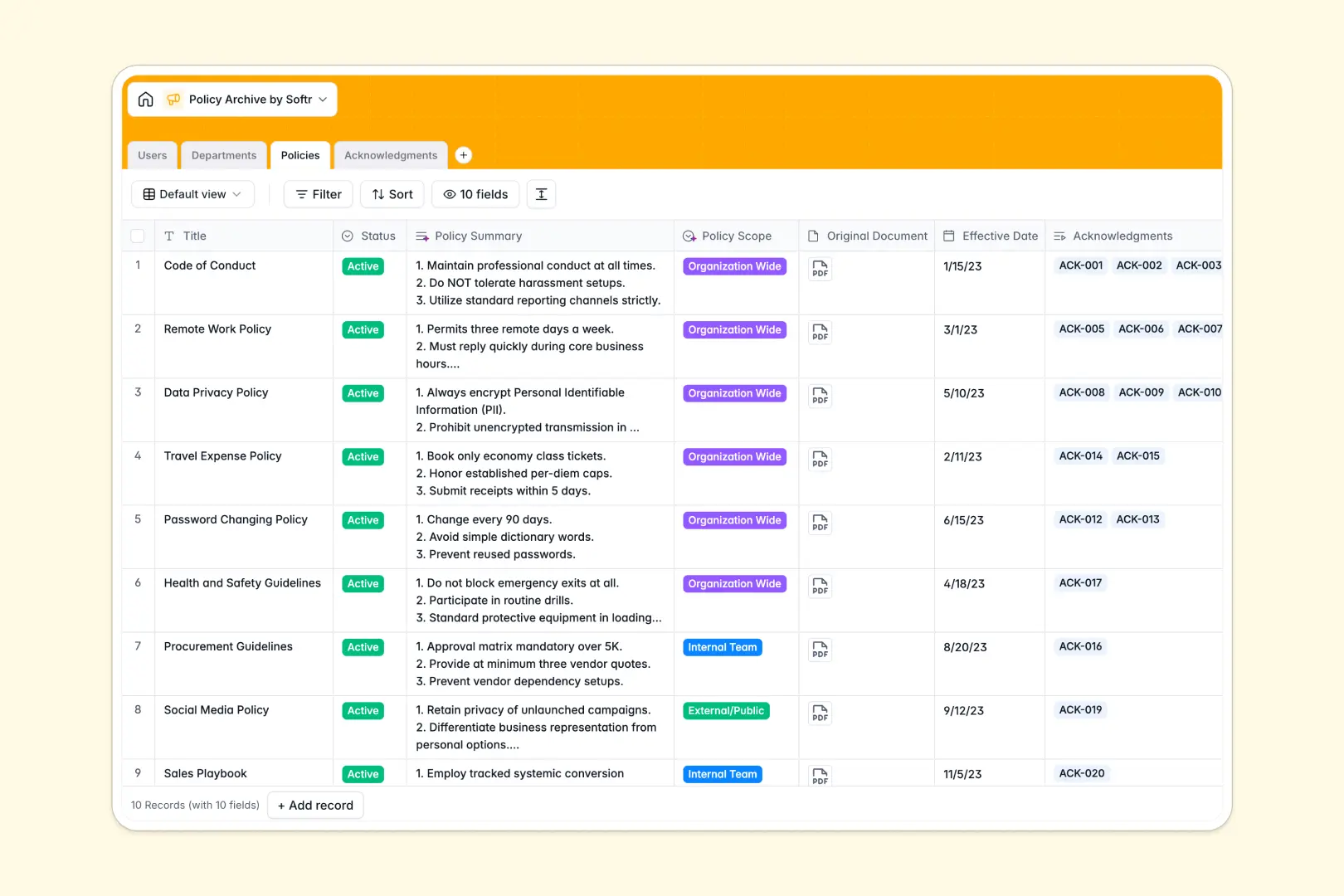
Your Policy Archive database at a glance
The Policy Archive template centralizes your organizational guidelines, handbooks, and standard operating procedures while tracking employee compliance in real time.
It connects four dedicated tables: Policies, Departments, Users, and Acknowledgments. When a policy updates, related records link directly to assigned team members and log signatures without manual data entry.
Native AI fields summarize lengthy policy content into bullet points, categorize policy scope automatically, and draft customized reminder notices based on signature status.
Why a Google Sheet fails as a compliance backend
Google Sheets is great for real-time collaboration, but running a formal policy archive in a sheet exposes sensitive compliance records and risks broken references.
When multiple team members edit rows, accidently sorted ranges or overwritten cells break formulas. Crucially, a sheet cannot restrict view access so an employee sees only their required acknowledgments without viewing confidential policy drafts or executive records.
What a structured database changes
In a dedicated database, typed columns enforce clean data by keeping effective dates, signature statuses, and user lookups distinct.
Instead of fragile lookup formulas that fail when a row moves, relational tables link each policy directly to its author, department, and signed acknowledgments.
This is exactly what Softr Databases are designed for: maintaining data integrity, providing relational linking, and powering secure team workflows. While you can connect an existing Google Sheet to Softr if needed, a native database gives you full control over structure and record security.
What you can do with this template
This ready-to-use template lets you publish new policies, map them to specific departments, and automatically assign acknowledgment tasks to employees.
Built-in Database AI agents analyze documentation automatically, generating clean 3-bullet summaries and writing personalized reminder messages for overdue sign-offs.
You can monitor real-time compliance dashboards across departments, ensuring audit readiness without chasing signatures manually.
-
Users
Manage employee profiles, departmental roles, and policy permissions
-
Departments
Organize company branches, department leadership, and related policies
-
Policies
Store guidelines with AI-generated summaries and scope classifications
-
Acknowledgments
Track policy compliance, signing dates, and AI notification messages
Who is this Policy Archive database for
This template gives organizations complete visibility over document governance and employee compliance.
- Human Resources teams: Centralize handbooks and automatically track employee sign-offs during onboarding.
- Legal & Compliance officers: Maintain an audit-ready trail of effective dates and version acknowledgments.
- Department heads: Distribute team-specific procedures and verify that members read critical updates.
- Operations managers: Standardize standard operating procedures across distributed or remote teams.
How to take it further
Customize the database. Tailor the schema to fit your company's hierarchy. Add custom categories, modify the signature status options, or adjust the AI prompts to match your corporate tone.
Import your existing data. Bring over your current documentation using a quick CSV upload or sync data automatically using the API. You can quickly map existing staff lists and document links into clean, relational records.
Build a full app around it. When you are ready, use Softr to generate an app with AI directly on top of this database. You can launch a branded internal policy portal where employees sign documents and managers review compliance metrics, protected by granular users and permissions.
-
1
-
2
-
3
-
4
Frequently asked questions
-
What is a policy archive database?
-
Why use a no-code database to build a policy archive?
-
How can AI help managing data for policy archives?
-
Can I build an app with this policy archive database?
-
Is this Policy Archive database free?
-
How is this database different from tracking policies in Google Sheets?
Start building today. It's free!
Build and launch your first app in under 30 minutes.