


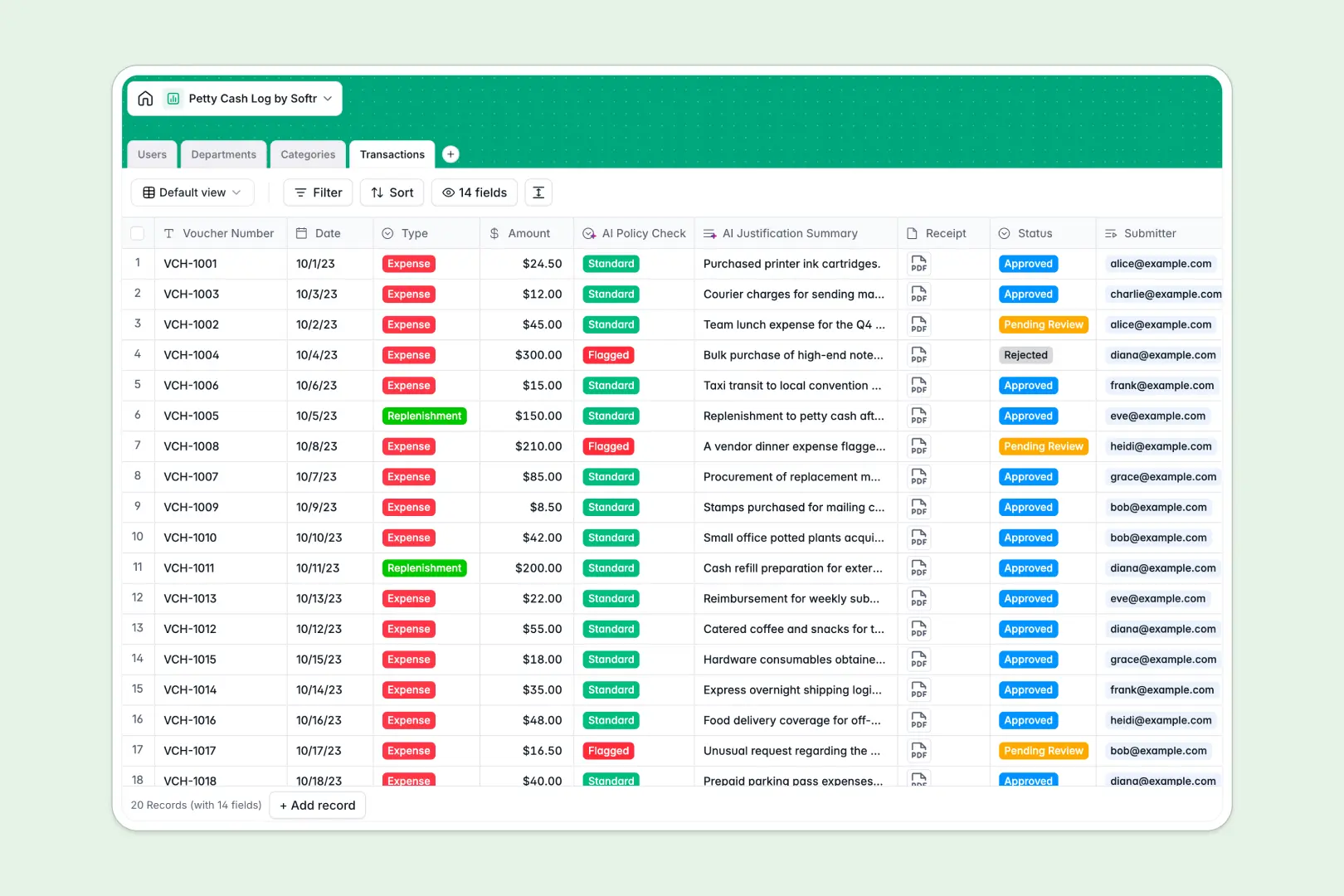
Your Petty Cash Log database at a glance
This template gives your team a clear, reliable way to record cash outlays, attach receipts, and reconcile balances across departments. It keeps your finance records audit-ready without manual math.
The system links Transactions directly to Users, Departments, and expense Categories, automatically rolling up total spend against monthly budget limits. Submissions, approvals, and voucher numbers stay connected in one structured place.
Built-in AI fields automatically review each expense description against department thresholds to flag policy risks and generate one-sentence justification summaries for quick finance approval.
When a shared sheet becomes a financial liability
Google Sheets makes collaboration easy, but financial tracking breaks down when everyone can edit every cell, formula, and total.
What a structured database changes
In a shared spreadsheet, someone sorting a column can break budget calculations, and receipt images often live across external drive links. Free-text cells allow mismatched categories and missing voucher numbers.
A dedicated database enforces typed fields: dates stay dates, receipts remain attached directly to the transaction, and approvals require explicit status selections. Tables link naturally, so transactions automatically deduct from department budget limits without complex cross-tab formulas.
This is exactly what Softr Databases are designed for: reliable structure, native relationships, and effortless tracking without fragile grid setups. While Softr can connect an existing Google Sheet, using a dedicated database keeps your accounting data strictly controlled and scalable.
What you can do with this template
Every outlay is logged with voucher numbers, receipt files, and designated submitters and approvers. Department spend rolls up in real time, giving finance visibility into remaining balances instantly.
Native Database AI agents run policy checks on new records, automatically classifying outlays into Standard or Flagged status while summarizing expense reasons for faster reviews.
-
Users
Manage employee profiles, role permissions, and transaction approvals
-
Departments
Track monthly petty cash spending allocations and departmental budgets
-
Categories
Organize expense types and track aggregate spending across classifications
-
Transactions
Log outlays with receipts and AI compliance checks plus summary reviews
Who is this Petty Cash Log database for
- Finance Teams: Maintain accurate audit trails and monitor department spending against monthly limits without reconciling broken sheets.
- Office Managers: Log daily cash purchases, store digital receipts, and track box replenishments in one place.
- Department Leads: Submit expense vouchers, track team spending, and review pending reimbursements quickly.
- Small Business Owners: Prevent cash leakage with clear approval workflows and automated risk checks.
How to take it further
Customize this database to match your internal controls. Adjust expense categories, update monthly budget allocations per department, or add custom fields like tax rates and payment methods.
If you have existing cash logs or past receipts, upload them instantly via CSV import or sync your transaction records via the API.
When your team expands, turn this database into a complete internal finance portal. With Softr's AI app generator, describe the petty cash portal you need, and it builds custom submission forms, approval dashboards, and automated notifications on top of your data.
Set up custom users and permissions so employees only submit and view their own transactions, while managers review team requests and finance administrators manage global budgets.
-
1
-
2
-
3
-
4
Frequently asked questions
-
What is a petty cash log database?
-
Why use a no-code database to build a petty cash log system?
-
How can AI help managing data for petty cash tracking?
-
Can I build an app with petty cash log database?
-
Is this Petty Cash Log database free?
-
How is this database different from tracking petty cash in Google Sheets?
Start building today. It's free!
Build and launch your first app in under 30 minutes.