


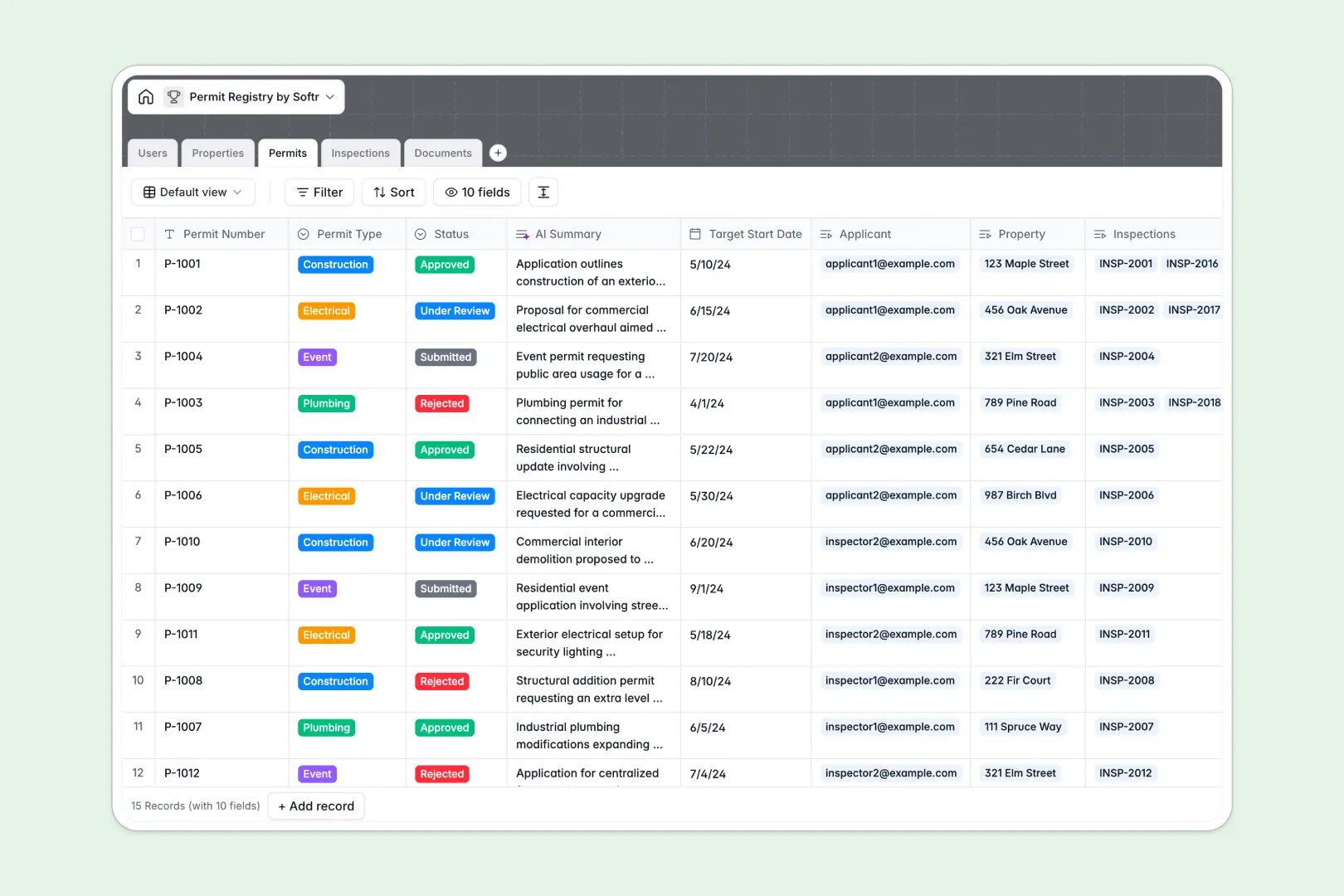
Your Permit Registry database at a glance
This template centralizes your municipal or corporate permit management by tracking applications, approvals, physical properties, and field inspections in one connected place.
Five core tables connect your workflow: Permits link directly to Properties, Documents, and Users, while Inspections automatically attach field findings to their corresponding permit numbers.
Built-in AI fields auto-summarize permit scopes, extract safety issues from inspector notes, and research local zoning ordinances based on property addresses.
Why municipal permit tracking breaks inside a shared spreadsheet
Google Sheets makes sharing simple, but when applicants, inspectors, and coordinators collaborate in the same file, lack of permission control and fragile links lead to corrupted records.
What a structured database changes
In a shared sheet, any editor can accidentally overwrite an inspection date, delete an attached blueprint link, or see confidential applicant contact information.
A dedicated database enforces typed fields for dates, attachments, and status choices, while linking properties to permits without broken cell references. This is exactly what Softr Databases are designed for: keeping operational records clean, reliable, and secure.
What you can do with this template
With this template, municipal teams can track application statuses from submission to approval while linking blueprints and safety certificates to the exact record.
Integrated Database AI agents research zoning data for any address automatically and pull critical safety bullet points from unstructured inspector field notes.
-
Users
Manage applicants, city inspectors, and admins with roles and assignments
-
Properties
Track physical property sites with AI-researched zoning and local rules
-
Permits
Process permit applications with status workflows and AI scope summaries
-
Inspections
Log site inspections and evaluate compliance using AI key findings summaries
-
Documents
Store blueprints, safety certificates, and forms linked to permit records
Who is this Permit Registry database for
This system is designed for teams that coordinate property compliance, reviews, and field verifications.
- City planning departments: Manage municipal building permits, public notices, and multi-stage approval pipelines efficiently.
- Field inspectors: Log site visits, record compliance outcomes, and attach inspection notes on the go.
- General contractors: Track required trade permits, expiration dates, and sub-contractor documentation across job sites.
- Commercial property managers: Maintain a permanent compliance registry of renovations, maintenance work, and safety certificates.
How to take it further
Customize this database in minutes to match your local jurisdiction's specific codes. You can add permit types like mechanical or grading, modify approval stages, or create custom tags for fast filtering.
If you have existing permit records or property registries in a spreadsheet, you can import them instantly via CSV or sync data using the built-in API.
When you are ready for a complete software experience, turn this database into a portal. Use Softr's AI app generator to generate client portals and inspector interfaces in a single prompt. Configure granular users and permissions so applicants only see their own submissions while inspectors manage their assigned reviews.
-
1
-
2
-
3
-
4
Frequently asked questions
-
What is a permit registry database?
-
Why use a no-code database to build a permit registry system?
-
How can AI help managing data for permit registries?
-
Can I build an app with this permit registry database?
-
Is this Permit Registry template free?
-
How is a permit registry database different from Google Sheets?
Start building today. It's free!
Build and launch your first app in under 30 minutes.