


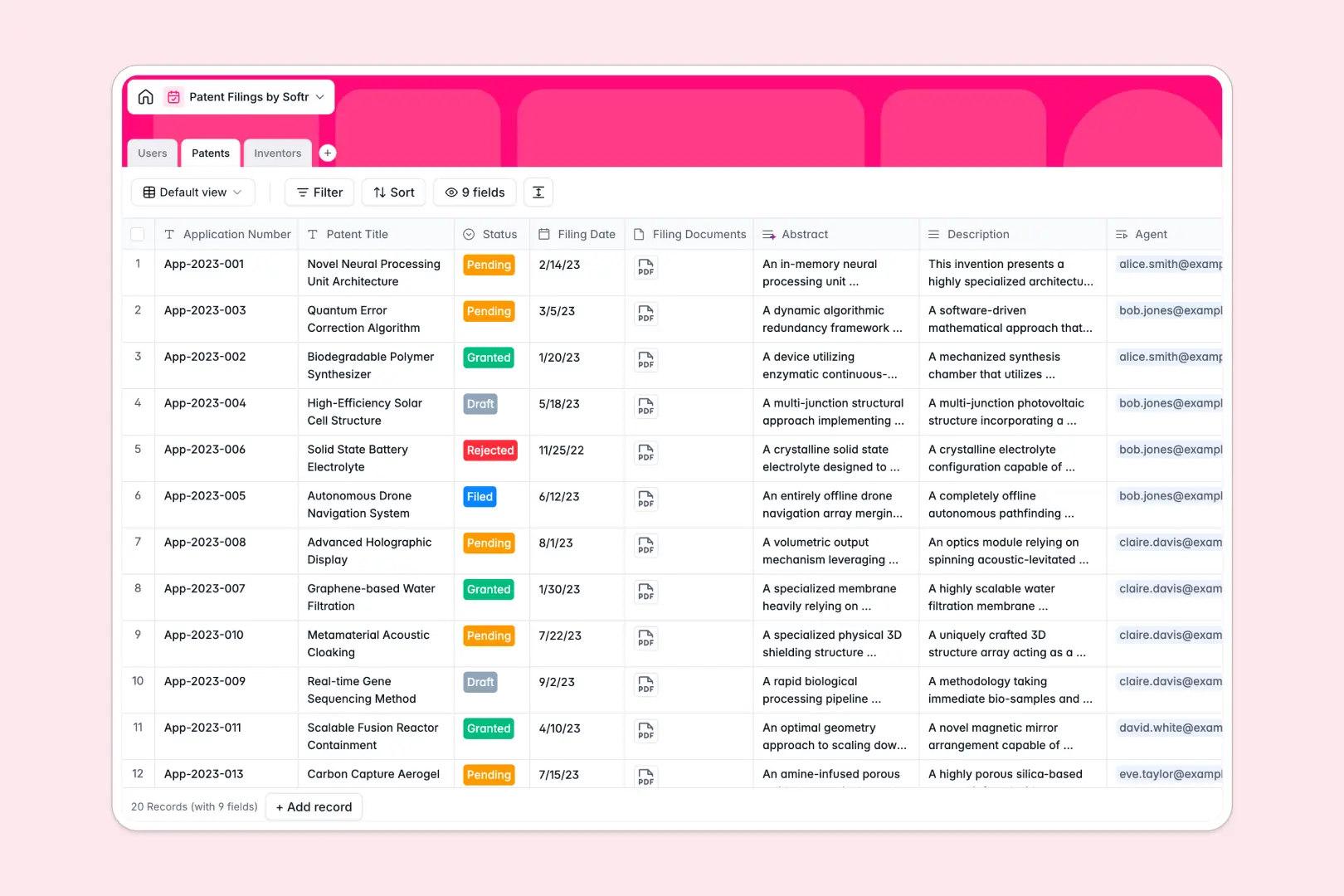
Your Patent Filings Database at a glance
This template gives your legal or R&D team a structured, secure place to track patent applications from draft to grant.
It natively links core data together so that every patent connects directly to its assigned agent and listed inventors. This means you can view an inventor's total filings or safely access a patent's required documents without searching across scattered tabs.
It also includes built-in AI that automatically reads lengthy technical descriptions and generates concise abstracts for you in real time.
Why tracking patent filings in Google Sheets breaks down
Managing complex intellectual property in spreadsheets quickly becomes a liability. Crucial filing dates get overwritten, and linking required documentation to specific inventors requires endless manual copy-pasting.
What a structured database changes
In a true database, your data follows strict rules to protect integrity. Dates stay formatted as dates, PDF attachments stay securely linked to specific applications, and status drop-downs never break.
Instead of relying on fragile VLOOKUPs, tables connect naturally and scale securely. You can link a single patent to multiple inventors seamlessly, and instantly calculate their total historical filings.
This level of secure, relational tracking is exactly what Softr Databases are designed for. It keeps your IP data clean and connected, no matter how many cross-referenced applications you file.
What you can do with this template
Right away, you can safely track internal agents, inventors, and applications in one unified system. You can actively monitor application statuses like "Pending" or "Granted" while keeping all sensitive filing documents attached directly to the record.
Thanks to Database AI agents, this template even works alongside you automatically. It immediately reads and summarizes dense patent descriptions into clear, searchable abstracts the moment a new filing is logged.
-
Users
Manage internal staff profiles, roles, and assigned patent applications
-
Patents
Track application status with AI-powered summaries of core inventions
-
Inventors
Maintain directory of inventors with contact info and ownership history
Who is this Patent Filings database for
This ready-to-use database is designed for teams that need precise control over intellectual property without managing complex software.
- Law Firms & Legal Clinics: Centralize client patent applications, manage critical filing dates, and assign review agents flawlessly.
- Corporate R&D Teams: Track internal innovations, neatly link patents to employed inventors, and monitor total filings across departments.
- University Tech Transfer Offices: Manage growing IP portfolios while keeping inventor profiles, contact details, and filing histories perfectly organized.
- Solo Patent Agents: Keep track of drafting priorities, pending statuses, and critical client documents in one structured dashboard.
How to take it further
First, you can easily customize the database to fit your exact internal process. Simply modify the dropdown choices for patent stages, or add new columns for specific filing fees and deadlines.
Next, you can import your existing data so you don't have to start from scratch. Upload your current spreadsheets securely via CSV to instantly populate your historical inventors and filed applications.
Finally, when your team is ready to scale, you can build an app directly on top of this data. You can easily create a secure self-serve portal where inventors can log in to check the status of their own applications.
Because this is a true database, native users and permissions ensure that external inventors only see their specific IP. You have total control over what data is shared, making collaboration safe and seamless.
-
1
-
2
-
3
-
4
Frequently asked questions
-
What is a patent filings database?
-
Why use a no-code database to build a patent tracking system?
-
How can AI help managing data for patent filings?
-
Can I build an app with this patent filings database?
-
Is this Patent Filings database template free?
-
Why do patent filings get messy in Google Sheets?
Start building today. It's free!
Build and launch your first app in under 30 minutes.