


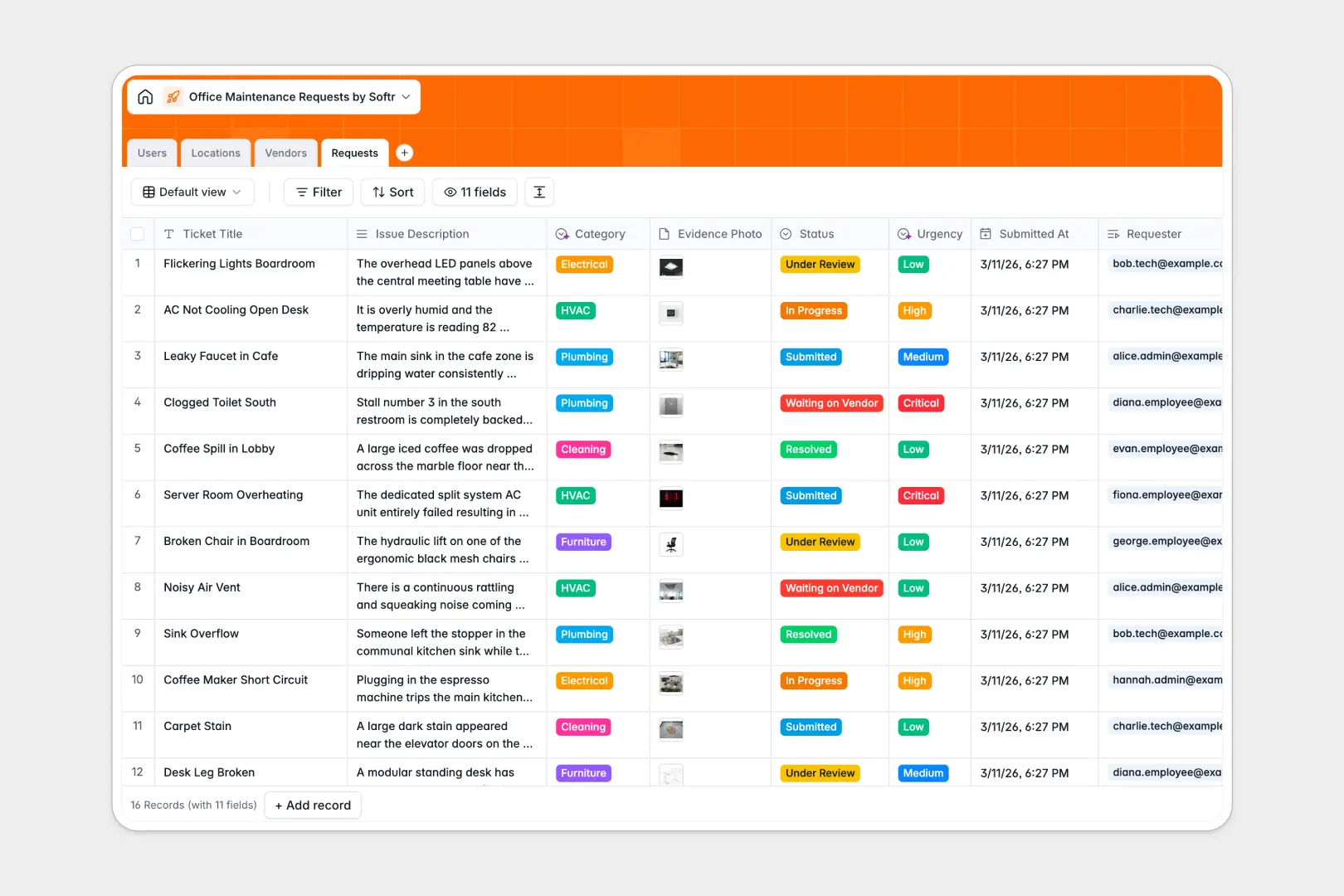
Your Office Maintenance Requests database at a glance
This template gives facility managers and operations teams a centralized hub to log, triage, and resolve workplace issues. It keeps repair tickets organized and visible so nothing slips through the cracks.
Connected tables link Requests directly to Locations, Users (employees and technicians), and external Vendors. Photo attachments and status tags keep everyone aligned on progress without messy email chains.
Built-in AI fields automatically classify issue categories, evaluate ticket urgency from text descriptions, and research vendor profiles straight from the web.
When a shared repair spreadsheet breaks under real office traffic
Google Sheets is great for quick lists, but using it as a facilities ticketing backend quickly leads to overwritten rows, missing photos, and broken formulas whenever someone sorts a column.
What a structured database changes
In a true database, every field enforces clean data. Photos stay attached to the right ticket, and requests link directly to specific rooms and assigned technicians without fragile lookups.
Everyone gets the exact visibility they need without risking accidental edits to raw formulas. This is exactly what Softr Databases are designed for.
While Softr can also connect to an existing Google Sheet, running your maintenance operations on a dedicated database ensures reliability and scale.
What you can do with this template
Log repairs by exact floor and zone, assign tasks directly to staff, and monitor resolution times across departments.
Native Database AI agents instantly read issue descriptions to set urgency levels and route tickets to the right maintenance category automatically.
The template is ready to use immediately out of the box, letting your team standardize office maintenance in minutes.
-
Users
Manage office employees and service technicians with contact details and roles
-
Locations
Track office zones and rooms alongside aggregated maintenance issue counts
-
Vendors
Store external repair contractors with AI-generated company summaries
-
Requests
Track tickets with AI-powered category and urgency assessment workflows
Who is this Office Maintenance Requests database for
- Facility Managers: Track all incoming tickets, monitor repair statuses, and coordinate maintenance schedules.
- Office Operations Teams: Keep workspaces safe and functional while managing supplier contacts and work orders.
- Internal Technicians: View assigned repair tasks, update ticket statuses, and review location notes.
- External Vendors: Coordinate specialized plumbing, HVAC, or electrical work orders with clear context.
How to take it further
Customize the database structure to match your building layout. Add custom fields for repair budgets, adjust location zones, or update the list of specialized contractors in a few clicks.
Import your existing records in bulk using CSV uploads or connect external data via API to sync assets and contact directories instantly.
When you are ready, turn this database into a complete internal tool. You can generate an app with AI by describing your ideal ticketing portal in a single prompt.
Use granular users and permissions so employees submit issues via simple forms, technicians see only assigned jobs, and managers oversee the entire facility from one unified app.
-
1
-
2
-
3
-
4
Frequently asked questions
-
What is an office maintenance requests database?
-
Why use a no-code database to build an office maintenance requests tool?
-
How can AI help managing data for office maintenance requests?
-
Can I build an app with an office maintenance requests database?
-
Is this Office Maintenance Requests database free?
Start building today. It's free!
Build and launch your first app in under 30 minutes.