


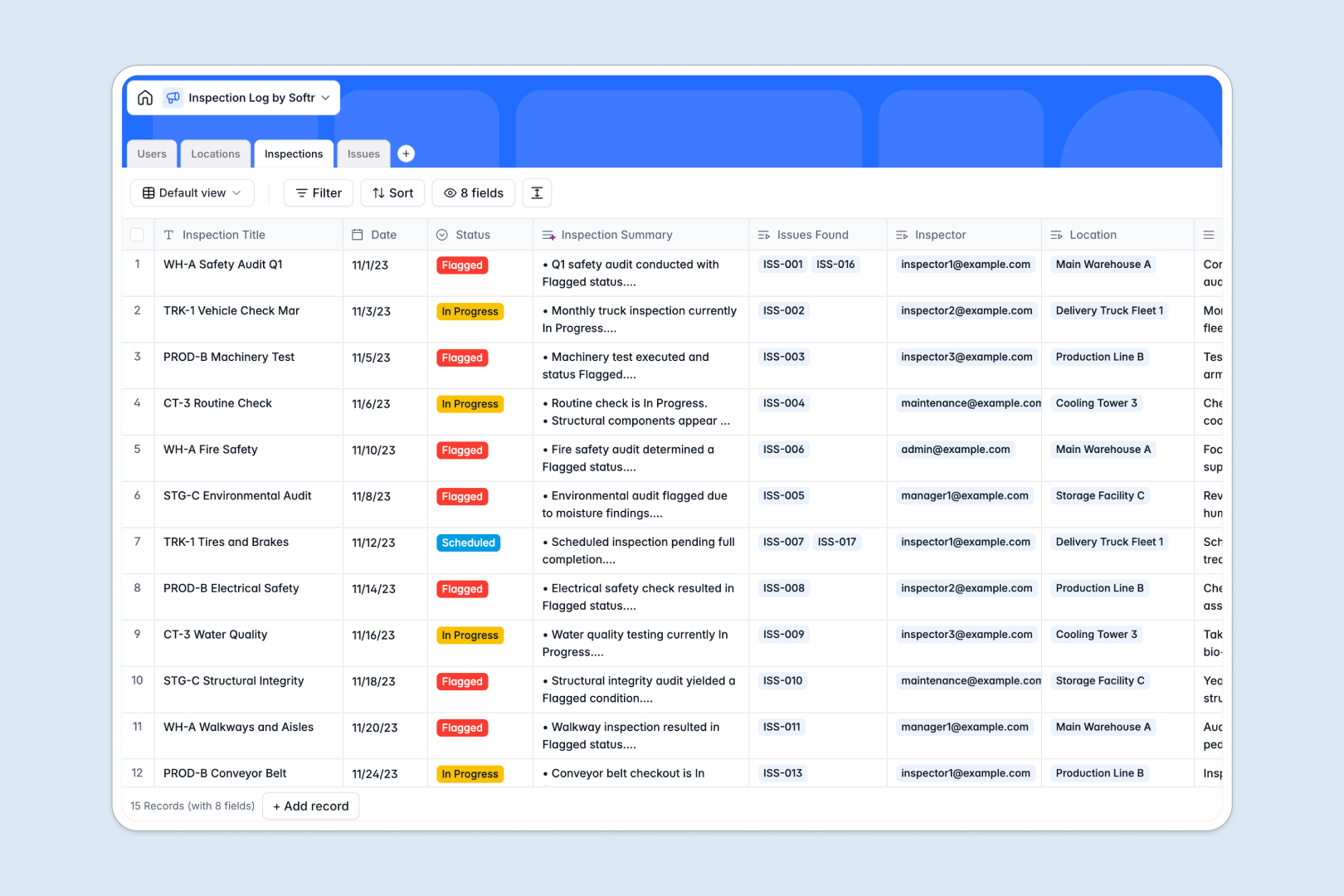
Your Inspection Log database at a glance
This template helps field teams and operations managers record audits, track facility compliance, and resolve flagged issues in one reliable place. It eliminates scattered notes by linking every report directly to specific assets and assigned inspectors.
Your data is organized across four connected tables: Locations, Inspections, Issues, and Users. Linking an inspection to a location automatically updates audit counts and keeps full repair histories tied to the right equipment.
Built-in AI summarizes long inspector field notes automatically, classifies issue severity, and generates step-by-step resolution plans as soon as defects are logged.
When a shared grid becomes an unreliable audit log
Google Sheets is great for quick lists, but it was never designed to act as an operational backend for field inspections. When multiple inspectors edit the same sheet, formulas break, image attachments get messy, and anyone can accidentally overwrite critical compliance records.
What a structured database changes
A structured database enforces clean data entry across every audit. Dates remain valid timestamps, evidence photos stay attached directly to records, and inspectors only select from standardized status options.
Instead of writing fragile lookup formulas across tabs, your locations, audits, and open defects link together natively. This is exactly what Softr Databases are designed for, giving you a structured foundation that prevents accidental edits while keeping historical data safe.
What you can do with this template
Track scheduled audits, log on-site notes, and assign follow-up tasks to specific team members without manual copying. Location profiles automatically aggregate past inspection logs and open defects for complete visibility.
Natively integrated Database AI agents analyze issue descriptions in real time, categorizing severity levels and drafting remediation steps instantly so your maintenance team can act immediately.
-
Users
Manage inspectors and team members with assigned roles and issues
-
Locations
Track facilities, machinery, and equipment subject to inspection audits
-
Inspections
Log inspection events and auto-generate summaries using AI
-
Issues
Track defects with AI-classified severity and automated action plans
Who is this Inspection Log database for
This template is designed for operations and compliance teams that need structured audit tracking without manual file upkeep.
- Facility Managers: Monitor building safety audits, aggregate recurring issues, and verify maintenance resolutions across multiple properties.
- Field Inspectors: Log inspection notes, upload photo evidence directly on-site, and track scheduled visits.
- Operations Leads: Standardize compliance reporting, oversee inspector workloads, and prevent critical equipment failures.
- Safety Officers: Ensure regulatory compliance with structured defect logging and automated severity classifications.
How to take it further
1. Customize the database
Adapt the database to your exact standards in seconds. Add custom inspection categories, adjust severity scales, or add custom fields for regulatory reference numbers and GPS tags.
2. Import your existing data
Bring over existing audit history easily using CSV uploads or direct API syncs. While Softr can also connect an existing Google Sheet directly, importing your data into this dedicated database provides better structure, performance, and field validation.
3. Build a full app around it
Turn your database into a secure field portal when you are ready. Use the AI app generator to generate dedicated interfaces for inspectors and managers from a single prompt, then configure role-based users and permissions so inspectors only see their assigned tasks while managers view company-wide reports.
-
1
-
2
-
3
-
4
Frequently asked questions
-
What is an inspection log database?
-
Why use a no-code database to build an inspection log system?
-
How can AI help managing data for an inspection log?
-
Can I build an app with this inspection log database?
-
Is this Inspection Log database free?
-
How is an inspection log database different from Google Sheets?
Start building today. It's free!
Build and launch your first app in under 30 minutes.